Table of Contents >> Show >> Hide
- Why Home Office Lighting Matters More Than You Think
- 12 Home Office Lighting Ideas for Better Focus and Comfort
- 1. Put Your Desk Near Natural LightBut Not Directly in the Sunbeam
- 2. Use Layered Lighting Instead of One Lonely Ceiling Light
- 3. Choose an Adjustable Desk Lamp for Task Lighting
- 4. Control Screen Glare Like It Owes You Money
- 5. Pick LED Bulbs With the Right Brightness
- 6. Use Color Temperature Strategically
- 7. Add a Floor Lamp for Soft Ambient Light
- 8. Try Wall Sconces to Save Desk Space
- 9. Use Bias Lighting Behind Your Monitor
- 10. Install Dimmers for Flexible Lighting
- 11. Use Smart Bulbs to Match Your Work Rhythm
- 12. Improve Video Call Lighting Without Creating a Studio
- Best Home Office Lighting Setup by Room Type
- Common Home Office Lighting Mistakes to Avoid
- Personal Experience: What Actually Works in a Real Home Office
- Conclusion: Build a Home Office That Works With Your Eyes, Not Against Them
- SEO Tags
Note: This article is synthesized from practical guidance on lighting, ergonomics, LED efficiency, glare reduction, and eye comfort from reputable U.S.-based health, workplace, and energy-efficiency sources, rewritten as original web-ready content.
Your home office can have the best chair, the fanciest keyboard, and a coffee mug that says “CEO of Multitasking,” but if the lighting is bad, your brain will still feel like it is working inside a cave with Wi-Fi. Good home office lighting is not just about making a room look pretty. It affects how clearly you see your screen, how tired your eyes feel, how alert you stay, and whether your workspace feels like a place for focused work or a suspiciously well-decorated nap trap.
The best lighting for a productive workspace usually blends three things: natural light, comfortable ambient lighting, and focused task lighting. Add glare control, smart bulb choices, and a little design common sense, and suddenly your home office stops fighting you. Below are 12 home office lighting ideas that can help you reduce eye strain, improve focus, and make your workday feel smootherwithout turning your desk into an airport runway.
Why Home Office Lighting Matters More Than You Think
Lighting influences visual comfort, posture, mood, and concentration. When your screen is surrounded by darkness, your eyes constantly adjust between bright and dim zones. When sunlight bounces off your monitor, you squint, lean forward, and slowly transform into a question mark with shoulders. Neither is ideal.
A well-lit home office supports productivity by balancing brightness across the room. It also helps you avoid harsh shadows, screen glare, flickering bulbs, and the classic “one overhead light trying to do the work of an entire lighting department” situation. The goal is simple: create a workspace where your eyes, brain, and body do not have to work overtime before you even start your actual work.
12 Home Office Lighting Ideas for Better Focus and Comfort
1. Put Your Desk Near Natural LightBut Not Directly in the Sunbeam
Natural light is the superstar of home office lighting ideas. It can make a workspace feel brighter, more open, and more energizing. Morning daylight may also help support your natural sleep-wake rhythm, which is useful if your commute is now the heroic journey from bed to desk.
Place your desk near a window when possible, but avoid putting your monitor directly in front of or directly behind a bright window. The best setup is usually perpendicular to the window. This lets you enjoy daylight without turning your screen into a reflective mystery mirror. If sunlight lands directly on your face, papers, or monitor, use shades, curtains, or blinds to soften it.
2. Use Layered Lighting Instead of One Lonely Ceiling Light
A single ceiling fixture rarely gives a home office everything it needs. It may create glare, cast shadows, or leave your desk dim while proudly lighting the empty floor behind you. Layered lighting solves this by combining ambient, task, and accent lighting.
Ambient lighting gives the room overall brightness. Task lighting focuses on your work area. Accent lighting adds visual warmth and reduces the harsh “interrogation room” effect. Together, they create a balanced home office lighting plan that feels comfortable throughout the day.
3. Choose an Adjustable Desk Lamp for Task Lighting
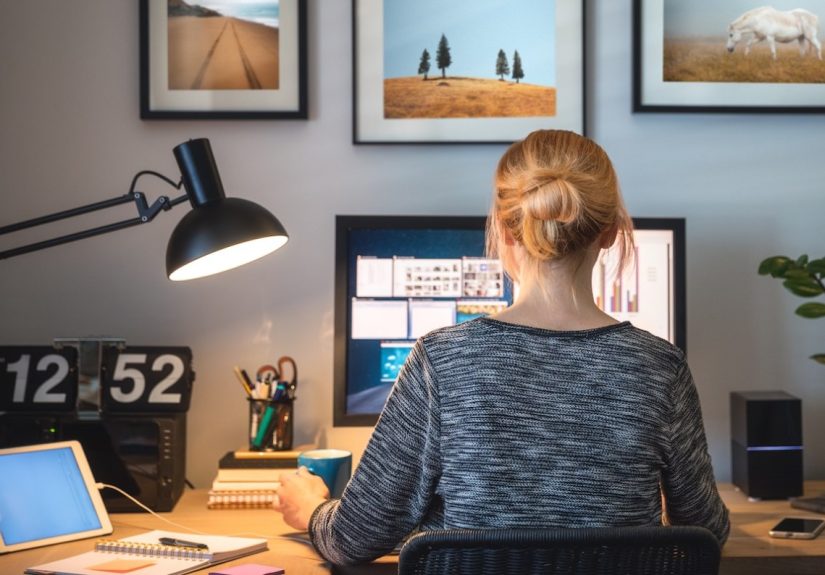
A good desk lamp is the reliable sidekick of a productive workspace. It helps illuminate paperwork, notebooks, keyboards, sketchpads, and anything else your monitor does not light up. Look for an adjustable lamp with a movable arm, stable base, and shade or diffuser that directs light where you need it.
Place the lamp on the opposite side of your writing hand to reduce shadows. If you are right-handed, put the lamp on the left. If you are left-handed, put it on the right. Your hand should not act like a tiny eclipse every time you write a note.
4. Control Screen Glare Like It Owes You Money
Glare is one of the biggest enemies of comfortable home office lighting. It happens when light reflects off your monitor, desk surface, glossy wall art, or even a shiny white tabletop. The result is squinting, eye fatigue, and the strong urge to blame your computer for everything.
To reduce glare, position your screen at a right angle to windows and bright light sources. Avoid placing lamps where they shine directly into your eyes or reflect on the screen. Matte screen protectors, blinds, sheer curtains, and repositioned lights can all help. Also, clean your monitor regularly. Dust can scatter light and make glare worse, which is rude behavior from something so tiny.
5. Pick LED Bulbs With the Right Brightness
When buying bulbs, think in lumens, not watts. Watts measure energy use, while lumens measure brightness. For a home office, you want enough brightness to see clearly without making the room feel like a stadium before kickoff.
LED bulbs are a smart choice because they are energy efficient, widely available, and come in many brightness levels and color temperatures. Check the Lighting Facts label on the package for lumens, estimated energy cost, color appearance, and lifespan. For many home offices, a mix of general room lighting and a focused desk lamp works better than simply choosing the brightest bulb on the shelf and hoping for greatness.
6. Use Color Temperature Strategically
Color temperature is measured in Kelvin, usually written as “K.” Lower numbers, such as 2700K to 3000K, look warm and cozy. Higher numbers, such as 4000K to 5000K, look cooler and more daylight-like. For home office lighting, many people prefer neutral white or cool white bulbs because they feel crisp and alert without being icy.
A practical approach is to use 3500K to 4000K for general work and 4000K to 5000K for detail-heavy tasks. Warmer lighting can be useful in the evening when you are winding down. The trick is not to turn your entire office into a blue-white spaceship at 10 p.m. unless your productivity plan includes arguing with your sleep schedule.
7. Add a Floor Lamp for Soft Ambient Light
If your home office feels dark in the corners, a floor lamp can instantly make it more inviting. Choose a lamp with a fabric shade, frosted diffuser, or upward-facing design to spread light gently across the room. This helps reduce contrast between your bright screen and darker surroundings.
A floor lamp is especially useful in offices without overhead lighting. It also works well in small apartments, guest-room offices, and multipurpose rooms where you need flexible lighting that can shift from “serious spreadsheet mode” to “this room is also where guests sleep” mode.
8. Try Wall Sconces to Save Desk Space
Wall sconces are excellent for small home offices because they add light without stealing precious desk real estate. Adjustable wall-mounted lamps can work like task lights, while fixed sconces can provide soft background illumination.
Install sconces at a height that avoids direct glare in your eyes. If you use them near a desk, choose designs that can be angled downward or outward. This keeps the light useful rather than decorative-but-confusing, which is a category many pretty lamps sadly join.
9. Use Bias Lighting Behind Your Monitor
Bias lighting is a soft light placed behind your monitor or desk setup. It helps balance the brightness between your screen and the wall behind it, which can reduce visual discomfort during long computer sessions.
This idea is especially helpful if you work early in the morning, late at night, or in a room with limited natural light. A simple LED strip behind the monitor or desk can create a gentle glow. Choose a dimmable option so you can adjust it. The goal is subtle support, not turning your office wall into a nightclub with quarterly reports.
10. Install Dimmers for Flexible Lighting
Your lighting needs change throughout the day. Morning work may call for brighter, cooler light. Late afternoon calls may feel better with softer ambient light. Evening admin tasks might need a warmer tone so your brain understands that bedtime still exists.
Dimmers give you control. You can lower brightness when reading from a screen, increase it when reviewing printed documents, and create a calmer setting after work. If you rent or do not want electrical work, consider plug-in dimmers, dimmable desk lamps, or smart bulbs.
11. Use Smart Bulbs to Match Your Work Rhythm
Smart bulbs can change brightness and color temperature throughout the day. You might use brighter neutral light during deep work, warmer light for evening planning, and lower brightness when taking video calls so your face does not look like it is being lit by a search helicopter.
Some smart lighting systems allow schedules, voice control, and presets. Create a “focus” setting, a “meeting” setting, and a “wrap-up” setting. This helps your lighting support your routine instead of staying stuck at one brightness level from breakfast to bedtime.
12. Improve Video Call Lighting Without Creating a Studio
Video calls are now part of many home offices, and lighting makes a huge difference. Place a soft light source in front of you, slightly above eye level if possible. Avoid sitting with a bright window behind you, unless your goal is to appear as a mysterious silhouette from a documentary.
A small ring light, LED panel, or shaded desk lamp can work well. The key is softness. Harsh light creates shiny spots and deep shadows. Soft, even light makes you look awake, approachable, and less like you just crawled out from under a deadline.
Best Home Office Lighting Setup by Room Type
Small Home Office
Use wall-mounted lighting, a compact adjustable desk lamp, and a light-colored wall or curtain to reflect brightness. A mirror can also help bounce daylight around the room, but place it carefully so it does not reflect glare into your screen.
Bedroom Office
Use dimmable lighting so the room can shift from work mode to rest mode. A warm bedside lamp should not be your only work light. Add a focused desk lamp and keep cooler, brighter lighting limited to working hours.
Basement Office
Basement offices need layered artificial lighting because natural light is often limited. Use bright ambient lighting, a desk lamp, and warm accent lights to prevent the space from feeling like a productivity bunker.
Shared Living Room Office
Choose lighting that looks good when the workday ends. A stylish floor lamp, discreet LED strip, or decorative table lamp can provide useful light without making the living room feel like a corporate annex.
Common Home Office Lighting Mistakes to Avoid
Working in Total Darkness
A bright monitor in a dark room creates strong contrast, which can make your eyes work harder. Add soft ambient lighting around your workspace.
Using Bulbs That Are Too Bright
More brightness is not always better. Excessive light can cause glare, reflections, and visual fatigue. Aim for balanced illumination instead of maximum wattage drama.
Ignoring Shadows
If your hand, head, or monitor blocks your work light, the lamp is in the wrong place. Move it until the light falls evenly across your work area.
Forgetting About Evening Light
Bright, cool light late at night may make it harder to relax after work. Use warmer, dimmer lighting in the evening when possible.
Personal Experience: What Actually Works in a Real Home Office
After experimenting with home office lighting in different spaces, one lesson stands out: lighting is not one big decision. It is a collection of small adjustments that either help your day flow or quietly annoy you for eight hours. The first setup many people try is simple: desk, laptop, overhead light, done. It works for about 20 minutes. Then the screen looks too bright, the room feels too dim, the lamp reflects off the monitor, and suddenly productivity has left the building wearing sunglasses.
The biggest improvement usually comes from moving the desk. A desk near a window feels great, but only when the sunlight is controlled. Placing the monitor perpendicular to the window often makes the room feel brighter without creating direct glare. Sheer curtains are surprisingly powerful here. They soften sunlight, reduce harsh contrast, and make the office feel calmer. It is like giving the sun a manners class.
The second improvement is adding a real task lamp. Not a decorative lamp that looks charming but lights only one heroic corner of the desk. A proper adjustable desk lamp lets you aim light at notebooks, papers, or a keyboard without blasting the screen. It is especially helpful in the late afternoon when natural light fades and your room enters that gloomy “is it still today?” stage.
Another experience worth mentioning is that color temperature matters more than expected. Warm bulbs can make a room cozy, but if everything is too warm and dim, work can feel sleepy. Cool daylight bulbs can feel energizing, but if they are too blue or too bright, they may feel harsh. A neutral white bulb often hits the sweet spot for daytime work. In the evening, warmer dimmed light feels better for wrapping up tasks without making the brain think it is noon again.
Bias lighting behind the monitor is also underrated. It sounds fancy, but it can be as simple as a soft LED strip behind the desk. The benefit is immediate in darker rooms: the screen no longer feels like a glowing rectangle floating in space. This is especially useful for people who work late, edit documents, code, design, or spend long hours switching between tabs like a professional digital squirrel.
For video calls, front-facing soft light wins every time. A lamp behind you makes your face dark. A harsh lamp to the side creates dramatic shadows, which is useful only if your meeting is secretly a crime podcast. A soft light in front of you, even a small one, makes you look clearer and more present. It also helps reduce the temptation to use extreme video filters, which is good because nobody needs to attend a budget meeting looking like a porcelain doll.
The final practical lesson is flexibility. The best home office lighting setup is not fixed forever. Morning, afternoon, cloudy days, video calls, reading, writing, and creative work all need slightly different light. Dimmers, smart bulbs, adjustable lamps, and curtains make the space adaptable. A productive workspace is not just bright; it is responsive. When your lighting changes with your tasks, your office feels less like a corner you were forced to work in and more like a room designed to help you do your best work.
Conclusion: Build a Home Office That Works With Your Eyes, Not Against Them
Great home office lighting does not require a luxury renovation or a lighting designer with a clipboard. Start with the basics: place your desk near natural light, reduce glare, use layered lighting, choose the right LED bulbs, and add adjustable task lighting. From there, small upgrades like dimmers, smart bulbs, bias lighting, and better video call lighting can make your workspace feel more comfortable, focused, and professional.
The best lighting setup is the one that supports how you actually work. If you read printed documents, prioritize task lighting. If you spend hours on video calls, improve front-facing light. If you work late, add softer evening lighting. When your workspace is easier on your eyes, it becomes easier on your brain tooand that is where real productivity begins.