Table of Contents >> Show >> Hide
- Why Reset a Nespresso Vertuo Machine?
- Before You Reset: Identify Your Vertuo Model
- How to Reset a Nespresso Vertuo Next or Vertuo Pop
- How to Reset a Nespresso Vertuo Plus
- How to Get a Nespresso Vertuo Out of Descaling Mode
- What to Do Before Resetting
- When a Reset Will Not Fix the Problem
- Best Maintenance Habits After a Reset
- Common Mistakes People Make When Resetting a Nespresso Vertuo
- Real-Life Experiences With Resetting a Nespresso Vertuo Machine
- Final Thoughts
Note: HTML body only, ready for web publishing and easy copy/paste.
If your Nespresso Vertuo machine is acting like it woke up on the wrong side of the countertop, you are not alone. One day it is pouring silky coffee like a tiny cafe hero, and the next day it is blinking, stalling, refusing to brew, or acting as if the concept of espresso is beneath it. That is usually the moment people start Googling how to reset a Nespresso Vertuo machine with the urgency of someone who has not had caffeine yet.
The good news is that resetting a Nespresso Vertuo machine is usually quick, simple, and surprisingly effective. The slightly less fun news is that the reset method depends on which Vertuo model you own. A Vertuo Next or Vertuo Pop does not reset the same way as a Vertuo Plus, and that is where many coffee lovers get tripped up.
This guide breaks it all down in plain English. You will learn why a reset helps, how to reset each major Vertuo style, what to do if your machine is stuck in descaling mode, and when a reset is not enough. There is also a practical section on real-life experiences at the end, because sometimes the most useful troubleshooting tip is, “Yes, this has happened to other people too.”
Why Reset a Nespresso Vertuo Machine?
A factory reset restores your machine to its default settings. Think of it as giving your coffee maker a polite but firm reminder that it has one job. Resetting can help when the machine is not brewing correctly, gets stuck after cleaning or descaling, stops responding to button presses, or seems confused after custom cup-size programming.
In many cases, a reset is worth trying when your Nespresso Vertuo machine does any of the following:
- Refuses to brew even though the tank is filled
- Blinks in odd patterns and does nothing helpful
- Dispenses the wrong amount of coffee
- Gets stuck in a special function or descaling mode
- Acts normal for a second, then suddenly goes full drama queen
That said, a reset is not magic. If the problem is scale buildup, an overheated machine, a poorly seated water tank, or a mechanical issue, you may need cleaning, descaling, cooling time, or support instead of a reset alone.
Before You Reset: Identify Your Vertuo Model
This step matters more than people expect. “Vertuo” is a family name, not one single machine. The reset steps vary by model, especially between the Vertuo Next, Vertuo Pop, Vertuo Plus, and older Vertuo or Evoluo styles.
As a rule of thumb:
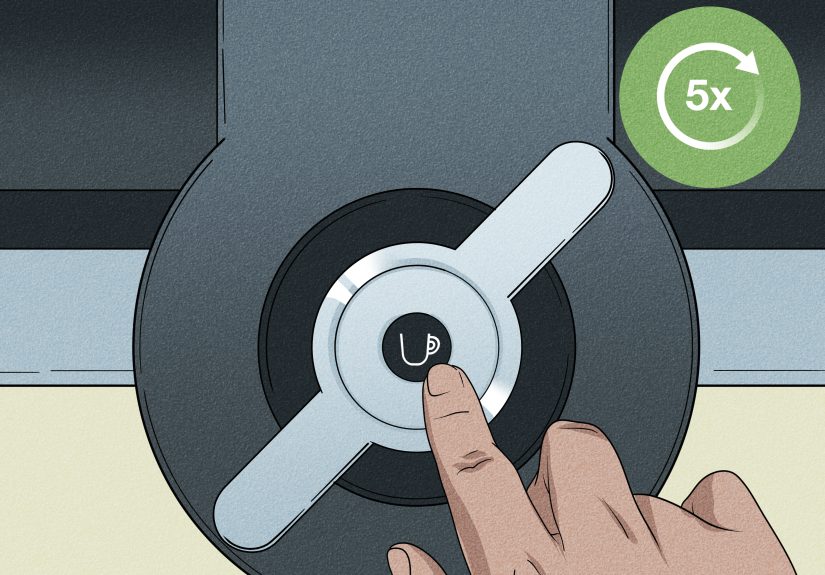
- Vertuo Next and Vertuo Pop usually use the quick five-button reset method.
- Vertuo Plus uses a lever-and-button combination.
- Older Vertuo and Evoluo models may have their own model-specific instructions, so checking the machine-assistance guide for your exact unit is the safest move.
If you are not sure what you own, look at the label on the underside or back of the machine, or compare the shape of the head and lever design. It is not glamorous detective work, but it saves a lot of button-mashing.
How to Reset a Nespresso Vertuo Next or Vertuo Pop
If you own a Vertuo Next or Vertuo Pop, this is the reset process most people need. It is simple once you know the sequence.
Step-by-Step Reset Instructions
- Turn the machine on if needed and open the machine head.
- Let any used capsule eject.
- Close the head again.
- Press the coffee button five times within three seconds.
That is it. No secret handshake, no whispered apology to the machine, no mystical coffee chant. Just five quick presses within three seconds.
What the Reset Actually Does
When you reset a Vertuo Next or Vertuo Pop, the machine returns to factory settings. That means any custom cup-size programming is cleared, and the machine goes back to its default brewing behavior. If you changed a pod size to pour more or less coffee than usual, that adjustment will be erased.
This is one reason a reset is especially helpful when your machine starts overpouring or underpouring. Sometimes the problem is not the capsule, not the water tank, and not your imagination. It is simply a programming setting that needs to be rolled back.
How to Reset a Nespresso Vertuo Plus
The Vertuo Plus does things a little differently. Instead of five quick button presses, it uses the lever and the button together.
Step-by-Step Reset Instructions for Vertuo Plus
- Turn the machine off by pushing the lever down for three seconds.
- Then push the lever down and press the button at the same time for three seconds.
Once completed, the Vertuo Plus resets to factory settings. This is the method to use when the machine is not responding normally, keeps behaving oddly after maintenance, or seems to have forgotten how to make coffee without being dramatic about it.
When the Vertuo Plus Reset Helps Most
The Vertuo Plus reset is particularly useful if your machine is stuck after descaling, if coffee volume has changed unexpectedly, or if special functions were activated by mistake. Since the Plus uses a lever-based menu system, it is easier than you might think to land in a function you did not mean to select.
How to Get a Nespresso Vertuo Out of Descaling Mode
This is one of the most common reasons people search for reset instructions. The machine finishes the descale process, but the lights keep blinking as if it is still not emotionally over the whole experience.
For a Vertuo Plus, the standard way to exit descaling mode is to press and hold the button and lever at the same time for three seconds, or until the light turns green. If that does not happen, the rinse cycle may not have been completed correctly, or the machine may still think it is mid-process.
If your machine is a Vertuo Next or Vertuo Pop, the exact menu logic differs by model. In many cases, a machine that seems stuck in descaling mode actually needs one of the following:
- The rinse cycle fully completed
- The handle or head correctly locked
- The used capsule removed
- A proper factory reset after maintenance
If you ran the descale halfway, paused it, or skipped the rinse, the machine may keep signaling that the job is unfinished. In other words, your Nespresso is not broken. It is just being literal.
What to Do Before Resetting
Resetting is useful, but it should not always be your first move. A few basic checks can solve the issue without wiping settings.
1. Check the Water Tank
A low or badly seated water tank is a classic culprit. If the tank looks full but is not aligned correctly, the machine may act as if it has no water at all. Remove it, refill it, reseat it firmly, and try again.
2. Eject the Capsule
Open the head and let any used capsule drop out. A capsule stuck in the brew head can trigger odd behavior, especially during cleaning, descaling, or after an interrupted brew.
3. Run a Cleaning Cycle
If the machine is brewing slowly, tasting off, or behaving inconsistently, a cleaning cycle is a smart first step. On many Vertuo models, pressing the button three times quickly starts the rinse or cleaning cycle. This is useful when coffee residue is interfering with normal operation.
4. Let It Cool Down
If your Nespresso has a constant red light and refuses to work, it may be overheated. Unplug it, wait about fifteen minutes, then plug it back in and try again. No reset on earth can out-argue a machine that simply needs to cool off.
When a Reset Will Not Fix the Problem
Sometimes a factory reset is the right answer. Sometimes it is just a nice idea that does not solve the real issue. If your Nespresso Vertuo machine still will not cooperate after a reset, look at these possibilities:
- Scale buildup: A reset will not remove mineral deposits. You need a proper descale cycle.
- Dirty internal pathways: Old coffee oils and residue can affect flow and taste. Run the cleaning cycle and wipe the head area carefully.
- Mechanical or pump issues: If the machine hums, blinks, or stalls repeatedly, it may need service.
- Faulty power or overheating: Check the outlet, unplug briefly, and let the machine rest before retrying.
- Incorrect model steps: Using the wrong reset method for your machine can leave you exactly where you started, just more annoyed.
If none of those fixes work, contacting Nespresso support is the sensible next step. That is not a defeat. That is just good troubleshooting with fewer counter-top speeches.
Best Maintenance Habits After a Reset
Once your machine is back in business, the goal is to keep it there. Resetting should be occasional maintenance, not a weekly ritual.
Descale on a Regular Schedule
Nespresso advises descaling roughly every three months for optimal performance. If you have hard water or use the machine heavily, you may need to do it sooner. Descaling helps prevent clogs, sluggish flow, inconsistent temperatures, and blinking-light nonsense.
Clean Removable Parts Often
Wash the capsule container, drip tray, and water tank regularly with mild soap and a non-abrasive sponge. Let them dry fully before reassembling. Small messes turn into stubborn grime faster than you think.
Wipe the Exterior and Head Area
The spout, lever, and button area collect splashes, oils, and dust. A soft damp cloth is usually enough. This is not the time to attack your machine with steel wool like it personally insulted your family.
Run the Cleaning Cycle Periodically
If your coffee starts tasting dull or the flow seems slightly off, a rinse cycle can help flush old residue from the system before a bigger issue develops.
Common Mistakes People Make When Resetting a Nespresso Vertuo
Even easy resets go sideways when the sequence is rushed or misread. Here are the mistakes that trip people up most often:
- Pressing too slowly during the five-press reset
- Forgetting to eject the used capsule first
- Trying Next instructions on a Vertuo Plus
- Resetting without finishing the descaling rinse cycle
- Assuming every blinking light means “factory reset needed”
- Ignoring the possibility of overheating or low water
In short, do not treat every problem like a reset problem. Sometimes the machine just wants clean water, proper alignment, or a completed maintenance cycle.
Real-Life Experiences With Resetting a Nespresso Vertuo Machine
One of the most reassuring things about troubleshooting a Nespresso Vertuo is realizing that the same handful of problems happen to a lot of people. The machine is wonderfully convenient when it works, which is probably why it feels extra dramatic when it does not. Resetting often becomes the moment where panic turns into relief.
A very common experience is the “nothing is happening, but the machine still looks alive” scenario. The light comes on, the tank is full, the capsule is in place, and yet the machine refuses to brew. In many of those cases, a proper reset works because the machine is not actually broken. It is just stuck in an odd internal state after a misread cycle, interrupted clean, or accidental programming change. Once the reset is done correctly, it is back to brewing like nothing happened, which can feel mildly insulting after twenty minutes of stress.
Another familiar situation happens after descaling. People do everything they think they are supposed to do, but the machine keeps blinking like it is filing a complaint. What usually helps here is slowing down and retracing the process. Was the capsule removed? Was the rinse cycle fully completed? Was the lever locked or unlocked at the correct time? Many users discover the machine was not “stuck” so much as it was patiently waiting for the final step to be done properly.
There is also the custom cup-size problem. Someone accidentally holds the button too long, the machine learns a new pour size, and suddenly every coffee comes out too short or too long. That is when a reset feels less like troubleshooting and more like correcting a tiny kitchen mystery. People often assume the capsule changed or the machine is wearing out, when the real issue is that the settings were altered without anyone noticing.
Then there is the overheating experience, which tends to happen at the least convenient possible time. The machine shows a red light, brewing stops, and everyone assumes disaster. In reality, letting the machine cool off and restarting it can solve the problem. It is not exciting, but it is effective.
What most long-term Vertuo owners eventually learn is this: the machine usually gives you clues. A blinking light pattern, a pause during descaling, or a wrong cup volume often points to a specific maintenance or reset step. The trick is not to poke buttons at random like you are defusing a movie bomb. The trick is to match the behavior to the correct fix.
And honestly, that is the real value of understanding how to reset a Nespresso Vertuo machine. It saves time, saves frustration, and saves you from the deeply sad possibility of standing in your kitchen at 7:12 a.m. whispering, “Please just make one coffee.”
Final Thoughts
If you know your model, resetting a Nespresso Vertuo machine is not difficult. For a Vertuo Next or Vertuo Pop, it is usually a quick five-button sequence. For a Vertuo Plus, it is a lever-and-button combination. And if your machine is stuck in descaling mode, the fix is often less about brute-force resetting and more about completing the correct exit steps.
The biggest takeaway is simple: do not guess. Identify the model, follow the right reset method, and check the basics like water, capsules, cleaning, and descaling before assuming the machine is done for. Most of the time, your coffee maker is not dead. It is just confused, overdue for maintenance, or in need of a reset that takes less than a minute.
And when it starts working again and pours a perfect cup like none of this ever happened, you are allowed to feel victorious. Slightly smug, even.