Table of Contents >> Show >> Hide
- What Exactly Debuted at Best Buy?
- Why the Launch Mattered More Than It First Appeared
- What Makes a Senior-Friendly Smartphone Actually Work?
- The Bigger Best Buy Advantage
- Where the Lively Approach Shines and Where It Falls Short
- Who Should Consider a Lively Phone Today?
- Final Take
- Experiences Related to the Lively Smartphone at Best Buy
For years, the smartphone industry has acted like everyone wants the same thing: more megapixels, more processing power, and about seven thousand more notifications than any human spirit can reasonably endure. Then along came Lively Smart, a phone introduced by Best Buy Health in May 2021 with a refreshingly different idea: maybe some people do not want a tiny supercomputer that behaves like an attention-seeking raccoon. Maybe they just want a smartphone that is easy to read, easy to use, and easy to trust.
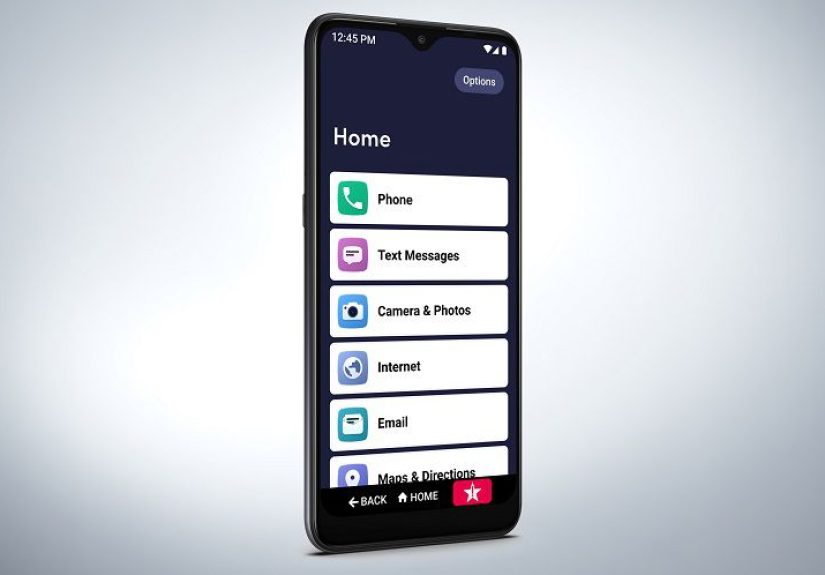
That is what made the debut of the Lively smartphone at Best Buy feel significant. It was not simply another handset launch. It was a direct pitch to older adults who wanted the benefits of modern mobile technology without the chaos that usually comes bundled with it. Large text, a straightforward list-style menu, one-touch access to help, video chat, maps, and health-related services were all packaged in a design meant to feel less intimidating from the very first tap.
In other words, Lively Smart was not trying to beat the iPhone in a spec showdown. It was trying to answer a more practical question: what should a smartphone look like when the goal is confidence, connection, and independence?
What Exactly Debuted at Best Buy?
When Best Buy Health introduced Lively Smart, the device arrived with a 6.2-inch display, a simplified home screen, and a menu organized into one clear, easy-to-read list. Instead of burying important tools inside a maze of icons and settings, the phone highlighted the basics older adults are most likely to care about: calling, texting, taking photos, getting directions, and reaching help quickly when needed.
The launch also tied the phone to Lively’s broader health and safety ecosystem. That meant access to features such as Urgent Response for 24/7 help, Urgent Care for around-the-clock contact with a registered nurse or board-certified doctor without an appointment, and Lively Link, which lets family members stay informed about a loved one’s activity, battery status, and emergency contact events. At launch, the device sold for $149.99 plus monthly service, placing it in a category that was more about reassurance and simplicity than flashy hardware bragging rights.
That approach helped the phone stand out immediately. A regular budget Android phone can be inexpensive, sure, but cheap is not always the same thing as easy. Lively Smart was designed to reduce friction. For many older adults, that matters more than whether the camera can photograph the moon in dramatic detail.
Why the Launch Mattered More Than It First Appeared
It challenged the stereotype that older adults do not want smartphones
One of the biggest misconceptions in consumer tech is that seniors either do not use smartphones or do not want to. That idea has aged about as well as milk in July. Older adults are using technology for texting, video chatting, streaming, maps, shopping, and health apps more than many people assume. The real issue usually is not interest. It is usability.
Lively Smart recognized that distinction. It did not talk down to older adults by assuming they needed a toy-like device. It offered a real smartphone experience, but with guardrails. That is a smart move, because many older users want modern features, just not the feeling that the phone is constantly trying to outsmart them.
It connected the phone to health and safety, not just communication
This is where the launch became especially timely. Smartphones are no longer just for calls and family photos. They are gateways to telemedicine, navigation, caregiver support, medication reminders, and everyday peace of mind. For adults ages 65 and older, telemedicine usage has been especially notable, which makes a phone with built-in access to support and health services more relevant than ever.
That connection between mobile technology and aging in place is important. The conversation is no longer just, “Can Mom text?” It is also, “Can Mom get help quickly?” “Can Dad join a video call with a nurse?” “Can family members check in without becoming full-time IT support?” Lively Smart was built to live in that space.
It treated ease of use as a feature, not a compromise
Tech companies often treat accessibility like parsley on a restaurant plate: technically present, but not the main event. Lively took the opposite path. Big text, a simple list-based interface, and quick access to assistance were central to the pitch. That matters because accessibility is not a “nice extra.” For many users, it is the whole ballgame.
What Makes a Senior-Friendly Smartphone Actually Work?
The debut of the Lively smartphone also raised a broader question: what do older adults really need from a phone? The answer is not one single thing, because older adults are not one giant hive mind with matching cardigans. Still, a few priorities come up again and again.
Readable screens and simpler navigation
Low vision, arthritis, and unfamiliarity with app-heavy design can make standard smartphones frustrating. A senior-friendly phone should cut through clutter, boost legibility, and make common actions obvious. Lively Smart leaned into that idea early, and the current Jitterbug Smart4 continues the formula with an even larger display and the same simplified menu concept.
Loud, clear communication
A phone can have all the clever features in the world, but if the user cannot hear well on calls, the relationship is over. That is why speaker strength, hearing-aid compatibility, and readable captions matter so much in this category. Senior-focused reviews continue to rank Lively’s Jitterbug line highly because it pays attention to these very practical needs instead of assuming everyone has perfect hearing and the patience of a saint.
Help that is easy to reach
This is one area where Lively separates itself from a typical bargain smartphone. Built-in access to urgent support gives the device a different personality. It is not just a communications tool. It is also a confidence tool. For an older adult living independently, that psychological value can be enormous. For family members, it can lower the ambient panic level from “constant” to merely “occasional.”
Support for family without turning them into unpaid help desk workers
Anyone who has ever tried to explain app permissions over the phone to a parent or grandparent knows the pain. “Tap the icon.” “Which icon?” “The blue one.” “They are all blue.” Lively’s family-facing features help make caregiving more collaborative and less chaotic. That matters because a good senior smartphone should reduce household stress, not create a weekly tech crisis.
The Bigger Best Buy Advantage
There is also something important about where Lively Smart debuted. Best Buy is not a random digital storefront hidden in a forgotten corner of the internet. It is a mainstream retailer with physical stores, recognizable customer service, and a growing health-tech strategy. That gave Lively more credibility than a niche gadget sold only through obscure TV ads or suspiciously cheerful infomercials.
The Best Buy connection also suggested that senior technology was moving into the retail mainstream. That matters. Products for older adults often get marketed either as medical devices or as novelty items. Lively landed in a more useful middle ground: everyday consumer tech with an aging-focused purpose.
Today, that strategy still shows up in Best Buy’s Lively lineup, from phones to medical alert devices. Current Lively offerings emphasize affordable plans, easy setup, and ongoing health and safety support. The product family has evolved, but the original idea behind the Lively Smart debut still feels intact: simplify the technology, keep the person in control, and make help easier to reach.
Where the Lively Approach Shines and Where It Falls Short
No honest article should pretend this phone is perfect for every older adult with a pulse and a charging cable. Lively’s strengths are very real, but so are its trade-offs.
Where it shines
Lively is strongest for people who want a smartphone that feels calm. The interface is easier to understand than a conventional phone’s app grid. The health and safety services add real value for users who care about support. The device also makes video chatting, texting, navigation, and photos more accessible for people who may be new to smartphones or easily overwhelmed by them.
Where it can disappoint
On the other hand, tech-savvy seniors may find it limiting. Some users will prefer the flexibility of an iPhone or Samsung phone with customized accessibility settings. Others may balk at paying ongoing monthly fees for the very services that make Lively distinct. And as with any carrier-tied ecosystem, shoppers should pay attention to coverage, activation, and whether the overall package fits their real needs rather than their family’s anxiety.
That is the key distinction. A phone for seniors should not be chosen because it looks “old-person appropriate.” It should be chosen because it matches the user’s confidence level, health priorities, hearing and vision needs, and daily routines.
Who Should Consider a Lively Phone Today?
The people most likely to benefit from the Lively model are older adults who want a smartphone experience but do not want a smartphone headache. That includes first-time smartphone users, adults transitioning from a flip phone, people who value one-touch support, and families trying to help a loved one stay independent at home.
It is especially appealing for someone who wants three things at once: a larger screen, a simpler interface, and built-in peace of mind. That combination is still surprisingly rare in the broader phone market.
It may be less ideal for older adults who already use a standard smartphone comfortably, rely heavily on specialized apps, or want full control over every setting and software feature. In those cases, a mainstream phone with accessibility tweaks may be the better fit.
Final Take
The debut of the Lively smartphone at Best Buy was not memorable because it was flashy. It was memorable because it was focused. It addressed a real and often ignored problem in consumer technology: plenty of older adults want the benefits of smartphones, but not the clutter, confusion, and steep learning curve that often come with them.
By pairing a big screen and simple navigation with health and safety services, Lively Smart helped redefine what a senior-friendly smartphone could be. It was not just a phone with bigger text. It was an early signal that age-focused tech could be practical, modern, and retail-ready all at once.
And maybe that is the most important point. Good technology for older adults does not need to be cute, patronizing, or stripped down to the point of absurdity. It just needs to be clear, useful, and respectful. Lively understood that. Frankly, a lot of tech brands still have homework to do.
Experiences Related to the Lively Smartphone at Best Buy
What does a phone like this feel like in everyday life? Usually, it starts with hesitation. A son or daughter walks into Best Buy with a parent who says they “do not need anything fancy,” which is family code for “please do not hand me a device that requires a software engineering degree to answer a call.” The parent picks up the Lively phone, notices the larger text and simpler screen, and relaxes a little. That reaction matters. Confidence is often the first feature that gets overlooked in tech, but it is the one that decides whether a phone gets used or sits in a drawer next to old chargers and mystery instruction manuals.
For many older adults, the first meaningful moment is not sending a text. It is successfully doing something ordinary without help. Making a call. Reading a message without squinting. Finding the camera without wandering through six folders and accidentally opening weather radar for Nebraska. Those tiny wins build trust fast. A phone that feels understandable on day one is much more likely to become part of someone’s routine on day thirty.
Families also tend to notice the emotional shift. Instead of repeated “How do I do this?” calls, there are more natural conversations. A granddaughter gets a photo of Grandma’s tomato plant. A grandfather joins a video chat and spends five full minutes positioning the camera at his forehead, which is still progress because he made the call himself. The technology fades into the background, and that is usually the sign that it is working.
There is another kind of experience here too: reassurance. Older adults who live alone often like the idea that help is easier to reach, even if they never need it. Family members like it too. It changes the tone of daily life. A daughter who lives two states away cannot prevent every problem, but she can breathe easier knowing her mother has a phone built around communication and support rather than endless app clutter. Peace of mind may sound like marketing language, but for many families it is very real.
Of course, the experience is not always flawless. Some users still need help with setup. Some will grumble about monthly service costs. Some will compare the phone to a grandchild’s iPhone and decide the camera is not exactly Hollywood. And some older adults who are already comfortable with mainstream smartphones may find Lively a little too simplified. That is fair. A good experience is not about forcing one phone on everyone. It is about finding the device that fits the person.
Still, the strongest experiences around Lively tend to come from people who want technology to feel calmer. They want a phone that helps them stay connected, not a phone that constantly demands updates, passwords, and emotional resilience. In that sense, the Lively smartphone’s debut at Best Buy was about more than retail placement. It gave older adults and their families a mainstream place to find a product designed with their reality in mind. And in a tech world obsessed with what is next, that simple act of meeting people where they are feels surprisingly meaningful.