Table of Contents >> Show >> Hide
- Why Sharing Steam Games Is Better Than Ever
- Step 1: Choose the Right Sharing Method Before You Start
- Step 2: Secure Your Steam Account First
- Step 3: Create or Join a Steam Family
- Step 4: Invite Family Members and Organize Access Carefully
- Step 5: Start Sharing Eligible Games the Smart Way
- Step 6: Use Privacy, Controls, and Backups to Avoid Awkward Moments
- Step 7: Know the Most Common Problems and Fix Them Fast
- Best Practices for Sharing Steam Games Without Regret
- Conclusion: Share Smarter, Play More, Stress Less
- Extended Reader Experience: What Sharing Steam Games Actually Feels Like
- SEO Tags
If your Steam library has quietly turned into a digital museum of bad decisions, surprise hits, and at least one game you bought at 2 a.m. because it was 90% off, you are not alone. The good news is that Steam does make sharing easier than many people realize. The slightly less magical news is that “sharing” on Steam can mean a few different things depending on whether you want to share full library access, play together, or simply send someone a game as a gift.
That is where a lot of guides get tangled up. Some still talk mostly about the old Family Library Sharing setup, while newer Steam users are seeing Steam Families instead. So this guide cuts through the confusion and gives you a modern, practical walkthrough in seven simple steps. You will learn how to share Steam games the smart way, how to avoid common mistakes, and how to decide whether Steam Families, Remote Play Together, or gifting is the better move.
If you want to share Steam games with family and friends without turning your PC into a customer support hotline, start here.
Why Sharing Steam Games Is Better Than Ever
Steam’s current family features are much more flexible than the older version that many longtime PC gamers still remember. Instead of treating one person’s entire library like a sacred artifact nobody else may touch, the newer system is designed to make shared access feel more practical for actual households. People can keep their own profiles, achievements, cloud saves, and play history, which means your sibling can enjoy your favorite RPG without overwriting your heroic decisions or exposing your shameful number of hours in farming simulators.
That said, Steam is still not a free-for-all. Not every game is shareable, not every “friend” is the right person to invite into your library ecosystem, and there are still rules around simultaneous access. That is why the best results come from understanding what kind of sharing you actually need before you click anything.
Step 1: Choose the Right Sharing Method Before You Start
The first step is simple but important: decide what “share Steam games” means in your situation.
Use Steam Families for shared library access
This is the best option if you live with family members or have a trusted household-style setup. Steam Families lets members access eligible games from one another’s libraries while still using their own Steam accounts. This is the closest thing to true Steam game sharing.
Use Remote Play Together for instant co-op
If your goal is to play with a friend who does not own the game, Remote Play Together may be the better choice. It is great for couch co-op games, party games, and titles where one person can host and invite others. It is less about sharing ownership and more about sharing the actual session.
Use gifting for a friend who wants permanent access
If your friend lives elsewhere, wants their own copy, or you do not want to mix libraries and family settings, gifting is often the cleanest solution. It avoids future confusion and keeps everyone’s collection separate.
Think of it this way: Steam Families is for ongoing shared access, Remote Play Together is for shared play sessions, and gifting is for permanent ownership. Pick the right lane now, and the rest gets much easier.
Step 2: Secure Your Steam Account First
Before you share anything, lock down your account. This is not the glamorous part of the guide, but it is the part that prevents future regret.
Turn on Steam Guard, make sure your email is current, and use a strong password. If you use the Steam Mobile app, even better. Steam sharing should never mean handing over your password to someone else. In fact, if you are considering texting your login to a cousin, roommate, or “bro who totally won’t mess anything up,” step away from the keyboard.
A secure setup matters because shared access still connects to your purchases, your account reputation, and in some cases your payment environment. You want the convenience of sharing games, not the chaos of recovering an account because someone “just wanted to check one thing.”
Quick security checklist
- Enable Steam Guard
- Update your password if it is old or reused
- Confirm your email and recovery methods work
- Never give out your account password
Step 3: Create or Join a Steam Family
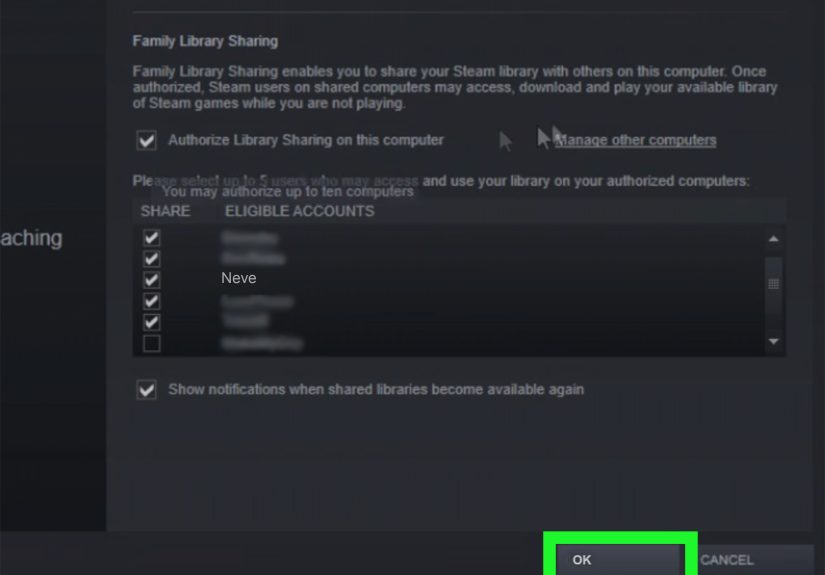
Now for the real setup. Open Steam and head to the family settings. In the modern Steam interface, this is where you can create or manage a Steam Family rather than relying only on the older device-based library authorization method.
If you are the one organizing things, create the family group and give it a sensible name. Something like “Smith Family Games” works. Something like “The Empire of Tactical Goblins” also works, though it may raise questions during holidays.
Once the family exists, you can start inviting people. Steam generally expects this feature to be used for close family-style sharing, so do not treat it like a public giveaway. The cleaner and more legitimate your setup, the fewer headaches you will have later.
What happens when you form a Steam Family?
Eligible games from members’ libraries become available to the group. Each person still plays under their own account, keeps their own saves, and earns their own achievements. That is what makes the system so much better than crude account swapping.
This is also the point where adults and children can have different roles. If you are setting things up for younger players, assign the right permissions from the start instead of waiting until someone accidentally lands on a mature game page and asks a very inconvenient question at dinner.
Step 4: Invite Family Members and Organize Access Carefully
After the family is created, invite the people who should be in it. Be selective. The best Steam sharing setups are built on trust, not optimism.
For parents, this is where Steam gets especially useful. Child accounts can have parental controls, and purchase requests can flow to adults for approval. That means a child can ask for a game without directly buying it, which is much healthier than discovering an unexpected cart total after the fact.
For adults, the big choice is whether you are sharing with someone who understands how shared libraries work. A reliable sibling who plays a few times a week is one thing. A chaotic friend who clicks every sale banner like it is a game show buzzer is another.
Tips for keeping access organized
- Invite only people you trust long-term
- Explain the rules before they start using shared games
- Use child settings for younger gamers
- Decide in advance how purchases and approvals will work
A two-minute conversation now can save two hours of “Why can’t I launch this?” messages later.
Step 5: Start Sharing Eligible Games the Smart Way
Once your family group is set up, members can browse and install eligible shared games from the family library. This is where Steam sharing starts to feel genuinely useful. Instead of buying duplicates immediately, a household can test whether multiple people actually play a title before deciding whether a second copy is worth the money.
Here is the key word, though: eligible. Not every Steam game can be shared. Some titles are excluded because of publisher rules, third-party launchers, anti-cheat setups, subscriptions, or other licensing issues. So if one game appears and another does not, that does not necessarily mean you broke anything. It may simply be unavailable for sharing.
What sharing looks like in real life
Imagine you own a big strategy game, your partner owns a cozy puzzle collection, and your teenager owns a racing title. With Steam Families, each person can pull from that shared pool of eligible games while keeping their own progress. That creates a much better value than buying every title multiple times right away.
Also remember that simultaneous use still has limits. Different shared games may work more smoothly than the old system did, but if two people want the exact same title at the same time, you may need multiple copies. This is the part where reality gently reminds us that even digital generosity has a business model.
Step 6: Use Privacy, Controls, and Backups to Avoid Awkward Moments
Sharing access is one thing. Sharing everything is another. Fortunately, Steam gives you a few ways to make the experience less awkward and more manageable.
Mark sensitive games as private
If there are games in your library you would rather not put on display, mark them private where supported. This can keep your activity, ownership, and playtime from becoming a family discussion topic for no reason.
Use parental controls when kids are involved
Steam’s updated family tools are much stronger for parents than the older Family View system. You can control what child accounts can access, manage permissions more directly, and keep purchases behind adult approval.
Keep saves and cloud sync healthy
Even though each person keeps separate progress, it is still smart to make sure Steam Cloud is enabled where available. Shared libraries are more enjoyable when nobody loses a 40-hour save because a sync setting was ignored in a fit of confidence.
This step may not feel exciting, but it is what separates a smooth Steam Families setup from one that turns into a recurring family IT problem.
Step 7: Know the Most Common Problems and Fix Them Fast
If Steam game sharing stops working, the fix is usually less dramatic than people think. Most problems come down to one of a handful of familiar issues.
The game is missing
Check whether the title is actually eligible for sharing. If it relies on a third-party account, has special licensing rules, or the developer has excluded it, it may not appear in the shared library.
The game will not launch
Make sure Steam is updated, the family group is still active, and the user is signed into the correct account. It is also worth checking whether access rules changed after a client update.
Someone is playing and another person cannot access what they want
This often comes down to the limits around concurrent play and copy ownership. If multiple people want the same game at once, buying an extra copy may be the simplest solution.
A child account cannot buy or access something
That is probably the parental control system doing its job. Review the permissions, approve purchase requests where appropriate, and confirm the account role is set correctly.
The setup seems too messy for a casual friend
At that point, stop forcing Steam Families to solve a problem it was not built to solve. Use gifting or Remote Play Together instead. Sometimes the best tech fix is choosing a different tool.
Best Practices for Sharing Steam Games Without Regret
Once everything is working, keep these habits in mind:
- Do not share your Steam password with anyone
- Use Steam Families for trusted, long-term sharing
- Use gifting when someone really needs their own copy
- Use Remote Play Together for casual co-op with friends
- Expect some games to be excluded from sharing
- Review privacy and child settings before problems happen
The smartest Steam users are not the ones who memorize every menu. They are the ones who know which sharing option fits the moment.
Conclusion: Share Smarter, Play More, Stress Less
Steam makes it surprisingly easy to share games with family and, in some cases, friends, but the best experience comes from using the right system the right way. Steam Families is the modern answer for shared library access in a trusted household setting. Remote Play Together is perfect for spontaneous multiplayer sessions. Gifting is still king when you want clean, permanent ownership without any setup drama.
If you follow these seven steps, you can share Steam games more confidently, avoid the biggest mistakes, and make your library work harder for everyone who matters. That means fewer duplicate purchases, more game nights, and a lot less confusion over who can play what and when.
And honestly, if your biggest household argument becomes “Who launched the co-op game before dinner?” you are probably doing pretty well.
Extended Reader Experience: What Sharing Steam Games Actually Feels Like
In real-world use, sharing Steam games is rarely just about saving money. It often changes how people discover games and how they spend time together. One common experience is that one person in the house becomes the “collector,” buying strategy games, shooters, indie bundles, and seasonal sale pickups, while everyone else becomes the happy beneficiary of that slightly out-of-control hobby. Suddenly, a sibling who would never have bought a city builder tries one because it is already there. A parent experiments with a puzzle game they would never have clicked on. A teen explores older classics without spending anything extra. A shared library becomes less like a shopping list and more like a family bookshelf.
Another common experience is learning that sharing works best when expectations are clear. People are usually thrilled at first because it feels like unlimited access. Then practical questions show up. Why is one game missing? Why can I play this co-op title but not that competitive shooter? Why did one person think a friend from school counted as “basically family”? These moments are not deal-breakers, but they do reveal that the best Steam setup is not just technical. It is social. The smoothest households are the ones that explain the rules, choose the right members, and treat shared access like a privilege rather than a loophole.
There is also the emotional side of sharing, which sounds dramatic until you watch it happen. A shared game library often creates low-pressure ways to connect. Someone recommends a game they love, another person tries it because it is already available, and suddenly there is an easy new topic to talk about. For families with different tastes, that matters. The sports gamer may never become an RPG fanatic, and the cozy-farm enthusiast may never care about tactical shooters, but sharing lowers the barrier to trying something new. It creates overlap.
At the same time, Steam sharing teaches a fast lesson in boundaries. Many users quickly realize they do not want every title in their library treated like a public announcement. That is why privacy settings and private games feel more useful than people expect. Sharing should make gaming easier, not more embarrassing. Nobody wants to explain a random impulse purchase to three relatives and a roommate because it suddenly showed up in the family feed like breaking news.
For parents, the experience is often even more practical. Steam Families can reduce the friction around game buying, permissions, and supervision. Instead of constantly handing over a credit card or saying “ask me later,” purchase requests and child controls create a more structured system. It feels less chaotic and more intentional. That is especially helpful in households where kids play often, experiment with new genres, or have a talent for clicking “buy” with suspicious confidence.
In the end, the best experience with Steam game sharing is not that it gives away free entertainment forever. It is that it makes gaming more flexible, more social, and a lot more efficient when used wisely. Done right, it turns one library into a shared source of fun without turning one account into a disaster zone.