Table of Contents >> Show >> Hide
- Introduction: When Your Boat Wants a Brain
- What Is an Open Source Chart Plotter?
- Why Raspberry Pi Works So Well on Boats
- The Software Stack: OpenCPN, OpenPlotter, Signal K, and GPSD
- Charts: The Digital Map Is the Star of the Show
- AIS: Traffic Updates on the Seven Seas
- Hardware Checklist for a Raspberry Pi Chart Plotter
- Installation Overview: From Bare Board to Boat Brain
- Real-World Use Cases
- Benefits of an Open Source Marine Navigation Setup
- Limitations and Safety Considerations
- Experience Section: Lessons From Building and Using a Raspberry Pi Chart Plotter
- Conclusion: Open Source Navigation Has Earned Its Place Onboard
Note: This article is written for educational and informational purposes. A Raspberry Pi chart plotter can be a powerful onboard tool, but it should supportnot replaceofficial navigation practices, updated charts, proper lookout, marine radio use, and sound seamanship.
Introduction: When Your Boat Wants a Brain
A boat without good navigation is basically a floating picnic table with ambition. Add tides, fog, commercial traffic, channel markers, crab pots, and one overly confident cousin holding a paper chart upside down, and suddenly “just follow the coastline” feels less like a plan and more like a deleted scene from a disaster movie.
That is where an open source chart plotter using a Raspberry Pi becomes exciting. It gives boaters a low-cost, flexible way to display electronic nautical charts, GPS position, AIS vessel traffic, routes, waypoints, and marine data on a compact computer that can fit almost anywhere. Instead of spending a small fortune on a proprietary marine display, many DIY sailors, cruisers, researchers, and weekend boaters are building their own marine navigation systems with Raspberry Pi, OpenCPN, OpenPlotter, Signal K, GPS receivers, and AIS hardware.
The result is not magic. It is better: it is understandable technology. You can see how the pieces work, customize them, repair them, and upgrade them. In a world where many marine electronics are sealed boxes with mysterious menus and price tags that make wallets whimper, open source navigation feels like opening a hatch and finding fresh air.
What Is an Open Source Chart Plotter?
A chart plotter is an electronic navigation display that shows your boat’s location on nautical charts. It can help you plan routes, monitor speed and heading, mark hazards, watch nearby AIS targets, and keep track of your voyage. Commercial chart plotters often combine hardware, software, charts, and accessories into one marine-rated system.
An open source chart plotter takes a different approach. Instead of depending entirely on one brand’s hardware and software ecosystem, it uses community-developed software and general-purpose hardware. A Raspberry Pi can run navigation software such as OpenCPN, connect to GPS and AIS data, display NOAA electronic charts, and even share information across a boat network.
The key phrase is “open source.” The software can be inspected, improved, translated, modified, and supported by a global community. That does not mean every setup is free, effortless, or suitable for every vessel. It means the user has more control. For technically curious boaters, that control is half the fun. For budget-conscious cruisers, it may also be the difference between having a capable digital navigation station and squinting at a phone screen in direct sunlight.
Why Raspberry Pi Works So Well on Boats
The Raspberry Pi is small, affordable, energy-efficient, and widely supported. Modern models offer enough performance to run a desktop operating system, navigation software, GPS utilities, wireless networking, and dashboards. It can connect to USB GPS receivers, serial devices, touchscreens, sensors, and network equipment. It is not marine hardware by birth, but with the right case, power supply, cooling, and waterproof installation, it can become a surprisingly capable onboard computer.
Low Power Draw
On a boat, every amp matters. A Raspberry Pi typically uses far less power than a laptop. That is especially helpful for sailboats, small cruisers, research skiffs, and vessels running from solar panels or modest battery banks. You can keep the navigation computer running for long passages without feeling like you are feeding a hungry toaster.
Flexible Connections
Marine navigation is a conversation between devices: GPS says where you are, AIS says who is nearby, depth sounders report underwater surprises, wind instruments gossip about apparent wind, and autopilots wait for steering instructions. A Raspberry Pi can serve as a hub for many of these data streams using USB, serial adapters, Wi-Fi, Ethernet, NMEA 0183, NMEA 2000 gateways, Signal K, and related tools.
Affordable Experimentation
With a commercial multifunction display, experimentation can be expensive. With a Raspberry Pi chart plotter, you can build gradually. Start with the Pi, a GPS dongle, OpenCPN, and free charts. Later, add an AIS receiver, touchscreen, waterproof enclosure, external antenna, or boat data network. Your system can grow with your knowledge and your cruising plans.
The Software Stack: OpenCPN, OpenPlotter, Signal K, and GPSD
A good Raspberry Pi chart plotter is not just one program. It is a stack of tools working together, preferably without throwing a digital tantrum five minutes before entering a narrow channel.
OpenCPN: The Chart Plotter at the Helm
OpenCPN is one of the best-known open source marine chart plotter applications. It runs on several platforms, including Linux and Raspberry Pi, and is designed for use at the helm. It supports route planning, waypoint management, GPS tracking, chart display, AIS input, target tracking, and collision alerting features.
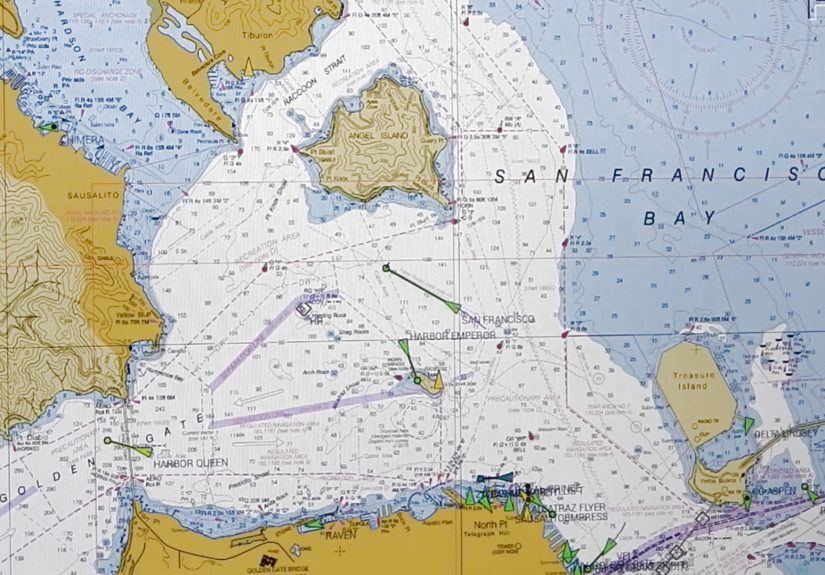
For many DIY marine computers, OpenCPN is the main navigation screen. It displays your boat over nautical charts, lets you create routes, shows course and speed, and can overlay AIS targets when connected to an AIS receiver or data feed. It also supports plugins, which means users can extend functionality depending on their needs.
OpenPlotter: The Boat-Friendly Raspberry Pi Toolkit
OpenPlotter is a marine-focused open source toolkit built around Raspberry Pi. It helps package several useful boating tools into a more approachable system. Instead of manually assembling every component from scratch, boaters can use OpenPlotter to manage navigation software, Signal K, serial connections, sensors, AIS tools, and other onboard services.
Think of OpenPlotter as the dockmaster of your Raspberry Pi marine computer. It does not sail the boat for you, but it helps organize the chaos so your GPS, AIS, sensors, and chart plotter can talk like civilized adults.
Signal K: A Modern Language for Marine Data
Signal K is an open data format and server ecosystem for marine information. It can collect data from different sources and make it available to apps, dashboards, logs, and other devices. Traditional marine electronics often rely on standards such as NMEA 0183 and NMEA 2000. Signal K helps translate, organize, and distribute that information in a modern network-friendly way.
For a Raspberry Pi boat computer, Signal K can become the central nervous system. GPS position, wind, depth, temperature, battery voltage, AIS, and other data can flow into one place and then be displayed in useful ways. It is especially attractive for boaters who want dashboards, logging, remote monitoring, or integration with tablets and onboard Wi-Fi.
GPSD: Making GPS Data Useful
GPSD is a service that monitors GPS, GNSS, and AIS receivers connected by USB or serial ports. It helps applications access location data without each program needing to directly manage the hardware. In a Raspberry Pi chart plotter setup, GPSD can help stabilize GPS data handling and share position information with software that needs it.
In plain English: GPSD is the quiet person in the background making sure the navigation apps know where the boat is. It rarely gets applause, but you miss it quickly when it is not working.
Charts: The Digital Map Is the Star of the Show
A chart plotter is only as useful as the charts it displays. In the United States, NOAA provides official Electronic Navigational Charts, commonly called ENCs, for free download. These charts cover U.S. coastal waters, the Great Lakes, many rivers, and other navigable areas. OpenCPN can use NOAA chart sources through its chart downloader and manual installation options.
Electronic charts show important navigation information such as depths, channels, buoys, beacons, aids to navigation, restricted areas, shoreline details, and hazards. NOAA has been moving chart production toward ENC-based products, which makes electronic chart literacy increasingly important for boaters.
Vector Charts vs. Raster Charts
Vector charts are built from data layers. Users can zoom, query objects, change display settings, and view chart information dynamically. Raster charts are more like scanned traditional paper charts. They preserve the look of paper charts but do not offer the same object-level flexibility.
Many modern setups favor ENCs because they are scalable and data-rich. However, experienced navigators often appreciate having multiple references. A Raspberry Pi chart plotter can be part of a broader navigation strategy that includes paper backups, cruising guides, tide tables, local knowledge, and the ancient art of looking out the window.
AIS: Traffic Updates on the Seven Seas
AIS stands for Automatic Identification System. It allows vessels equipped with AIS transponders to broadcast information such as position, course, speed, vessel name, MMSI, and vessel type over VHF radio frequencies. Nearby vessels and shore stations can receive that data and display it on chart plotters or monitoring systems.
For boaters, AIS is one of the most useful additions to a Raspberry Pi chart plotter. It turns the screen from a static “you are here” map into a living traffic display. Commercial ships, ferries, tugs, some fishing boats, and many recreational vessels may appear as moving targets. OpenCPN can show AIS targets, track them, and provide alerts based on closest point of approach and time to closest point of approach.
Receiver or Transponder?
An AIS receiver lets you see AIS-equipped vessels, but it does not broadcast your own boat’s position. An AIS transponder both receives and transmits. For many small-boat Raspberry Pi projects, users start with receive-only AIS because it is cheaper and simpler. However, offshore cruisers and boats operating in busy traffic areas may choose a Class B AIS transponder so other vessels can see them too.
Receive-only AIS is like listening at a party. Transmitting AIS is introducing yourself. Both have value, but they are not the same thing.
How AIS Gets Into the Raspberry Pi
AIS data can reach the Raspberry Pi in several ways. Some boaters use a dedicated AIS receiver connected by USB or serial. Others use an SDR dongle with an antenna and software to decode AIS signals. More advanced setups may receive AIS from an NMEA 2000 gateway, a Wi-Fi multiplexer, or a marine network device. Once the data is available, OpenCPN or Signal K can display and distribute it.
The practical lesson is simple: antennas matter. A good AIS receiver with a poor antenna installation may disappoint you. A modest receiver with a clean antenna placement and proper cabling can perform surprisingly well. Saltwater is excellent for floating boats and terrible for sloppy electrical work, so marine-grade connections are worth the effort.
Hardware Checklist for a Raspberry Pi Chart Plotter
A basic Raspberry Pi chart plotter does not need to be complicated. The following components are common in DIY builds:
- Raspberry Pi board with suitable power supply
- MicroSD card or SSD storage
- Raspberry Pi OS, OpenPlotter, or another Linux-based setup
- OpenCPN chart plotter software
- NOAA ENC charts or other appropriate chart sources
- USB GPS or GNSS receiver
- AIS receiver, SDR dongle, or AIS transponder connection
- Touchscreen, HDMI monitor, or remote tablet display
- Water-resistant enclosure and proper ventilation
- Stable 12V-to-5V power conversion
- Backup navigation method, such as paper charts or a second device
The power system deserves special attention. Boats do not provide laboratory-perfect electricity. Voltage spikes, low battery conditions, corrosion, and loose connections can cause random crashes. A quality DC-DC converter, fuse protection, clean wiring, and strain relief can prevent many headaches.
Installation Overview: From Bare Board to Boat Brain
Every boat is different, but a typical build follows a recognizable path.
Step 1: Prepare the Raspberry Pi
Install the operating system or a marine-oriented distribution such as OpenPlotter. Update the system, configure regional settings, enable networking, and test that the Pi boots reliably. Do this at home before the boat installation. Debugging Linux while kneeling in a cockpit locker is character-building, but not in a good way.
Step 2: Install OpenCPN
Install OpenCPN and confirm that it launches properly. Adjust display settings for readability, especially if the screen will be used in bright daylight or at night. Large icons, simple layouts, and night mode can make a big difference underway.
Step 3: Add Charts
Download appropriate NOAA ENC charts or other legal chart sources for your cruising area. Use the OpenCPN chart downloader when available, or install charts manually. After loading charts, zoom around your home waters and confirm that chart details appear correctly.
Step 4: Connect GPS
Plug in the GPS receiver and verify that the system receives a position fix. In OpenCPN, your boat should appear in the correct location. If your boat appears in a cornfield, either the GPS has not locked yet or you have bigger problems than software.
Step 5: Add AIS
Connect the AIS receiver, SDR setup, or transponder data output. Configure the connection in OpenCPN, Signal K, or the relevant tool. Test in an area with known AIS traffic. Harbors, shipping lanes, ferry routes, and busy rivers are useful test environments.
Step 6: Sea Trial Carefully
Never trust a new navigation system blindly. Take the boat out in familiar waters during good conditions. Compare the Raspberry Pi chart plotter with another GPS device, visual navigation marks, depth soundings, and known landmarks. Check whether the screen is readable, the GPS remains stable, AIS targets update properly, and the power supply survives engine starts and battery changes.
Real-World Use Cases
The Weekend Sailor
A weekend sailor might use a Raspberry Pi chart plotter mainly for local routes, AIS awareness, and waypoint management. The system can sit at the nav station while a tablet mirrors the display in the cockpit. For local cruising, this offers an affordable upgrade from phone-only navigation.
The Long-Distance Cruiser
A cruiser may integrate GPS, AIS, wind, depth, battery monitoring, and log data through Signal K. OpenCPN becomes the main planning and monitoring interface, while dashboards show system health. The Raspberry Pi can also store tracks, export logs, and support remote access from other devices on the boat.
The Marine Researcher
Researchers can use a Raspberry Pi setup to record AIS activity, GPS tracks, environmental data, and vessel movement patterns. Because the platform is flexible, it can be adapted for custom sensors, data logging scripts, and field deployments where a commercial chart plotter would be too closed or too expensive.
Benefits of an Open Source Marine Navigation Setup
The biggest benefit is flexibility. You are not locked into one manufacturer’s chart store, display size, cable type, or software update schedule. You can build a system that matches your boat, budget, and curiosity.
Cost is another advantage. A Raspberry Pi setup can be much cheaper than a full commercial marine electronics package. While a rugged, polished commercial unit may still be better for harsh exposed helm stations, a DIY Raspberry Pi chart plotter can deliver impressive capability for the price.
There is also educational value. Building the system teaches you how GPS, AIS, electronic charts, serial data, marine networks, and onboard power interact. That knowledge can help you troubleshoot problems at sea. When something fails, you are not completely at the mercy of a manual written in five languages and none of them helpful.
Limitations and Safety Considerations
A Raspberry Pi chart plotter is not automatically waterproof, sunlight-readable, vibration-proof, or certified for mission-critical navigation. It is a computer, and computers occasionally behave like cats: useful, clever, and suddenly uninterested in your priorities.
Boaters should protect the Pi from moisture, heat, corrosion, and unstable power. They should also maintain backups. A phone, tablet, handheld GPS, paper charts, compass, and traditional navigation skills remain valuable. Electronic navigation is powerful, but it does not remove the need for judgment.
AIS also has limitations. Not every vessel transmits AIS. Small boats, kayaks, navigation hazards, logs, and unlit objects may not appear. AIS data can be delayed, incorrect, or unavailable. Radar, lookout, radio communication, and local awareness still matter.
Experience Section: Lessons From Building and Using a Raspberry Pi Chart Plotter
The first lesson is that the bench test is not optional. A Raspberry Pi chart plotter may look perfect on a desk, connected to home Wi-Fi, with a comfortable chair and coffee nearby. The boat will immediately introduce chaos: glare, vibration, wet hands, weak signals, engine noise, low voltage, and someone asking where the snacks are. Testing at home helps, but testing onboard is where the truth appears.
One common experience is discovering that screen choice matters more than expected. A cheap monitor may look fine indoors and almost invisible in sunlight. A touchscreen may work beautifully with dry fingers and less beautifully after handling dock lines. Some boaters solve this by placing the main display at the nav station and using a tablet or phone as a remote cockpit display. Others invest in a brighter marine-friendly screen. Either way, readability is not a luxury; it is part of safety.
Power is the second big lesson. Many mysterious software problems are actually power problems wearing a fake mustache. If the Pi reboots when the engine starts, freezes when the battery is low, or disconnects USB devices randomly, look at the power supply before blaming OpenCPN, Linux, or the moon phase. A stable marine-grade DC-DC converter, short quality cables, proper fusing, and secure terminals can transform an unreliable setup into a dependable one.
AIS testing can also surprise new users. In a quiet anchorage, the screen may show nothing, making it easy to think the receiver is broken. Move near a ferry route, commercial harbor, or major river and suddenly the display fills with targets. Antenna height and placement make a huge difference. A small antenna inside the cabin may receive nearby traffic, but an external antenna with a clear view can dramatically improve range.
Chart management becomes another habit. It is tempting to download charts once and forget them forever, but navigation data changes. Buoys move, channels shift, restricted areas update, and hydrographic offices publish corrections. Updating charts should become part of the same routine as checking fuel, weather, tide, and whether someone remembered the boat keys.
The best part of using a Raspberry Pi chart plotter is the feeling of ownership. You are not just tapping icons on a sealed device. You know where the GPS data comes from. You know how AIS reaches the chart. You know which power circuit feeds the computer. You can add a dashboard, change a display, log a voyage, or rebuild the system. That familiarity creates confidence.
The humbling part is that boats always win arguments. A tidy software configuration can be defeated by corrosion in a connector. A perfect route can be made irrelevant by weather. A beautiful AIS display does not mean the small fishing boat ahead is transmitting. The Raspberry Pi is a tool, not a captain. The smartest setup is one that supports seamanship rather than replacing it.
For many DIY boaters, the project becomes addictive in the best way. First comes GPS position. Then AIS. Then Signal K dashboards. Then battery monitoring. Then wind data. Then remote access from a tablet. Then, suddenly, the boat has a small digital nervous system and the owner has strong opinions about cable glands. This is normal. Possibly incurable. Thankfully, it is also useful.
Conclusion: Open Source Navigation Has Earned Its Place Onboard
A Raspberry Pi chart plotter is one of the most rewarding marine technology projects a boater can build. It combines practical navigation, open source software, affordable hardware, and real learning. With OpenCPN for chart plotting, NOAA ENCs for official U.S. chart data, Signal K for marine data sharing, GPSD for location services, and AIS for traffic awareness, a small computer can become a serious onboard navigation assistant.
It is not a replacement for seamanship, certified equipment where required, or common sense. But as a flexible, customizable, budget-friendly marine computer, it is hard not to love. The seven seas may not come with a traffic app, but with a Raspberry Pi, a good chart setup, and a careful skipper, your boat can get much closer.