Table of Contents >> Show >> Hide
- The Short Answer: How Far Does Wi-Fi Usually Reach?
- Why Wi-Fi Range Is Not One Number
- Wi-Fi Range by Band: 2.4 GHz vs. 5 GHz vs. 6 GHz
- What Actually Limits Wi-Fi Range?
- How Much Space Can One Router Cover?
- Does Wi-Fi 6, 6E, or 7 Increase Range?
- How to Improve Wi-Fi Range Without Losing Your Mind
- So, What Is the Range of a Typical Wi-Fi Network?
- Real-World Experiences With Typical Wi-Fi Range
- Conclusion
Wi-Fi range is one of those questions that sounds simple until you actually try to answer it. It is a little like asking, “How far can I throw a baseball?” The honest answer is: it depends on who is throwing, what is in the way, and whether the baseball is secretly a pineapple. In the real world, the range of a typical Wi-Fi network depends on your router, your device, your walls, your floors, your neighbors, and the strange urge many people have to hide routers inside cabinets like they are decorative shame boxes.
Note: The range estimates in this article reflect typical home use in realistic conditions, not showroom fantasy or empty-field testing.
The Short Answer: How Far Does Wi-Fi Usually Reach?
A typical Wi-Fi network from a single home router often reaches about 100 to 150 feet indoors on the 2.4 GHz band under decent conditions. On 5 GHz, practical indoor range is often shorter, sometimes around 50 feet or so through a typical structure, though it can be better with newer equipment and a cleaner environment. Outdoors, with fewer obstacles, Wi-Fi can stretch much farther, and 2.4 GHz may reach up to around 300 feet in good open-air conditions.
That said, most people do not live in an empty parking lot. They live in homes with brick walls, concrete floors, mirrors, TVs, microwaves, plumbing, neighbors, and furniture large enough to qualify as terrain. So the most useful answer is this: most single-router Wi-Fi networks work well across a small home or apartment, work unevenly in a medium-size home, and start begging for help in larger or multi-story homes.
Why Wi-Fi Range Is Not One Number
When people ask about Wi-Fi range, they are usually asking two different questions at once:
- How far away can my device still see the network?
- How far away can it still use the network well?
Those are not the same thing. Your phone may still detect Wi-Fi at the far edge of your house, but that does not mean video calls will stop freezing or that your game will stop behaving like it is being powered by hope alone.
A weak signal may technically be “in range,” yet still deliver slow speeds, high latency, dropped connections, and random moments of digital betrayal. So when talking about typical Wi-Fi range, it is smarter to think in terms of usable coverage, not just whether a device can barely cling to life on one lonely signal bar.
Wi-Fi Range by Band: 2.4 GHz vs. 5 GHz vs. 6 GHz
2.4 GHz: The Long-Distance Runner
The 2.4 GHz band is the veteran workhorse of home Wi-Fi. It generally reaches farther and penetrates walls better than higher-frequency bands. That makes it useful for devices that are farther from the router or move around a lot, such as phones, smart plugs, doorbells, printers, and many smart-home gadgets.
But 2.4 GHz has a flaw, and it is a big one: everyone loves it a little too much. It is often crowded with neighboring Wi-Fi networks and other household electronics. Microwaves, baby monitors, some security gear, and other devices can add interference. So while 2.4 GHz often wins the range contest, it does not always win the speed or reliability contest.
5 GHz: Faster, Cleaner, Shorter
The 5 GHz band is the speedier sibling. It usually delivers faster throughput, lower congestion, and a smoother experience for bandwidth-heavy tasks like 4K streaming, gaming, video calls, and large downloads. If your laptop or console is reasonably close to the router, 5 GHz is often the better choice.
The tradeoff is range. Higher-frequency signals do not travel as far and usually weaken faster through walls and floors. In plain English, 5 GHz is great until a few walls show up and decide to ruin the party.
6 GHz: Very Fast, Very Fancy, Usually Nearby
The 6 GHz band, used by Wi-Fi 6E and some Wi-Fi 7 setups, can be fantastic for speed and congestion relief. It has more room to breathe, which is wonderful in dense environments like apartment buildings. But it is even less forgiving with distance and obstacles than 5 GHz in many real homes.
So if 2.4 GHz is the reliable old pickup truck and 5 GHz is the sporty sedan, 6 GHz is the sleek performance car that absolutely shines on the right road and gets grumpy when you ask it to cross three walls, a staircase, and your refrigerator.
What Actually Limits Wi-Fi Range?
1. Walls and Floors
Not all walls are equal. Drywall is annoying. Brick is rude. Concrete is brutal. Metal framing, mirrors, stone, tile, and large appliances can all weaken signals. Multi-story homes are especially tricky because floors are often harder for Wi-Fi to penetrate than people expect.
A router that works beautifully in a one-level apartment may struggle in a tall house where the signal has to travel vertically. Wi-Fi does not always fail dramatically; sometimes it just gets slower room by room until your bedroom becomes a buffering documentary about sadness.
2. Router Placement
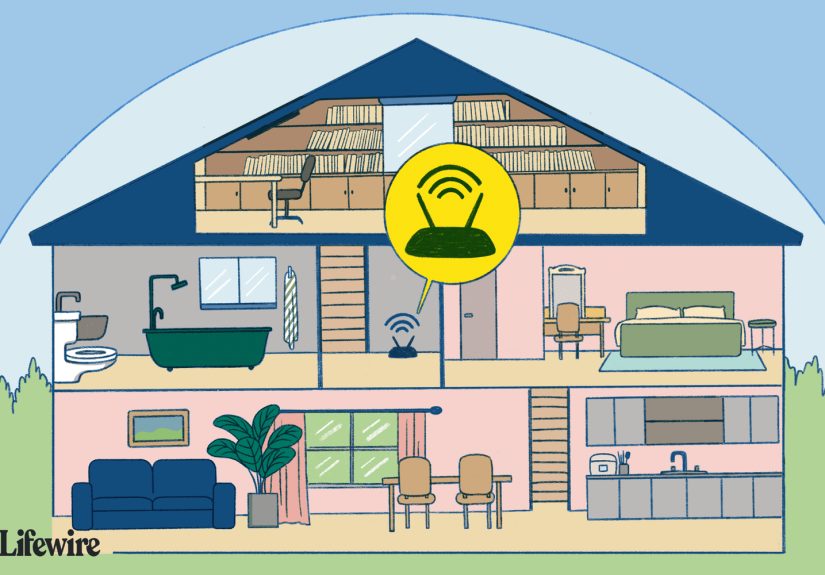
Router placement matters more than many people realize. Put the router in the center of the home, and coverage usually improves. Put it in a far corner, behind a TV, inside a cabinet, or on the floor, and the signal spends half its energy serving places you do not care about, like the coat closet or the emotional void behind the couch.
Routers work best when they are placed high, open, and central. Even moving a router a few feet can make a noticeable difference. That is not marketing hype. That is radio physics being dramatic again.
3. Interference
If you live in a house surrounded by neighbors, apartment units, or lots of wireless electronics, interference can shrink your effective range. A crowded 2.4 GHz environment may feel worse than a cleaner 5 GHz network even if the 2.4 GHz signal technically reaches farther.
This is why the “longer-range” band is not always the best band. In a crowded building, a shorter-range but cleaner 5 GHz signal can feel faster and more stable.
4. Router and Device Quality
Not all routers are created equal. A bargain-bin router from the dinosaur era will not perform like a modern Wi-Fi 6 or Wi-Fi 7 system. Your phone, laptop, tablet, or smart TV also matters. Wi-Fi is a two-way conversation, and a great router cannot fully rescue a weak client device.
Newer routers often improve beamforming, antenna efficiency, and traffic handling. That does not break the laws of physics, but it can improve usable range and stability compared with older hardware.
5. Channel Settings and Bandwidth
Wi-Fi range is also shaped by how your network is configured. On 2.4 GHz, using the right channel matters because there are only a few non-overlapping choices that tend to work best. On crowded networks, channel width also matters. Wider channels may promise more speed, but they can also increase interference and reduce real-world reliability.
In other words, your router may not need more power. It may just need better manners.
How Much Space Can One Router Cover?
Many modern home routers are marketed to cover somewhere around 1,500 to 2,200 square feet under favorable conditions. That is not nonsense, but it is usually based on open layouts and reasonable placement. Real coverage can be lower in homes with thick materials, odd floor plans, multiple levels, or dead zones at the edges.
Here is a practical way to think about it:
Small apartment or condo
One decent router is often enough. In a smaller space, the bigger issue may be congestion from neighbors rather than raw distance. In that case, 5 GHz or 6 GHz can be especially helpful for nearby devices.
Average single-family home
A single quality router may still do the job, especially if it is centrally placed. But if the router is stuck in a corner because that is where the internet line enters the home, range can drop fast in the far bedrooms, office, garage, or patio.
Large home or multi-story home
This is where single-router dreams often go to die. A larger home can benefit from mesh Wi-Fi, wired access points, or at least a carefully placed extender. Mesh systems are designed to spread coverage across multiple nodes, and many consumer systems scale to several thousand square feet with additional units.
Does Wi-Fi 6, 6E, or 7 Increase Range?
Sometimes yes, but not in the magical way people hope. Newer Wi-Fi standards can improve efficiency, device handling, latency, and overall performance. A newer router may give you better real-world coverage than an old one because it manages the network more intelligently and uses better radio design.
But the underlying frequency physics still matter. A 5 GHz or 6 GHz signal does not suddenly become a long-range superhero just because the box says Wi-Fi 7 in giant shiny letters. Newer standards can help you use the signal better, but they do not turn concrete into a friendly suggestion.
So yes, a modern router can improve your experience. No, it cannot make three brick walls disappear. If it could, it would be sold in the superhero aisle, not the electronics section.
How to Improve Wi-Fi Range Without Losing Your Mind
Move the router first
Before buying anything, place your router in a central, open, elevated location. This is the cheapest upgrade in networking history and one of the most effective.
Use the right band for the right job
Use 5 GHz or 6 GHz for nearby high-speed devices. Use 2.4 GHz for farther devices or smart-home gear that values reach more than raw speed.
Check the channel
If your Wi-Fi feels crowded, changing channels can help. On 2.4 GHz, the common best choices are channels 1, 6, and 11. On 5 GHz, selecting a less congested channel may improve performance.
Add mesh or an extender for weak areas
If your dead zones are far from the router, a mesh system is often a cleaner long-term fix than repeatedly yelling at your laptop. A range extender can help too, especially when placed midway between the router and the weak zone instead of being shoved directly into the dead zone itself.
Use wired backhaul when possible
If you can connect mesh nodes or access points with Ethernet, do it. Wired backhaul improves both speed and stability and makes your Wi-Fi feel far more grown-up.
So, What Is the Range of a Typical Wi-Fi Network?
A typical Wi-Fi network usually reaches far enough for a small home, somewhat unevenly across a medium home, and not quite enough for a large or obstacle-heavy home without help. In practical terms, expect around 100 to 150 feet indoors on 2.4 GHz in many cases, shorter indoor reach on 5 GHz, and even more limited practical reach on 6 GHz unless devices are closer and obstacles are minimal.
But the smarter answer is this: Wi-Fi range is really about useful coverage, not maximum distance. A network is “in range” only if it still works well for what you need. Streaming, gaming, video calls, smart devices, and remote work all demand different things. The best network is not the one that reaches the farthest on paper. It is the one that stays fast, stable, and boring. In home networking, boring is beautiful.
Real-World Experiences With Typical Wi-Fi Range
In real homes, Wi-Fi range almost never behaves the way people expect on day one. A router gets installed near the modem, usually in the corner of a room, near a wall, behind furniture, or beside a television, because that is where the cable enters the house. Then people walk to the bedroom, the kitchen, the upstairs office, or the backyard and wonder why the signal suddenly acts like it has entered a witness protection program.
One of the most common experiences is that the network feels great in the same room and surprisingly average just one or two rooms away. That is especially true on 5 GHz. A person might get excellent speeds in the living room, then move to a back bedroom and watch performance drop enough to turn a crisp video call into a low-budget robot documentary. Nothing is “wrong” with the router. The signal is simply dealing with walls, furniture, plumbing, interference, and distance all at once.
Another very common experience happens in apartments and condos. In those spaces, range is not always the biggest problem. Congestion is. Your router may cover the whole apartment just fine, but the airwaves are packed with neighboring networks. In that situation, 2.4 GHz often feels crowded and sluggish even though its range is technically better. People switch to 5 GHz, move a little closer to the router, and suddenly the connection feels faster and more stable. Same internet plan, same home, very different result.
Multi-story homes create another classic Wi-Fi surprise. People often assume the router should go on the first floor because that is where the service enters the home. Then the upstairs bedrooms get weak coverage, and the farthest room becomes the family’s official buffering chamber. The experience improves dramatically once the router is moved to a more central location or when a mesh point is placed partway upstairs instead of at the very edge of the dead zone.
Backyards, garages, and front porches bring their own reality check. A homeowner may think, “The patio is only a little farther than the kitchen,” but once an exterior wall gets involved, signal quality can drop fast. This is why some people feel like their Wi-Fi vanishes the second they step outside. It is not because the router is lazy. Exterior walls, distance, and angle matter more than most people realize.
Then there are smart-home devices. Many of them rely on 2.4 GHz because it reaches farther and handles lower-bandwidth devices well. In practice, that means a smart bulb or camera may connect from a room where your laptop struggles on 5 GHz. This often confuses people until they realize that “better range” and “better speed” are not the same thing.
The most satisfying real-world experience usually comes after simple fixes: moving the router higher, placing it in the open, switching a few devices to the right band, or adding one well-placed mesh node. Suddenly the office works, the TV stops buffering, the patio has signal, and nobody has to stand in a hallway like they are trying to summon Wi-Fi spirits. That is usually when people realize that typical Wi-Fi range is not just about power. It is about placement, planning, and using the right tools for the shape of the home.
Conclusion
The range of a typical Wi-Fi network is not a fixed number carved into stone tablets by the router gods. In most homes, 2.4 GHz reaches farther, 5 GHz delivers faster speeds over shorter distances, and 6 GHz performs best when devices are closer and obstacles are limited. A single router can often cover a smaller space well, but larger homes, thick walls, and multi-story layouts usually need better placement, mesh nodes, or wired access points.
If your Wi-Fi feels weak, the good news is that the problem is often fixable. And no, fixing it does not always require buying a spaceship-grade router with eight antennas that looks like it might judge your furniture choices.