Table of Contents >> Show >> Hide
- What Is a 40% Keyboard, Exactly?
- Why Open Source and 40% Layouts Belong Together
- The Core Parts of an Open-Source 40% Keyboard Build
- How a Tiny Keyboard Still Does Big-Keyboard Jobs
- PCB Build vs. Hand-Wired Build
- Real Examples of the Open-Source 40% Spirit
- What Beginners Usually Get Wrong
- Is a 40% Open-Source Keyboard Worth It?
- The Workbench Diary: What the Experience Really Feels Like
- Conclusion
If full-size keyboards are the SUVs of the typing world, a 40% keyboard is the tiny, suspiciously fast little coupe that somehow fits in one parking space and still makes you grin. It is compact, opinionated, and just weird enough to be lovable. At first glance, a 40% board looks like someone accidentally deleted half the keys and called it innovation. But spend a week with one, and you start to understand the appeal: less finger travel, more desk space, and a setup that feels built for you instead of for a mythical average office worker from 1998.
Now add open-source hardware and firmware to the mix, and the tiny keyboard gets a whole lot more interesting. A 40% build is one of the clearest examples of why open source matters in the mechanical keyboard world. With fewer physical keys, software has to do more work. Layers, tap-hold behavior, macros, navigation shortcuts, and custom symbols are not optional extras on a board like this. They are the secret sauce. And open-source tools make that sauce infinitely easier to tweak.
This is where the phrase “40% keyboard build is 100% open source” stops sounding like a slogan and starts sounding like a practical plan. If you want a compact keyboard that is truly yours, open-source design files, community firmware, and mod-friendly electronics are not just nice to have. They are the whole party.
What Is a 40% Keyboard, Exactly?
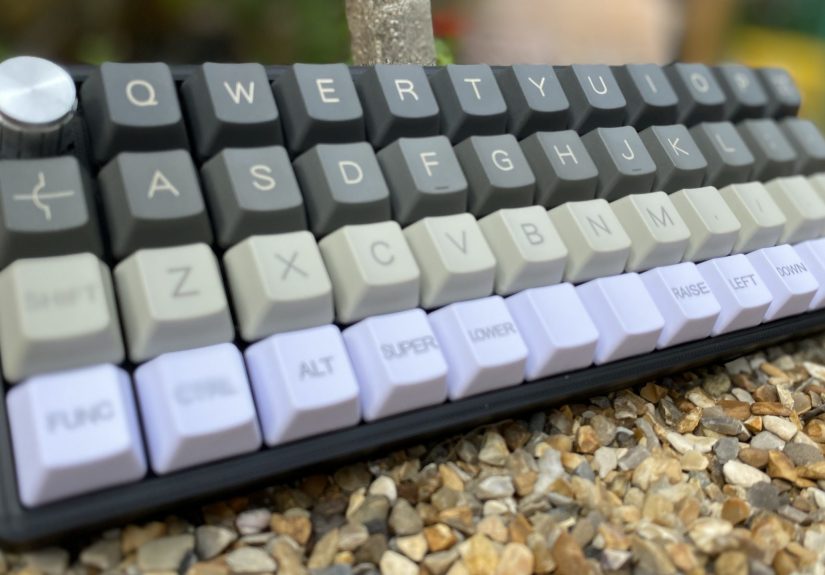
A 40% keyboard usually strips away the number row, function row, navigation cluster, and numpad. What remains is the alphabet, a few modifiers, and just enough punctuation to keep your emails from looking like ransom notes. Some 40% boards are ortholinear, meaning the keys sit in tidy vertical columns like tiny soldiers. Others use a more traditional staggered arrangement. Either way, the goal is the same: reduce hand movement and reclaim desk space without giving up full typing capability.
That last part is important. A 40% keyboard is not missing functions. It just hides them behind layers. Press one key and the board becomes numbers. Press another and it becomes arrows, function keys, or media controls. It is less “missing keys” and more “surprise, the keys are wearing disguises.”
Why people love 40% layouts
- Desk efficiency: You get more room for your mouse, notebook, coffee, or increasingly dramatic desk accessories.
- Reduced reach: Your hands stay closer to home position, which many typists find faster and more comfortable.
- Intentional customization: The layout forces you to think about what you actually use every day.
- Peak keyboard nerd energy: Let’s be honest, part of the charm is owning something that makes other people squint and ask, “Where are the numbers?”
Why Open Source and 40% Layouts Belong Together
On a regular keyboard, you can get away with average software. On a 40% board, average software becomes a problem very quickly. You need flexible firmware that lets a single key do two jobs, or a layer key stay active just long enough to access arrows, symbols, or function shortcuts. That is exactly why open-source firmware has become such a big deal in custom keyboard culture.
QMK is the heavyweight champion here for wired custom boards. It is open source, deeply customizable, and supports a huge number of keyboards and microcontrollers. It gives builders tools for layers, tap dance, mod-tap behavior, macros, combos, and other magic tricks that make compact boards usable instead of maddening. If you have ever used a key that types when tapped but acts as Shift when held, you have already met the philosophy.
ZMK is another major player, especially for wireless and split keyboards. It is also open source and has become a favorite for modern low-power builds. For anyone dreaming about a portable 40% board with Bluetooth and clean battery behavior, ZMK is often the first firmware name that comes up.
Open source also matters beyond firmware. KiCad, the PCB design suite used across electronics projects, gives keyboard builders a free path to create and edit schematics and board layouts. GitHub repositories host everything from plate files to case designs to full keyboard PCBs. In other words, you can start with a community design, tweak it, break it a little, fix it again, and come out the other side with a keyboard that feels personal instead of packaged.
The Core Parts of an Open-Source 40% Keyboard Build
1. A layout you actually want to use
Before ordering anything, you need to choose a layout. Do you want a neat 4×12 ortholinear grid? A staggered 40% that feels more familiar? A split-space arrangement for easier thumb layers? This is the moment where beginners learn that keycap compatibility can turn into a tiny soap opera. Many 40% boards use unusual bottom-row sizes, so it is smart to check your layout against the keycap set before buying a bag of beautiful disappointment.
2. A controller board
Many open-source 40% builds use microcontrollers such as the ATmega32U4-based Pro Micro or RP2040 boards. These controllers are popular because they are compact, well-documented, and friendly to keyboard firmware. The Pro Micro has long been a favorite in hand-wired builds, while RP2040-based boards are attractive for modern projects thanks to performance and growing firmware support.
3. A switch matrix and diodes
Whether you hand-wire the keyboard or use a PCB, the switches are usually arranged in a row-and-column matrix. This lets the controller scan many keys with fewer pins than if every switch had its own direct connection. Diodes are added to prevent unwanted key ghosting and help ensure each press registers correctly. It sounds technical because it is technical, but it is also one of those concepts that suddenly becomes obvious once you see it on paper.
4. A PCB or a hand-wired frame
A PCB build is cleaner, more repeatable, and easier to replicate if you ever want a version two. A hand-wired build is more flexible, often cheaper for one-off experiments, and strangely satisfying if you enjoy soldering point-to-point connections while whispering, “I have become the factory.” Neither route is more legitimate. They just scratch different itches.
5. Open-source case and plate files
One of the best parts of the open-source keyboard scene is that you can often find printable or modifiable case files, plate files, and PCB layouts shared by the community. That means your build does not have to begin from absolute zero. You can remix an existing design, swap in a rotary encoder, change the mounting style, or tweak the angle until your board goes from “cool project” to “daily driver.”
How a Tiny Keyboard Still Does Big-Keyboard Jobs
The genius of a 40% build is not the small size. It is the layer strategy. A smart keymap turns a compact keyboard into a shape-shifting little machine.
A common 40% layer setup
- Base layer: Letters, space, Enter, Backspace, and core punctuation.
- Numbers layer: The number row appears on the home row or top alpha row.
- Symbols layer: Brackets, braces, slashes, equals signs, and programming-friendly characters.
- Navigation layer: Arrow keys, Home, End, Page Up, and Page Down.
- Function/media layer: F-keys, volume, playback, brightness, and system shortcuts.
This is where QMK’s layer functions and tap-hold settings become a lifesaver. A single thumb key can open a number layer when held but type Space when tapped. Another key can act like Escape on a tap and Control on a hold. Layer Lock can keep a layer active without forcing you to hold the key the whole time. It sounds complicated until it is under your fingers. Then it feels oddly elegant, like teaching your keyboard to multitask better than most humans on a Monday morning.
PCB Build vs. Hand-Wired Build
If you are planning your first open-source 40% keyboard, one of the biggest decisions is whether to build from a PCB or hand-wire the matrix yourself.
PCB builds are ideal if you want a polished result. They simplify soldering, reduce wiring mistakes, and make troubleshooting a lot less dramatic. Open-source PCB guides built around KiCad have lowered the barrier to entry, so even hobbyists can design or modify their own boards without renting a room full of expensive EDA software.
Hand-wired builds are great for experimentation. They are perfect when you want to test a layout, reuse a controller, or build from shared plate and case files without waiting on a custom PCB run. Hand-wiring also teaches you how the matrix actually works, which pays off later when you are debugging weird behavior and trying not to blame innocent keycaps.
In short, PCBs are smoother. Hand-wired builds are more educational. Both can be wonderfully open source.
Real Examples of the Open-Source 40% Spirit
The open-source claim is not theoretical. The community has been proving it for years. Builders have documented compact ortholinear boards running QMK on Pro Micro controllers, often with open case and plate files, rotary encoders, and hand-wired matrices. There are also wireless column-staggered 40% boards running ZMK, complete with open PCB files and printable enclosures. GitHub is full of repositories for homebrew 40% boards with design files, firmware notes, assembly instructions, and sometimes refreshingly honest warnings like, “This worked for me; good luck, brave traveler.”
That openness changes the tone of the whole hobby. Instead of being locked into one vendor’s idea of a perfect board, you get a shared ecosystem of modifiable parts and software. You can start with someone else’s working design, improve it for your typing style, and pass the result forward. That is not just custom hardware. That is community hardware.
What Beginners Usually Get Wrong
They underestimate the keymap
New builders often focus on switches, caps, colors, and case materials first. Those things matter, but a 40% keyboard lives or dies by its keymap. If the layer logic is clumsy, the board will feel like a prank. Spend real time planning your thumbs, modifiers, and symbol access.
They forget about keycap compatibility
Forty-percent layouts often need nonstandard key sizes. Do not assume your favorite set includes them. Check the kit before checkout or prepare for the classic hobby experience of owning ninety-nine percent of a keyboard.
They make flashing harder than it needs to be
Use a controller and firmware path that are well supported. Open-source ecosystems are wonderful, but they are still ecosystems. Choosing common parts means better docs, more examples, and fewer midnight forum adventures.
They ignore reset access
Nothing is funnier than beautifully closing a keyboard case and realizing you sealed away the only button needed to reflash the firmware. Nothing is also less funny.
Is a 40% Open-Source Keyboard Worth It?
Yes, if you enjoy tinkering, want a layout tailored to your workflow, or simply like tools that feel intentional. A 40% keyboard is not the easiest starting point in the mechanical keyboard hobby, but it may be the most rewarding. It forces you to think about input design in a way larger keyboards never do. And when the build is open source, every part of that learning process becomes easier to inspect, modify, and improve.
You are not just buying a device. You are building a system: hardware, firmware, layout logic, and daily muscle memory all working together. That is a lot of value packed into a very small rectangle.
The Workbench Diary: What the Experience Really Feels Like
Building a 40% keyboard from open-source files feels a little like assembling a tiny spaceship from community wisdom and stubborn optimism. At first, everything seems charmingly simple. You have a layout file, a controller, a handful of switches, and the dangerous confidence that comes from watching exactly three keyboard build videos. Then the reality arrives. You discover that “40%” does not mean “40% effort.” It means “100% attention required.” And honestly, that is part of the fun.
The first emotional milestone is layout panic. Suddenly you are staring at a cluster of blank keys and asking serious life questions like, “Where should question mark live?” and “Do I love arrow keys enough to dedicate a whole layer to them?” This stage is humbling. It also teaches you more about your typing habits than years of casually pounding away on a full-size board ever could. You start noticing which shortcuts you use, which symbols you reach for, and which keys have just been freeloading on your keyboard all along.
Then comes the physical build, which is deeply satisfying when it goes well and educational when it does not. Soldering a clean row of switches feels fantastic. Accidentally bridging pads feels less fantastic, but it definitely builds character. If you go the hand-wired route, there is a special kind of joy in watching a messy cluster of wires transform into a working key matrix. It looks chaotic from the outside, but once you understand rows, columns, and diodes, the chaos starts to look elegant. Like jazz, but with more flux.
Flashing the firmware is the moment when the project stops being a pile of parts and starts becoming your keyboard. The first successful keypress is absurdly exciting. It does not matter if the key is A, Enter, or some weird layer toggle you mapped to a thumb key because you were feeling ambitious. The board is alive, and now the real relationship begins.
Using a 40% keyboard daily is also a genuine adaptation process. Day one feels strange. Day three feels interesting. By week two, your fingers begin to trust the layers, and your old full-size keyboard starts to feel bloated, like it showed up overdressed to a casual party. The compact layout encourages efficiency. Your hands move less. Your shortcuts become more deliberate. Even your desk looks calmer, which is nice, because the inside of your brain during a custom build definitely does not.
What makes the open-source side so rewarding is the lack of mystery. If something is not right, you can inspect it. You can edit the firmware, adjust the tapping term, redesign the plate, swap the controller, and remix the whole build without begging a manufacturer for permission. That freedom turns frustration into experimentation. Instead of hitting a wall, you open a file.
And maybe that is the best part of the whole experience. A 40% open-source keyboard is never just a gadget. It is a conversation between your hands, your habits, and a community of people who also looked at a normal keyboard and thought, “Yes, but what if it were smaller, smarter, and slightly more ridiculous?”
Conclusion
A 40% keyboard build is not for everyone, and that is exactly why it has so much personality. It rewards curiosity, patience, and the willingness to rethink what a keyboard actually needs to be. Open-source firmware like QMK and ZMK gives these tiny boards the brains they need, while community-shared case files, PCB designs, and build guides give makers the freedom to create something original without starting from scratch.
If you want a keyboard that feels less like a generic appliance and more like a custom instrument, a 40% open-source build is a brilliant place to start. It is compact in size, huge in flexibility, and surprisingly addictive once the layers click into place. Tiny board. Big brain. Very little desk clutter. Hard to argue with that.

![18 Best Types of Charts and Graphs for Data Visualization [+ How to Choose]](https://corkopencoffee.org/wp-content/uploads/2026/05/18-best-types-of-charts-and-graphs-for-data-visualization-how-to-choose-qKM1PBYG-thumb.jpg)