Table of Contents >> Show >> Hide
- Why Google Smart Home Devices Work So Well Together
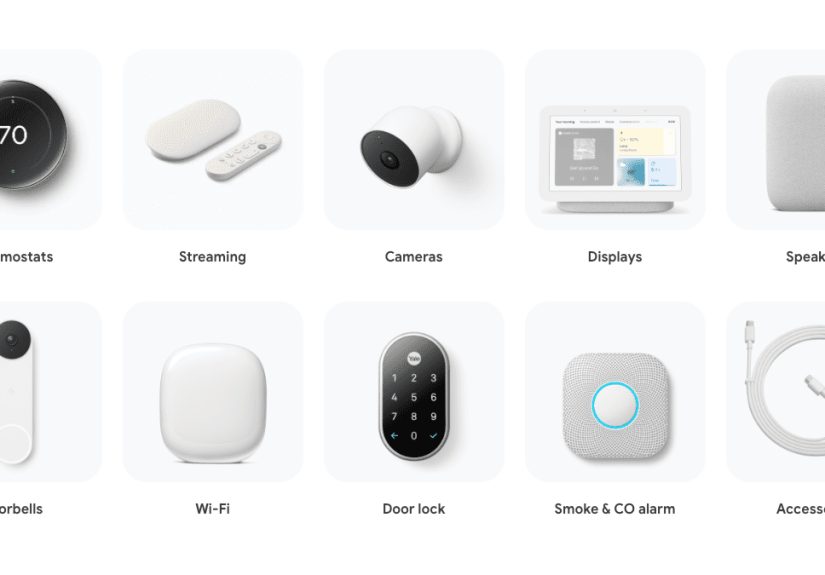
- The Main Google Smart Home Devices to Know
- How to Build a Google Smart Home Without Wasting Money
- Best Google Home Automations That Actually Feel Useful
- How Matter Makes Google Smart Homes More Flexible
- Privacy, Permissions, and Household Control
- Common Mistakes People Make With Google Smart Home Devices
- Real-Life Experiences With Google Smart Home Devices
- Conclusion
If you have ever wanted your house to feel a little more helpful and a lot less needy, Google smart home devices make a strong case for themselves. Instead of hopping from app to app like a caffeinated squirrel, you can manage lights, cameras, thermostats, speakers, plugs, and more from the Google Home app, with voice commands, or through automations that quietly do the work for you. That means fewer taps, fewer “Which app was that again?” moments, and a much better chance of feeling like the boss of your own home.
The appeal is simple: Google’s smart home ecosystem gives you one place to control everyday comfort, security, entertainment, and energy use. A Nest speaker can turn into your voice-powered command center. A Nest Hub can show your doorbell feed while you stir pasta and pretend you are hosting a cooking show. A Nest Thermostat can help keep the temperature comfortable without blasting money into the air vents. Add compatible Matter devices, smart lights, cameras, locks, and plugs, and suddenly your home starts acting less like a pile of gadgets and more like a coordinated team.
That is the sweet spot of a Google smart home. It is not really about owning “cool tech.” It is about shaving friction off your day. It is about saying, “Hey Google, good night,” and having the lights dim, the doors lock, and the thermostat shift without you doing a house-wide bedtime patrol like a tired mall cop. When it works well, smart home automation feels less futuristic than practical. It quietly handles the little things so you can focus on dinner, work, school, sleep, or tracking down the sock that vanished in the dryer.
Why Google Smart Home Devices Work So Well Together
The biggest strength of Google smart home devices is ecosystem control. The Google Home app has become the central dashboard for adding devices, organizing rooms, creating automations, checking camera activity, sharing access with family members, and controlling compatible third-party products. That matters because the average smart home can get messy fast. One camera brand has its own app. Your lights have another. Your thermostat has a third. Before long, your “smart” setup starts feeling like digital clutter with a power cord.
Google’s approach is better when you want one main command center. You can control devices from your phone, smart display, speaker, web browser, and in some cases even your TV. That flexibility is a big deal. Maybe you want to check the front door on a Nest Hub in the kitchen, turn down the heat from your phone while you are away, or use a Google TV home panel from the couch because getting up would be wildly disrespectful to movie night. Google smart home devices are designed to make those handoffs feel natural.
Compatibility is also stronger than it used to be. Matter support has made the Google Home ecosystem much friendlier to devices from other brands, especially for categories like lights, smart plugs, locks, thermostats, fans, blinds, and sensors. In plain English, that means you do not have to buy every device with a Google logo on it to build a home that plays nicely together. Google Nest devices can still be the anchor, but your setup can be more flexible and less brand-obsessed.
The Main Google Smart Home Devices to Know
1. Google Nest speakers and smart displays
If you are starting from scratch, a Nest speaker or display is usually the easiest first purchase. Devices like Nest Audio, Nest Mini, and Nest Hub give you hands-free voice control for the rest of your setup. They let you adjust lights, ask for weather updates, set reminders, run routines, stream music, and control compatible devices without pulling out your phone every five minutes. A smart display adds visual control, which is especially useful for camera feeds, timers, recipes, calendar views, and doorbell alerts.
These devices are not just voice assistants with nice manners. In many homes, they become the fastest way to issue commands that happen over and over again. “Turn off the kitchen lights.” “Start movie night.” “Show me the front door.” “Set the temperature to 72.” Those are tiny tasks, but they add up. Voice control works best when it saves you from doing something repetitive, not when it turns a two-second button press into a six-second speech.
2. Nest Thermostat and Nest Learning Thermostat
Few smart home upgrades feel as useful as a smart thermostat. Nest thermostats are popular because they combine remote control, scheduling, automation, and energy-saving features in one place. You can adjust the temperature from the Google Home app, include it in routines, and create schedules that match your day. If your routine is “empty house from 8 to 5, chaos from 6 to 9, sleep after 11,” a smart thermostat can work around that pattern instead of heating or cooling your home like nobody has a schedule.
Google also highlights real-world savings from Nest thermostats, with households in its bill comparisons averaging around 12% savings on heating and 15% on cooling. That does not mean every home will get the same result, because HVAC systems, insulation, local weather, and habits all matter. Still, it shows why thermostats remain one of the strongest practical reasons to build a Google smart home. Fancy lighting is fun. Lower utility bills are fun and useful.
3. Nest cameras and doorbells
Home security is another major reason people choose Google smart home devices. Nest cameras and doorbells can send alerts, show live feeds, and help you review events in the Google Home app. Some newer features tied to Google Home Premium add searchable camera history, richer descriptions, and summaries that make it easier to find what happened without scrubbing through video like you are editing a documentary about your driveway.
A Nest Doorbell is especially practical because it folds security into daily life. You can check deliveries, talk to visitors, and see what is happening at the front door from your phone or display. A good smart doorbell is not just about catching suspicious activity. It is also about confirming whether that package arrived, whether your kid got home, or whether the dog walker actually came by instead of merely sending an optimistic text message.
4. Smart lights, plugs, locks, and other compatible devices
Here is where the fun begins. Smart lights are often the gateway device because the benefits are immediate. You can dim lights by voice, schedule them to turn on before you get home, group them by room, and include them in scenes such as “Wake Up,” “Dinner,” or “Please Pretend I Have My Life Together.” Smart plugs do a similar trick for lamps, fans, coffee makers, and other simple devices, turning dumb hardware into controllable tools.
Locks, blinds, sensors, and robot vacuums can also fit into the Google Home ecosystem depending on compatibility. Thanks to Matter, building a mixed-brand setup is a lot less painful than it used to be. You can be selective and buy based on what solves an actual problem rather than buying an entire matching catalog like you are furnishing a tiny tech department store.
How to Build a Google Smart Home Without Wasting Money
The smartest approach is to start with problems, not products. Ask what annoys you most at home. Do you forget to turn off lights? Start with lighting. Want to check the front door and deliveries? Get a doorbell or camera. Hate walking into a freezing or overheated house? Look at a Nest thermostat. Want quick voice control in the kitchen or bedroom? Pick up a Nest speaker or display. A smart home works best when it grows around your habits instead of trying to force your habits to orbit a pile of new gadgets.
Room-by-room expansion is usually better than trying to automate the whole house at once. A great beginner setup might be a Nest Mini in the living room, two smart bulbs, one smart plug, and a thermostat if your HVAC supports it. That is enough to learn the Google Home app, build a couple of routines, and decide what actually helps. Once you see which features you use every day, you can add security devices, a smart display, or more rooms with confidence.
It is also smart to pay attention to network quality. Even the most impressive smart home devices become dramatic little divas when your Wi-Fi is weak. If you plan to add cameras, speakers, thermostats, and streaming devices, stable coverage matters. A Google smart home is only as smooth as the network underneath it. Fancy automation on shaky Wi-Fi is basically a high-tech way to practice patience.
Best Google Home Automations That Actually Feel Useful
Good automation should reduce effort, not create a part-time job. The best examples are simple, reliable, and tied to routines you already have. A morning routine can turn on the bedroom lights gradually, start a weather report, and play a favorite news or music source. An away routine can lower the thermostat, switch off selected lights, and turn on security devices. A bedtime routine can dim lights, stop media, and set a sleep-friendly temperature. These are not flashy. They are just genuinely helpful.
Google Home has also improved automation tools, including a stronger editor and more flexibility for household automations. That matters because advanced users want more than a basic “good morning” script. They want combinations of starters, conditions, and actions that respond to real life. Maybe the porch light comes on at sunset only if someone is home. Maybe a hallway light turns on when motion is detected late at night. Maybe a fan shuts off automatically if a window sensor shows the room is already cool. This is where a smart home stops being cute and starts being clever.
One of the biggest newer advantages is how natural language and AI-assisted controls are shaping the experience. Google has been expanding smarter command handling and camera search features, which makes the ecosystem feel less rigid. You do not always have to memorize the exact robotic phrase. That is a quiet but important upgrade, because the best smart home is one that understands normal human speech, including the exhausted kind.
How Matter Makes Google Smart Homes More Flexible
If you have followed smart home tech for a while, you already know the old pain: one brand worked with this platform, another demanded its own hub, and a third behaved like it had never met the other two. Matter helps fix that by giving more devices a common language. In the Google Home ecosystem, that means many compatible products can be added and controlled more easily, especially when you have Google devices such as Nest Hub or Nest Mini helping act as a bridge for modern smart home standards.
For buyers, the practical benefit is freedom. You can choose a smart plug because it is reliable, a lock because it fits your door, and blinds because they suit your windows, without needing the whole house to come from one label. Google smart home devices still matter because they provide control, automation, and management, but you are no longer boxed into a single-brand island. That is good for your budget and even better for your future sanity.
Privacy, Permissions, and Household Control
Smart homes are convenient, but convenience should never bulldoze common sense. Google gives users privacy and permission controls worth using. Speakers and displays have microphone mute options. Guest Mode exists for shared-device privacy. Home access can be shared with different permission levels, which matters more than many people realize. The person you invite into your home app may be able to control devices, see history, or change settings depending on the role you assign.
That means setup is not just technical. It is social. Before you give full access, think about who needs what. A spouse or trusted family member might need admin control. A teen might only need selected access. A house sitter may need temporary camera or lock access but not your whole automation history. Smart homes work better when the boundaries are smart too.
It is also wise to review privacy habits the same way you review passwords. Check which devices have microphones, where cameras are placed, what notifications are enabled, and who can see activity. Convenience is great. Oversharing with the whole household because you never checked the settings is less great.
Common Mistakes People Make With Google Smart Home Devices
The first mistake is buying too much too fast. The second is naming devices badly. Do not create a home with items called “Light 1,” “Bedroom 2,” and “Lamp Maybe.” You will regret this the first time you try voice commands. Use clear names by room and purpose, such as “Kitchen Sink Light” or “Office Fan.” Your future self will thank you, and your smart speaker will sound less confused.
Another mistake is overcomplicating automations. People sometimes build a ten-step routine to avoid flipping one switch. That is not efficiency. That is a hobby. Start with the automations you will use several times a week and make sure they are reliable before adding more layers. Smart homes should reduce mental clutter, not become a puzzle box that requires troubleshooting before breakfast.
Finally, do not ignore compatibility and power needs. Some lights need a separate app or bridge. Some thermostats depend on HVAC wiring. Some devices work best with stronger Wi-Fi coverage. A little planning saves a lot of returns, frustration, and muttering at inanimate objects.
Real-Life Experiences With Google Smart Home Devices
Living with a Google smart home tends to change your habits in small, sneaky ways. At first, you might think you will use voice commands for everything. In reality, most people settle into a mix. Voice control is perfect when your hands are full, when you are cooking, when you are heading to bed, or when you are halfway out the door and remember the downstairs lights are still on. Touch controls in the app become the backup plan, and automations handle the routines you repeat every single day.
One of the most noticeable changes is how much less you think about the house itself. With a few Google smart home devices in place, you stop doing little maintenance laps. You no longer walk room to room checking lights. You stop wondering whether the thermostat is still set too high while nobody is home. You can glance at the front door without sprinting across the house. That may sound minor, but it adds up to a home that feels calmer and easier to manage.
Families often notice a different kind of benefit: fewer tiny arguments. Nobody has to debate who forgot to turn off the lamp. Nobody has to get up during a movie to dim the lights. A shared home with clear rooms, routines, and permissions can make daily life smoother because the controls are simple and visible. Even kids can learn the basics quickly, though you still might hear “Hey Google” shouted with the emotional intensity of a sports announcer.
There is also something satisfying about smart home moments that feel unexpectedly thoughtful. The porch light clicks on right before you arrive. The bedroom is already cool by bedtime. The kitchen speaker reads a timer while music plays. The doorbell alert pops up while you are folding laundry and saves you from missing a package. None of this is dramatic. That is why it works. Good home tech does not need applause. It just needs to quietly save the day a few times a week.
Of course, real experiences are not all perfection and orchestral background music. Sometimes devices go offline. Sometimes you rename something and forget the new name. Sometimes Wi-Fi issues make a routine stumble. And yes, sometimes you will say a command clearly and your speaker will respond with the confidence of a straight-A student who somehow answered the wrong question. That is part of smart home life. The goal is not robotic perfection. The goal is getting enough convenience, comfort, and control that the occasional glitch feels like a hiccup, not a disaster.
For many households, the long-term experience is less about novelty and more about habit. The devices that stay useful are the ones tied to comfort, security, and routine. Cameras that help you check what happened. Thermostats that make the house feel right. Speakers that handle reminders, music, and quick commands. Lights that turn on when they should and off when they should. That is where Google smart home devices earn their place. Not as toys. As tools you actually miss when they are gone.
If you are the kind of person who likes a home to feel organized, responsive, and a little more cooperative, Google’s ecosystem can be a very good fit. It is especially strong for people who already use Google services, like the convenience of voice control, and want smart devices from multiple brands to work together with less friction. Start small, automate the boring stuff, and build slowly. That is usually when the magic shows up.
Conclusion
Google smart home devices can make your house easier to manage, more comfortable to live in, and better prepared for the ordinary chaos of modern life. The key is not buying everything at once. It is choosing devices that solve real daily problems, connecting them through the Google Home app, and using automations to cut down on repetitive tasks. Whether you begin with a Nest speaker, a thermostat, a doorbell, or a few smart lights, the smartest setup is the one that feels useful every day, not just impressive on day one.

![18 Best Types of Charts and Graphs for Data Visualization [+ How to Choose]](https://corkopencoffee.org/wp-content/uploads/2026/05/18-best-types-of-charts-and-graphs-for-data-visualization-how-to-choose-qKM1PBYG-thumb.jpg)