Table of Contents >> Show >> Hide
- Why PS/2 Still Deserves a Spot on the Bench
- The Electrical Personality of a PS/2 Keyboard
- What a PS/2 Packet Actually Looks Like
- Scan Codes: Because Keyboards Speak in Their Own Dialect
- Decoding It with Good Old Fashioned Hardware
- Reading the Bus Like a Grown-Up
- Common Pitfalls That Love Ambushing Beginners
- Hands-On Experience: What It Feels Like to Decode PS/2 the Old-School Way
- Final Thoughts
There are two kinds of engineers in this world: the ones who see an old PS/2 keyboard and say, “Neat, retro,” and the ones who immediately start wondering what the clock line is doing. This article is for the second group. Or for the first group after coffee.
Even in a world ruled by USB, Bluetooth, and enough software abstraction to make your head spin like a cooling fan at full blast, the PS/2 keyboard protocol remains a glorious example of straightforward digital communication. It is simple enough to decode with a handful of chips, a breadboard, and a stubborn attitude, yet rich enough to teach real lessons about timing, parity, scan codes, line discipline, and why hardware engineers keep trust issues in their toolboxes.
If you want to understand what happens when a key press becomes usable data, PS/2 is one of the friendliest places to start. Better yet, it rewards hands-on investigation. You can watch the waveforms, follow the bits, and decode the whole conversation without begging a bloated software stack for permission. That is deeply satisfying in the same way old oscilloscopes, clicky keyboards, and well-labeled schematic sheets are deeply satisfying.
Why PS/2 Still Deserves a Spot on the Bench
The PS/2 interface was introduced with IBM’s Personal System/2 family and became the familiar 6-pin mini-DIN connector many PC users remember from the back of beige desktop machines. For years, it handled keyboards and mice with the kind of practical competence that never gets enough credit. It was not glamorous. It was not universal. But it worked, and it did so with impressive clarity.
That clarity is exactly why hobbyists, students, retrocomputing fans, and embedded developers still care about it. Compared with USB, PS/2 feels refreshingly honest. You do not need to enumerate endpoints, parse descriptors, or make peace with a stack of software layers that reads like a tax manual. You need power, ground, clock, and data. Then you need patience, attention to timing, and a willingness to admit that hexadecimal eventually starts to look friendly.
PS/2 is also perfect for “good old fashioned hardware” because the protocol is visible. The data is not hiding in a mystery blob. A key press becomes a short burst of clock pulses and bits, and every part of that burst means something. You can observe it with LEDs, shift registers, a scope, a logic analyzer, an FPGA, or a tiny microcontroller. The bus is small, the rules are understandable, and the behavior is physical enough to make debugging feel like detective work instead of spiritual warfare.
The Electrical Personality of a PS/2 Keyboard
Two Signals, One Tiny Drama
At first glance, the PS/2 keyboard protocol seems almost suspiciously simple. The keyboard communicates over two active signal lines: Clock and Data. The idle state is high on both lines. That sounds polite, but it hides an important detail: the bus uses open-collector or open-drain behavior. In plain English, neither side normally drives the line high. Instead, pull-up resistors bring the lines high, and either side pulls the line low when it wants to say something.
This matters because it allows bidirectional communication without the keyboard and the host trying to arm-wrestle each other electrically. The line can be released or pulled low, which is much safer than one device screaming “HIGH!” while the other screams “LOW!” and the resistor quietly wonders why it got involved.
For practical bench work, this means you should treat PS/2 as a 5V-era interface unless you know exactly what your keyboard and receiving hardware can tolerate. Many classic keyboards expect 5V power, and the signal behavior assumes pull-ups and line sharing consistent with that environment. Level compatibility is one of those details that engineers ignore only once.
Who Controls the Bus?
Although the keyboard often generates the clock during transmission, the host still has ultimate authority. If the host pulls the clock line low, communication is inhibited. That is the protocol’s way of saying, “Please hold, your keystroke is important to us.”
When the host wants to send a command to the keyboard, it first inhibits communication, then pulls the data line low, then releases clock. That creates the request-to-send condition. The device notices, begins clocking, and the host transmits a byte using the same two lines. This is half-duplex communication with manners, timing rules, and a mild superiority complex on the host side.
What a PS/2 Packet Actually Looks Like
The 11-Bit Frame
The heart of PS/2 decoding is the data frame. In device-to-host communication, a normal keyboard byte is sent as an 11-bit frame:
Start bit → 8 data bits → odd parity bit → stop bit
The start bit is always 0. The stop bit is always 1. The eight data bits are transmitted least significant bit first. That last part trips people up because our brains tend to want the “nice” order. PS/2 does not care about your preferences. It sends the least significant bit first and expects you to keep up.
The parity bit provides basic error detection. Specifically, the protocol uses odd parity, meaning the total number of 1 bits in the data plus the parity bit should be odd. It is not elaborate error correction, but it is enough to help detect corrupted bytes, which is a welcome bit of discipline for such a minimal interface.
Timing Matters More Than Ego
Protocol references commonly place the keyboard-generated clock in roughly the 10 kHz to 16.7 kHz range. That is leisurely compared with modern high-speed buses, which is part of the charm. You can observe the waveform with modest tools and still make sense of it. Data validity depends on edge timing, so the exact point where the receiver samples the line matters. When you decode the bus in hardware, your entire design has to respect that timing relationship.
This is why PS/2 is so educational. It is not just about seeing ones and zeros. It is about understanding when those ones and zeros are valid. You are learning that digital communication is not only logical but temporal. A bit in the wrong place is not “sort of correct.” It is wrong, and the keyboard does not care how hard you tried.
Scan Codes: Because Keyboards Speak in Their Own Dialect
One of the first surprises for newcomers is that PS/2 keyboards do not send ASCII when you press a key. They send scan codes. That means a key press is reported as a hardware-oriented code representing the physical key event, not the printable character.
This is exactly what makes the protocol valuable. A keyboard is telling you what happened physically, and software later decides what character, action, or shortcut that event should become. The letter A is not really “A” at the protocol level. It is “the key in this position was pressed” or “released.” That distinction is the difference between input hardware and text processing.
Make Codes and Break Codes
When a key is pressed, the keyboard sends a make code. When it is released, the keyboard commonly sends F0 followed by that key’s code. That second sequence is the break code. So if you decode a stream and see F0 1C, you are not looking at a random hex tantrum. You are looking at the release of a particular key in the active scan code set.
Extended keys complicate things in a fun way. Keys such as arrows or certain control keys often use an E0 prefix. For example, an extended key release may appear as E0 F0 ... followed by the key code. This is where PS/2 stops being “cute little protocol” and becomes “actually serious enough to teach state-machine design.”
Scan Code Sets
PS/2 keyboards may support multiple scan code sets. Set 2 is the one most commonly associated with keyboard output, while hosts and controllers may translate data into other sets for compatibility. This matters because the same physical key can appear differently depending on the scan code set in use. If your decoding seems wrong, the problem may not be your wiring. It may be your assumptions. Hardware is very good at exposing those.
Decoding It with Good Old Fashioned Hardware
Why This Approach Is So Great
A modern engineer could absolutely decode PS/2 with a microcontroller interrupt routine in an afternoon. That is practical, clean, and sensible. Naturally, this is why some of us immediately decide to do the opposite.
Decoding the protocol with classic hardware is valuable because it forces you to confront the raw structure of the bus. You stop thinking in terms of libraries and start thinking in terms of edges, latching, propagation delay, and bit order. In other words, you stop borrowing understanding and start building it.
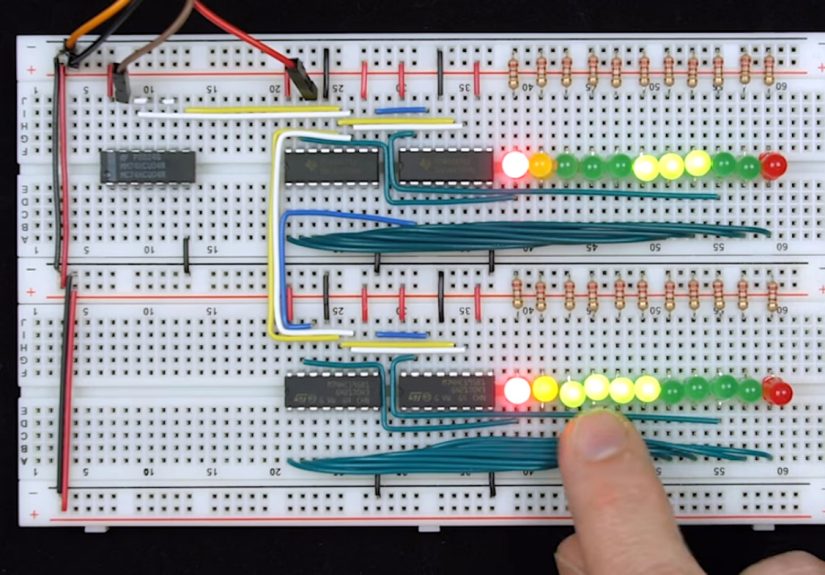
One especially elegant approach uses shift registers to clock in the serial data and then latch it for display or later processing. This works because each key event arrives as a bit stream that can be captured one edge at a time. But there is a catch, because of course there is: the shift register must sample on the correct edge, and the latch must update late enough to avoid grabbing incomplete data. That means inversion, delay, and timing discipline matter.
This is the sort of project that looks simple on paper and then teaches you several lessons about race conditions before dinner.
What You Need on the Bench
A practical setup might include a PS/2 keyboard, a breadboard, pull-up resistors if needed, a few logic chips, and a way to observe the output. LEDs are a crowd-pleaser because they let you literally watch bytes appear. A logic analyzer or oscilloscope is even better because it lets you correlate clock and data precisely. If you use a microcontroller or FPGA, you can combine the best of both worlds: hardware capture with easier display and interpretation.
The classic hardware route has another benefit: it teaches you why software debuggers are spoiled. On a breadboard, every assumption becomes a testable hypothesis. Is your clock inverted correctly? Is your latch late enough? Are you actually sampling on valid edges? Did the parity bit fail because the keyboard glitched, or because your wiring resembles modern art? These are character-building questions.
Reading the Bus Like a Grown-Up
To decode PS/2 reliably, think like a state machine. Wait for an idle bus. Detect a start bit. Shift in eight data bits LSB first. Check parity. Confirm the stop bit. Then decide whether the byte is a make code, a break prefix, an extended prefix, or part of a host-device command exchange.
If you are only listening to key events, life is easier. If you also want to send commands, you need to manage host-side timing and acknowledge behavior. Common commands include:
- ED to set keyboard LEDs
- EE for echo testing
- F0 to set or query the scan code set
- F3 to set typematic repeat rate and delay
- FE to request resend
- FF to reset the keyboard
In many flows, the keyboard acknowledges a valid command with FA. After reset, a successful self-test is commonly associated with AA. Once you start seeing these values on the wire, the protocol begins to feel less mysterious and more like a conversation with a slightly elderly but very dependable machine.
Common Pitfalls That Love Ambushing Beginners
Assuming ASCII
If you try to map bytes directly to printable characters, you will get nonsense fast. PS/2 speaks scan codes first, characters later.
Ignoring Release Codes
If you only watch make codes, your design may seem fine until modifier keys, extended keys, or key repeats start acting weird. The release path matters.
Forgetting Timing
This protocol is forgiving compared with modern high-speed buses, but it is not magic. Wrong sampling edges, sloppy latching, and poor line conditioning can still ruin your day.
Trusting Breadboards Too Much
Breadboards are wonderful. Breadboards are educational. Breadboards are also fully capable of betraying you while looking innocent. Keep your wiring short, your grounds solid, and your expectations realistic.
Hands-On Experience: What It Feels Like to Decode PS/2 the Old-School Way
The first time you decode a PS/2 keyboard with real hardware instead of a prewritten library, it feels like cheating in the best possible way. You plug in a keyboard that was built for a completely different era, clip onto the clock and data lines, and suddenly you are watching a conversation that has been happening invisibly for decades. It is one of those moments that makes old hardware feel less obsolete and more like an invitation.
At the beginning, the protocol seems almost too neat. The clock pulses are regular, the frame is short, and the bytes arrive in tidy bursts. Then you try to capture them with discrete logic and discover that neat does not mean trivial. You realize that getting the right bits is easy right up until you actually have to get the right bits.
One of the most memorable parts of the experience is how physical the debugging becomes. A software bug lives in a debugger window. A hardware bug lives in the real world. You can touch the jumper wire that caused the trouble. You can see the extra pulse on the scope. You can stare at a row of LEDs showing a byte that is almost right, which is somehow more insulting than being completely wrong. That “almost” is where the learning happens.
There is also a strange joy in discovering that tiny details matter. Inverting the clock at the right point matters. Latching slightly later matters. Remembering that the bits arrive least significant first matters. Suddenly, terms like propagation delay stop sounding academic and start sounding personal. The circuit is basically telling you, “I followed your instructions exactly, and that was your first mistake.”
Once the decoding works, the keyboard starts to feel alive in a new way. Every tap on a key becomes a visible structure: start bit, payload, parity, stop bit. Press a key and you get a make code. Release it and you see the break sequence. Hit an arrow key and the extra prefix reminds you that even old protocols have personality. It is no longer “a keyboard.” It is a disciplined digital device speaking a compact language with very little fluff.
What makes the whole project so rewarding is that it scales with your ambition. You can stop at simply displaying scan codes. Or you can build a translator to ASCII. Or you can add host commands, control LEDs, change repeat rate, and start behaving like a proper controller. You can move from shift registers to an FPGA, from an oscilloscope to a logic analyzer, from curiosity to full-on keyboard interface design.
Most of all, the experience reminds you why hardware work feels so satisfying. You are not guessing what the system is doing behind layers of abstraction. You are watching it happen. You are measuring it. You are decoding it. And when it finally works, there is no fake victory in that. The bits line up, the timing is right, and the keyboard answers with the confidence of a machine that was doing its job long before your laptop forgot where its ports went.
Final Thoughts
Decoding the PS/2 keyboard protocol using good old fashioned hardware is more than a retro electronics stunt. It is a practical lesson in synchronous serial communication, signal timing, error checking, scan-code interpretation, and hardware debugging. It teaches you how real interfaces behave when you strip away software convenience and look directly at the wire.
That is why this old protocol remains so lovable. It is simple, but not simplistic. It is approachable, but not boring. It gives you enough structure to learn from and enough quirks to keep you honest. Whether you decode it with shift registers, an FPGA, a logic analyzer, or a patient little microcontroller, PS/2 rewards curiosity with understanding.
And honestly, any protocol that lets you learn serious digital design while listening to the click of an old keyboard deserves a little respect.