Table of Contents >> Show >> Hide
- What “SLA Vs Extruded” Really Means
- Why A Mini PS One Is A Great Finishing Test
- SLA For A Mini PS One: The Smooth Operator
- Extruded FDM For A Mini PS One: The Practical Workhorse
- SLA Vs Extruded: Surface Finish
- SLA Vs Extruded: Strength And Functionality
- SLA Vs Extruded: Painting A PS One Color Scheme
- Best Hybrid Approach: SLA Details, FDM Shell
- Step-By-Step Finishing Plan For A Mini PS One
- Which Method Should You Choose?
- Extra Experience Notes: What Finishing A Mini PS One Teaches You
- Conclusion
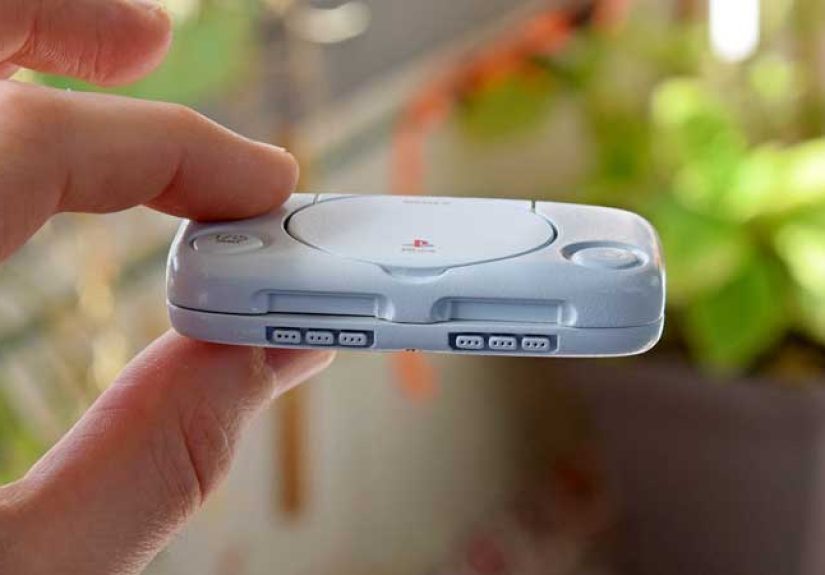
Building a Mini PS One is the kind of project that starts with innocent enthusiasm and ends with you staring at a tiny shell under a desk lamp, whispering, “Why can I still see that layer line?” Whether you are recreating Sony’s charming little console as a display piece, a Raspberry Pi case, a retro gaming enclosure, or a nostalgia-powered desk ornament, the print method matters. A lot.
The big question is simple: should you finish a Mini PS One printed in SLA resin, or should you use an extruded filament print, usually called FDM? Both can look excellent. Both can also look like they survived a tumble dryer full of gravel if you skip the finishing work. The difference is in how much effort you want to spend getting that clean, soft, molded-plastic look that made the original PS one feel like a friendly spaceship from the year 2000.
This guide compares SLA vs extruded 3D printing for finishing a Mini PS One, including surface quality, sanding, priming, paint strategy, durability, assembly, and real-world workflow. Think of it as a tiny console beauty contest, but with fewer evening gowns and more filler primer.
What “SLA Vs Extruded” Really Means
SLA, or stereolithography, uses light to cure liquid resin layer by layer. It is popular for detailed miniatures, smooth prototypes, small decorative parts, and projects where tiny curves and edges need to look crisp. For a Mini PS One shell, SLA can capture small details like button rings, controller port shapes, memory card slot outlines, vent grooves, and rounded corners with impressive sharpness.
Extruded printing usually means FDM, or fused deposition modeling. Instead of curing resin, the printer melts thermoplastic filament and lays it down in lines. The machine builds the part by stacking those lines into a solid object. FDM is affordable, accessible, and great for larger parts. It is also famous for visible layer lines, which are basically the print’s way of saying, “Hello, I was born one noodle at a time.”
Why A Mini PS One Is A Great Finishing Test
The PS one design is simple at first glance: a compact rounded rectangle, a circular disc lid, small buttons, ports, and a soft off-white shell. But simple shapes are often the hardest to fake. A rough dragon statue can hide layer lines in scales and horns. A Mini PS One has nowhere to hide. Its broad top surface, curved front edge, and smooth lid will reveal every sanding shortcut and every impatient spray-paint decision.
That makes it a perfect project for comparing SLA and extruded finishes. If a method can make a small PS One look like a molded consumer product instead of a craft-table experiment, it is doing something right.
SLA For A Mini PS One: The Smooth Operator
SLA is usually the easier path to a premium-looking Mini PS One. Resin prints often come off the machine with finer layer visibility than FDM prints, especially on curved surfaces and small details. That does not mean an SLA part is automatically finished. It still needs cleaning, curing, support removal, sanding, and paint preparation. But the starting point is smoother, and that matters.
Where SLA Shines
SLA is excellent for the small design details that make a Mini PS One recognizable. The disc lid seam can be narrow and clean. The power and open buttons can have crisp edges. The front controller ports can look intentional instead of blobby. If you are printing separate pieces such as tiny buttons, port inserts, feet, badges, or decorative panels, SLA gives you a strong advantage.
Another benefit is scale. A miniature console often includes features that become too small for a standard FDM nozzle to reproduce neatly. SLA can handle those details with less drama. It is the difference between a tiny “Open” button that looks like a button and one that looks like a sleepy marshmallow.
The SLA Finishing Workflow
A good SLA finishing process starts immediately after printing. First, remove the part carefully from the build plate. Then wash it according to the resin manufacturer’s instructions, usually with isopropyl alcohol or a compatible cleaning solution. Next, let the part dry fully before curing it under UV light. Skipping proper cleaning can leave tacky resin on the surface, and painting over that is like building a house on pudding.
Once the resin is cured, remove supports with flush cutters. Do not twist them off like you are opening a bag of chips. Twisting can leave divots, cracks, or ugly scars on the shell. After support removal, sand the marks gently with fine grit sandpaper. For a Mini PS One, start around 400 grit for small support marks, then move upward to 600, 800, and 1000 if you want a refined finish.
Prime the SLA shell with a plastic-compatible primer. Light coats are better than one heavy coat. Heavy primer can fill delicate seams, soften details, and make the console look like it has been dipped in pancake batter. After priming, inspect under a bright light. Small flaws will appear quickly. Sand, reprime, and repeat until the surface looks even.
Common SLA Problems
SLA is smooth, but it can be brittle depending on the resin. Thin clips, snap tabs, hinge posts, and screw bosses may break if they are too delicate. If your Mini PS One is a functional enclosure, use tough or engineering resin rather than standard brittle resin. Standard resin is beautiful for display, but it may not enjoy being opened and closed repeatedly.
Another issue is warping. Flat panels can curl if the print orientation, wall thickness, support placement, or curing process is not handled well. For a console shell, even a slight warp can make the lid seam uneven or the bottom plate rock on the desk. The fix is good design: add internal ribs, avoid overly thin walls, and cure evenly.
Extruded FDM For A Mini PS One: The Practical Workhorse
Extruded filament printing is the people’s champion. It is cheaper, widely available, and forgiving for larger shells. If you want a Mini PS One that is big enough to hold electronics, ports, screws, LEDs, or a small single-board computer, FDM may be the more practical choice. It can produce strong parts, especially with PLA+, PETG, ASA, or ABS, depending on your needs.
Where Extruded Printing Wins
FDM is excellent for the body of the project. A Mini PS One enclosure may need interior mounting posts, cable channels, ventilation, screw holes, and a removable bottom. These features are easy to prototype with filament. If one part does not fit, you can reprint it without feeling as if you have sacrificed a bottle of expensive resin to the hobby gods.
FDM also offers larger build volumes at lower cost. If your “mini” PS One is not tiny-tiny but more like “desk-friendly tiny,” an FDM printer can produce the shell in fewer pieces. That means fewer seams to glue and less alignment work.
The Extruded Finishing Workflow
FDM finishing is more labor-heavy because of layer lines. The basic workflow is: print cleanly, remove supports, sand high spots, apply filler primer, sand again, repeat as needed, then paint and clear coat. It sounds simple. It is simple. It is also where weekends go to disappear.
Start with print settings that reduce finishing pain. Use a lower layer height, tune your extrusion, slow down outer walls, and orient the shell so the most visible surfaces print as cleanly as possible. A bad print cannot be magically saved by primer. Primer is helpful, not wizardry.
After printing, remove supports carefully. Sand the surface with 220 or 320 grit to knock down ridges. For broad flat areas, use a sanding block so you do not create finger-shaped waves. Then apply filler primer in several light coats. Let it dry fully. Sand with 400 grit, inspect, and repeat. For a very smooth Mini PS One shell, you may need two or three cycles of filler primer and sanding.
Before paint, apply a final regular primer or a thin sealing coat. This helps create an even surface for color. The PS one shell has a warm light-gray or off-white look, so choose a soft satin finish rather than a harsh glossy white. Too much gloss can make the model look like a toy refrigerator.
Common Extruded Printing Problems
The most obvious problem is layer lines. Curved surfaces like the disc lid and rounded front lip will show them clearly. Filler primer helps, but aggressive sanding can flatten curves or soften design details. Be careful around button recesses, logo areas, and vent lines.
Another issue is visible seams if the shell is printed in multiple pieces. Use alignment pins, internal tabs, or hidden glue surfaces in the model design. A seam along the bottom is easier to hide than one across the top lid. When possible, design the part so natural PS One design lines become your assembly lines.
SLA Vs Extruded: Surface Finish
For pure surface quality, SLA wins. It provides a smoother starting point, better small details, and less obvious layering. If you want a Mini PS One that looks like a premium miniature collectible, SLA gives you the shortest path.
FDM can still look fantastic, but it needs more prep. The good news is that the PS one shell has simple geometry, which makes sanding easier than on complex figures. The bad news is that simple geometry makes flaws easier to see. Your reward for patience is a durable, clean model that can look surprisingly close to injection-molded plastic.
SLA Vs Extruded: Strength And Functionality
If the Mini PS One is only a display model, SLA is hard to beat. If it is a working enclosure, the answer becomes more complicated. Resin can be strong, but many common resins are brittle. A snap-fit lid printed in standard resin may eventually crack. Screw posts may split if over-tightened.
FDM materials are often better for functional parts. PLA is easy and stiff, PETG is tougher, ABS and ASA can handle heat better, and filament parts can flex slightly before failing. For a retro console case that will be opened, handled, plugged in, and moved around, extruded filament is often the safer everyday choice.
SLA Vs Extruded: Painting A PS One Color Scheme
The PS one look is not plain white. It is more like a soft, warm, slightly gray plastic. To recreate it, avoid pure bright white unless you want the console to look like it belongs in a dentist’s office. A good approach is to use light gray primer, then spray a warm off-white or pale gray topcoat. Satin clear coat gives a believable molded-plastic effect.
For buttons, use slightly different tones. A subtle contrast makes the power and open buttons visible without turning the project into a cartoon. The original design language is quiet and rounded, so restraint is your friend. This is a Mini PS One, not a gaming PC with eleven RGB fans and a personality crisis.
Best Hybrid Approach: SLA Details, FDM Shell
The best answer may be both. Print the large shell pieces with FDM and print the small detailed pieces with SLA. This hybrid method gives you the strength and affordability of extruded filament for the case, while using resin for details that benefit from precision.
For example, use FDM for the top shell, bottom shell, internal brackets, and mounting posts. Use SLA for the disc lid insert, button caps, controller port trim, memory card slot pieces, tiny logo plate, and decorative details. After painting, the viewer will notice the clean details first, not the fact that the main body began life as a stack of melted plastic noodles.
Step-By-Step Finishing Plan For A Mini PS One
Step 1: Decide The Purpose
If it is a display model, choose SLA or a hybrid build. If it is a functional enclosure, choose FDM or reinforce SLA with stronger resin and thicker design features.
Step 2: Print For Finishing, Not Just For Speed
Use fine layer heights and clean orientation. Put support marks on hidden surfaces whenever possible. Avoid placing supports on the top of the disc lid or the smooth front curve.
Step 3: Clean The Surface Properly
For SLA, wash and cure the print correctly. For FDM, remove dust, oils, and support residue before sanding and priming. A dirty surface ruins paint faster than impatience ruins a first pancake.
Step 4: Sand With A Plan
Do not attack the model randomly. Sand broad surfaces with a block, use folded paper for curves, and use small files for port openings. Protect crisp edges by sanding lightly around them.
Step 5: Use Primer As A Truth Detector
Primer reveals flaws. After the first coat, you will see scratches, support scars, seams, and layer lines you missed. This is normal. Do not panic. Sand, fill, and prime again.
Step 6: Paint In Thin Coats
Use several thin coats rather than one thick coat. Let each coat flash off before adding the next. Heavy paint can pool around the disc lid seam and button recesses, making the miniature look soft and cheap.
Step 7: Add A Protective Clear Coat
A satin clear coat protects the paint and gives the shell a realistic plastic sheen. Matte can look too chalky, while gloss can look too toy-like. Satin usually lands in the sweet spot.
Which Method Should You Choose?
Choose SLA if your priority is visual quality, fine details, and a collectible-style finish. Choose extruded FDM if your priority is strength, affordability, bigger parts, and functional enclosure design. Choose a hybrid workflow if you want the best balance: FDM for the structure, SLA for the details.
For most makers, the hybrid approach is the winner. It keeps the project practical while improving the areas people actually notice. Nobody picks up a Mini PS One and says, “Wow, what a beautifully printed internal screw boss.” They notice the lid, ports, buttons, surface finish, and overall silhouette.
Extra Experience Notes: What Finishing A Mini PS One Teaches You
Finishing a Mini PS One teaches a lesson that every maker eventually learns: the printer creates the part, but finishing creates the illusion. A raw print says, “I was manufactured at home.” A finished print says, “Maybe I came from a tiny alternate-universe Sony factory.” That difference is not magic. It is sanding dust, primer, patience, and the emotional strength to redo a surface you thought was already done.
One useful experience is to treat the shell like an automotive model rather than a toy. Car model builders understand that smooth paint begins before paint ever touches the surface. The same rule applies here. On an FDM Mini PS One, the first sanding pass should not aim for perfection. It should only remove the tallest ridges and obvious blobs. The filler primer does the next part. Then sanding refines it. Then primer checks it again. The process is a loop, not a straight road.
With SLA, the experience is more about restraint. Because the surface already looks smooth, it is tempting to rush straight to paint. That can work for small hidden parts, but visible surfaces still deserve inspection. Support marks near the back edge, tiny uncured resin residue around recesses, and slight uneven curing can all show up after primer. SLA rewards careful preparation, not laziness in a lab coat.
Another practical lesson is that color choice changes everything. A Mini PS One painted pure white may look clean but not authentic. A slightly warm gray instantly feels more believable. If you want the model to resemble aged plastic, add a tiny shift toward cream. If you want a fresh modern tribute, keep it pale gray and satin. Test paint on scrap pieces first. The test piece is your best friend because it suffers so the console does not have to.
Assembly also matters. Before final paint, dry-fit every part: lid, buttons, port covers, bottom plate, screws, and electronics if you are installing them. Paint adds thickness. A button that fits perfectly before primer may stick afterward. A lid seam that looks crisp in bare plastic may close too tightly once clear coat is added. Leave small tolerances, especially around moving or removable parts.
The biggest experience-based tip is to stop chasing perfection too early. A handmade Mini PS One will always have tiny signs of human effort, and that is part of its charm. The goal is not to erase every microscopic flaw. The goal is to make the overall piece feel intentional, clean, and satisfying. When the surface catches light smoothly, the buttons sit neatly, and the little console makes you grin, you have reached the finish line.
In the end, SLA vs extruded is not just a technology comparison. It is a personality test. SLA says, “I want fine detail and a beautiful surface right away.” FDM says, “I want a practical build I can modify, sand, repair, and use.” A Mini PS One can benefit from either, but the best finish comes from understanding the strengths of each and planning the project before the first layer appears.
Conclusion
Finishing a Mini PS One is all about matching the print method to the final goal. SLA resin gives you smoother details, cleaner mini features, and a more premium starting point. Extruded FDM gives you strength, affordability, easier large shells, and better functional enclosure potential. For a display piece, SLA is the faster road to beauty. For a working retro gaming case, FDM is often more practical. For the best of both worlds, combine them: print the body in FDM and the fine details in SLA.
Whichever path you choose, the real secret is not the printer. It is the finish. Sand carefully, prime lightly, paint patiently, and use a satin clear coat to bring the project together. Do that, and your Mini PS One will look less like a weekend experiment and more like a tiny tribute to one of gaming’s most lovable redesigns.
![18 Best Types of Charts and Graphs for Data Visualization [+ How to Choose]](https://corkopencoffee.org/wp-content/uploads/2026/05/18-best-types-of-charts-and-graphs-for-data-visualization-how-to-choose-qKM1PBYG-thumb.jpg)