Table of Contents >> Show >> Hide
- What Is Haiku OS, and Why Do People Still Care?
- Beta 5 Is a Big Step Toward the Long-Awaited Haiku R1
- A Better-Looking Desktop: Dark Mode and Simpler Color Controls
- Tracker and Deskbar: The BeOS Soul Still Beats
- USB Audio Support Finally Gets Its Moment
- Networking Gets a Serious Performance Boost
- TUN/TAP Support Opens the Door for VPN Workflows
- Performance Optimizations Make Haiku Feel Even Snappier
- Filesystem Improvements: FAT Rewritten, UFS2 Added
- Developer Tools Grow Up: GDB 15, kqueue, strace, and .NET
- More Software Ports Mean a More Useful Desktop
- 32-Bit vs. 64-Bit: Which Haiku Should You Choose?
- Why Haiku Beta 5 Feels Like a New BeOS Era
- Who Should Try Haiku R1/Beta 5?
- Practical Experience: Spending Time With the Haiku Beta 5 Mindset
- Conclusion
Note: This article is based on verified public information from Haiku’s official release materials and reputable technology coverage, rewritten in original language for web publication.
Every so often, the operating system world reminds us that computers do not have to feel like overstuffed backpacks full of background services, pop-up nags, and mystery processes named things like RuntimeBrokerButWhy.exe. Sometimes, a desktop can simply be fast, elegant, responsive, and refreshingly weird in the best possible way. That is exactly why Haiku OS’s Beta 5 release matters.
Haiku R1/Beta 5 is not just another incremental update from a small open-source project. It is a love letter to BeOS, the legendary multimedia-focused operating system that was ahead of its time in the 1990s and then, like many brilliant tech ideas, was swallowed by history before the mainstream fully understood it. Haiku keeps that spirit alive, but Beta 5 makes the project feel less like retro computing archaeology and more like a practical, modern alternative desktop for enthusiasts, developers, and anyone who enjoys a computer that reacts before the coffee gets cold.
Released on September 13, 2024, Haiku R1/Beta 5 arrived after roughly a year and a half of work. The update resolved nearly 350 bugs and enhancement tickets, improved hardware support, polished the interface, expanded software compatibility, and gave the system a serious performance tune-up. In plain English: Haiku got faster, more stable, more useful, and slightly more stylish. Yes, it even got better dark mode support. Somewhere, BeOS users from 1998 are nodding approvingly.
What Is Haiku OS, and Why Do People Still Care?
Haiku is an open-source operating system inspired by BeOS. It is not a Linux distribution. It does not use the Linux kernel. It is not Windows wearing a vintage jacket. Instead, Haiku is built around a unified design philosophy: personal computing should be fast, consistent, clean, and pleasant.
That matters because modern desktop operating systems often feel like they were assembled by committees with conflicting lunch orders. Haiku takes a different path. Its developers build the kernel, drivers, userland services, graphics stack, desktop applications, and system preferences around one integrated vision. The result is a desktop that feels cohesive from the moment you open the file manager to the moment you install software from HaikuDepot.
Haiku also aims for compatibility with BeOS R5, especially on its 32-bit builds. That gives it a unique role in computing history: it is both a preservation project and a forward-looking operating system. It keeps the BeOS experience alive while gradually modernizing the foundation underneath.
Beta 5 Is a Big Step Toward the Long-Awaited Haiku R1
The phrase “Beta 5” may sound cautious, but this release feels substantial. Haiku R1/Beta 5 focuses heavily on stability, hardware compatibility, networking, filesystem improvements, POSIX compatibility, and developer tooling. These are not always the flashiest features, but they are the kind of improvements that make an operating system go from “fun weekend experiment” to “I might actually use this for real work.”
Haiku still identifies itself as beta-quality software, and that warning should be taken seriously. Users should back up their data and avoid treating Haiku like a mission-critical production system. However, Beta 5 shows that the project is no longer simply chasing the ghost of BeOS. It is building an operating system that can stand on its own terms.
A Better-Looking Desktop: Dark Mode and Simpler Color Controls
One of the most visible updates in Haiku OS Beta 5 is improved color selection and better dark mode awareness. Previous versions exposed a rather intimidating collection of color options. Great for power users, perhaps, but for everyone else it could feel like being handed the cockpit controls of a small aircraft when all you wanted was “make it blue.”
Beta 5 simplifies this by showing only three main color controls by default. The system then calculates the remaining interface colors automatically. When users select darker panel backgrounds, Haiku can switch to lighter text colors and adapt controls more intelligently. This does not turn Haiku into a neon-soaked cyberpunk dashboard, thankfully. It keeps the classic Haiku personality intact while making customization friendlier and more modern.
Small interface improvements like this matter because Haiku’s charm comes from consistency. The desktop does not try to imitate Windows, macOS, GNOME, KDE, or anything else. It looks like Haiku. Beta 5 simply helps it look more refined while preserving the compact, efficient, slightly retro interface that longtime fans appreciate.
Tracker and Deskbar: The BeOS Soul Still Beats
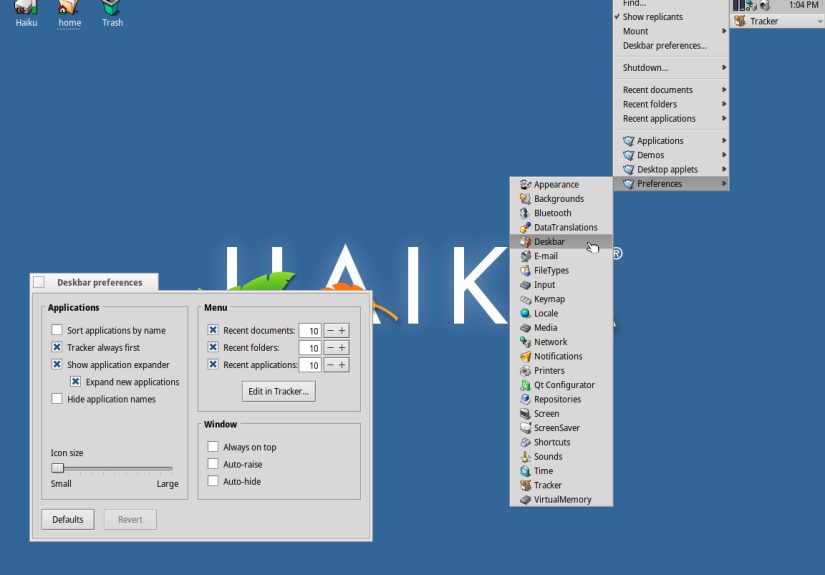
Haiku’s desktop revolves around Tracker, the file manager, and Deskbar, the compact application launcher and task area. These are direct descendants of the BeOS experience and remain central to Haiku’s identity.
In Beta 5, Tracker receives useful refinements, especially around read-only folders and volumes. Instead of allowing write-related menu actions and then throwing errors like a grumpy librarian, Tracker now disables actions that do not apply. Read-only views are also visually distinguished with a faded background. It is a small change, but it makes the system feel more intelligent and less likely to waste the user’s time.
These improvements highlight one of Haiku’s strongest qualities: it respects directness. The system rarely buries users under unnecessary layers. When something is available, it appears. When it is not available, it should not pretend otherwise. That sounds obvious, but many modern interfaces have turned obviousness into a luxury feature.
USB Audio Support Finally Gets Its Moment
Haiku R1/Beta 5 introduces basic support for USB audio input and output devices. This is a major quality-of-life improvement for users with external audio interfaces, USB headsets, speakers, or microphones.
The support is still not universal. Advanced USB 2.0 audio devices may not work perfectly, and switching outputs while the system is running may require restarting media services in some cases. Still, this is a meaningful step forward. Audio support is one of those areas where users notice failure immediately. A silent operating system may be peaceful, but not when you are trying to play music, join a call, or test a video.
For an operating system inspired by BeOS, which was famous for multimedia performance, improved USB audio support feels especially appropriate. It is not just a feature checkbox. It is part of Haiku reconnecting with its multimedia roots.
Networking Gets a Serious Performance Boost
One of the most important Beta 5 upgrades lives where casual users may not look first: the network stack. Haiku’s TCP performance received extensive work, including better ACK coalescing, SACK data handling, receive-side window scaling, reduced buffer copies, and improved checksum offload support for compatible drivers.
The practical result is huge. Haiku’s developers reported that TCP performance on many real-world connections improved by roughly an order of magnitude, with 8x to 10x improvements not being unusual. Loopback performance on modern hardware can now reach double-digit gigabits per second.
That is not just a benchmark flex. Better networking affects package downloads, browser performance, developer workflows, file transfers, remote access, and VPN scenarios. A fast desktop that crawls on the network is like a sports car with bicycle tires. Beta 5 replaces those tires with something far more appropriate.
TUN/TAP Support Opens the Door for VPN Workflows
Beta 5 also adds a TUN/TAP network driver. This is particularly useful for VPNs and tunneling tools. Configuration still requires manual work, and TAP mode is more experimental than TUN mode, but the presence of TUN/TAP support makes Haiku more realistic for users who need secure or specialized network routing.
This is another sign that Haiku is not merely polishing nostalgia. VPN support is a modern computing expectation. The fact that Beta 5 makes progress here shows that the project understands today’s desktop requirements, even while preserving the spirit of yesterday’s most elegant operating system.
Performance Optimizations Make Haiku Feel Even Snappier
Haiku has always had a reputation for responsiveness. Beta 5 strengthens that reputation with broad performance improvements across the kernel, drivers, memory management, I/O paths, and application startup behavior.
The release includes batching of more I/O operations, fewer unnecessary locks during application startup, improved memory mapping behavior, reduced lock contention, better page allocation handling, and support for DT_GNU_HASH in the ELF loader. The user_mutex system, which underpins pthread mutexes and related synchronization tools, also received a major overhaul.
These technical improvements translate into a desktop that feels smoother and development workloads that run faster. Compile performance improved by around 25% or more in many cases. For developers, that is not a small number. A 25% faster compile cycle means less time staring at terminal output and more time breaking things creatively, as software development tradition requires.
Filesystem Improvements: FAT Rewritten, UFS2 Added
Haiku OS Beta 5 replaces much of its older FAT filesystem driver with a port based on FreeBSD’s FAT driver. That change improves compatibility and data handling with a filesystem that remains surprisingly important. FAT may be ancient by computing standards, but it still appears on USB drives, SD cards, EFI system partitions, and many removable devices.
Beta 5 also adds read-only support for UFS2, the Unix File System used by FreeBSD. This will not matter to every desktop user, but it is valuable for developers, system tinkerers, and anyone moving data between Haiku and BSD environments.
Filesystem support is one of those areas where success often looks boring: the drive mounts, files appear, nothing catches fire. Beta 5 makes that boring success more likely, and that is exactly what users want.
Developer Tools Grow Up: GDB 15, kqueue, strace, and .NET
Haiku R1/Beta 5 is also a strong release for developers. It includes a full-featured port of GDB 15, replacing an older and less functional GDB 6 port. The new GDB support includes the command-line interface, machine interface for IDE integration, Python scripting, and gdbserver for remote debugging.
The system also implements a subset of the BSD kqueue API, which helps event-driven software handle file descriptors, sockets, and other wait objects more efficiently than older select or poll approaches. This matters for porting software that expects modern event notification APIs.
Haiku’s native strace and profile tools also improved. The enhanced strace can print flags, enums, and error codes by name, making debugging output more readable. The profile tool gained better CPU-time accounting and fixes that make it more useful for tracking performance problems.
Perhaps most surprising, Beta 5 includes experimental ports of .NET Core 8 and 9. They are not fully polished, and users should expect some assembly required. Still, .NET on Haiku is one of those developments that makes you blink twice and say, “Wait, really?” Yes, really. The BeOS-inspired desktop can now flirt with modern managed-code development.
More Software Ports Mean a More Useful Desktop
One of Haiku’s long-term challenges has been software availability. A beautiful operating system without applications is like a gorgeous kitchen with no food. Beta 5 benefits from ongoing work in HaikuPorts, which brings open-source software to the platform.
Thanks to the X11/Xlib compatibility layer, Haiku now has a working FLTK port, at least for applications that do not require OpenGL through GLX. The broader ecosystem also includes familiar productivity and creative applications such as LibreOffice, Krita, Audacity, GIMP, development tools, terminal utilities, and multiple browser options through HaikuDepot.
The growing software catalog changes the conversation around Haiku. Instead of being only a curiosity for operating system collectors, Haiku is becoming a platform where users can browse, write, code, organize files, edit images, listen to music, and enjoy a genuinely different desktop experience.
32-Bit vs. 64-Bit: Which Haiku Should You Choose?
Haiku R1/Beta 5 is available for both 32-bit and 64-bit x86 platforms. The 32-bit edition is important because it provides BeOS R5 binary compatibility. If you want to run older BeOS applications, the 32-bit build is the one to consider.
The 64-bit edition, meanwhile, is better suited for modern hardware and larger memory configurations. It does not support BeOS binaries, but it remains compatible with the BeOS API and benefits from modern architecture advantages.
For most new users trying Haiku in a virtual machine or on relatively recent hardware, the 64-bit version is usually the sensible choice. For retro-computing enthusiasts or users with legacy BeOS software, the 32-bit version keeps the historical bridge intact.
Why Haiku Beta 5 Feels Like a New BeOS Era
The phrase “new BeOS era” can sound dramatic, but Beta 5 earns it. BeOS was admired for speed, multimedia awareness, clean APIs, and a desktop that felt integrated rather than assembled from spare parts. Haiku Beta 5 carries those values forward while adding features that modern users expect.
Dark mode, USB audio, faster networking, VPN groundwork, improved filesystems, better developer tools, expanded software ports, and stronger POSIX compatibility all help Haiku feel less frozen in time. It is not trying to become Linux. It is not trying to become macOS. It is trying to become the best version of Haiku.
That distinction is important. Many alternative operating systems survive by imitating the mainstream. Haiku survives by being specific. It has a point of view. It believes the desktop should be responsive, coherent, and focused on personal computing. Beta 5 proves that this point of view still has technical and emotional power.
Who Should Try Haiku R1/Beta 5?
Haiku R1/Beta 5 is ideal for operating system enthusiasts, retro-computing fans, developers curious about non-Unix-like platforms, BeOS veterans, and users with older hardware looking for something lightweight and distinctive.
It is also a great system to test in VirtualBox, VMware, or QEMU. A virtual machine lets users experience the desktop, HaikuDepot, Tracker, Deskbar, WebPositive, Terminal, and the overall interface without repartitioning a real computer. For hardware testing, old laptops and mini PCs can be surprisingly fun candidates, especially when networking, audio, and display support cooperate.
However, Haiku is not yet the best choice for everyone. Users who depend on proprietary creative suites, major commercial games, advanced GPU acceleration, enterprise security policies, or specialized hardware may find limitations. This is still beta software. It is impressive, but it is not magic. It cannot turn your unsupported Wi-Fi chip into a team player through inspirational quotes.
Practical Experience: Spending Time With the Haiku Beta 5 Mindset
The most interesting thing about Haiku OS Beta 5 is not any single feature. It is the feeling of using a computer that behaves differently from the mainstream desktop world. A typical Haiku session starts quickly and feels lightweight from the first click. The desktop appears without theatrical loading screens, and the interface invites exploration rather than demanding account sign-ins, cloud sync choices, and eleven privacy toggles before breakfast.
Opening Tracker feels immediately different from using modern file managers. The interface is compact, direct, and surprisingly calm. Folders open in spatial windows unless you configure things differently, and the system encourages you to treat files as objects with attributes, not just blobs buried in directory trees. BFS, Haiku’s database-like filesystem, supports indexed metadata, which gives the operating system a distinctive way of organizing and searching information. It feels old-school and futuristic at the same time, like finding a smart refrigerator in a 1990s computer lab.
Installing applications through HaikuDepot is also part of the experience. The catalog is not as enormous as Linux repositories, but it is much richer than many first-time users expect. Seeing tools like LibreOffice, GIMP, Krita, development utilities, browsers, and media applications available on a BeOS-inspired system changes the mood quickly. Suddenly Haiku is not just a museum piece. It is a small but living workshop.
The desktop’s responsiveness is perhaps the most memorable part. Applications open with a lightness that makes modern operating systems feel slightly embarrassed. Menus appear instantly. Windows move cleanly. Terminal work feels crisp. Even when Haiku lacks some modern polish, it often compensates with speed and clarity. There is a certain joy in using a system that does not feel like it is constantly negotiating with background services before allowing you to type a sentence.
Of course, the Beta 5 experience also includes reminders that Haiku remains under development. Hardware compatibility can vary. Some web pages may challenge available browsers. USB audio may need patience. Advanced graphics acceleration remains a weak area. Certain workflows that are ordinary on Windows, macOS, or Linux may require workaround thinking. But this is part of the charm for the right audience. Haiku is not selling itself as a frictionless consumer appliance. It is offering a coherent alternative computing environment with a strong identity.
For writers, coders, tinkerers, and nostalgic BeOS fans, spending time with Haiku Beta 5 can feel oddly refreshing. It reminds you that desktop computing still has unexplored paths. The mainstream may have settled into three dominant families, but Haiku demonstrates that another design language is possible: smaller, faster, more unified, and more personal.
In that sense, Haiku OS’s Beta 5 release really does bring us into a new BeOS era. Not because BeOS has returned exactly as it was, and not because Haiku is suddenly ready to replace every daily driver on earth. It matters because the BeOS idea has survived long enough to become practical again. Beta 5 turns nostalgia into momentum, and momentum is exactly what this remarkable operating system deserves.
Conclusion
Haiku R1/Beta 5 is one of the most meaningful releases in the project’s long journey toward R1. It improves performance, strengthens networking, adds USB audio support, modernizes appearance controls, expands developer tools, improves filesystem compatibility, and makes the system feel more polished overall.
More importantly, it shows that Haiku is not merely preserving BeOS as a vintage curiosity. It is evolving the BeOS philosophy for modern personal computing. Beta 5 is fast, distinctive, increasingly usable, and still charmingly independent. In a world where desktops often feel heavier every year, Haiku reminds us that elegance, speed, and personality still matter.