Table of Contents >> Show >> Hide
- Minecraft Username vs. Gamertag: Know What You’re Actually Changing
- How to Change Your Minecraft Username in Java Edition
- How to Change Your Xbox Gamertag for Minecraft Bedrock
- What Changes After You Update Your Name?
- Common Problems When Changing a Minecraft Username or Gamertag
- Tips for Choosing a Better Minecraft Username or Gamertag
- Common Player Experiences After Changing a Minecraft Username or Gamertag
- Final Thoughts
If your Minecraft name still sounds like something you picked at 2:14 a.m. during a cereal-fueled identity crisis, you are not alone. Plenty of players eventually look at an old username or gamertag and think, “Wow. Past me was really committed to chaos.” The good news is that changing your Minecraft name is possible. The slightly annoying news is that the process depends on which version of Minecraft you play, which account you use, and whether you are changing a Java username or an Xbox gamertag.
That distinction matters more than most players expect. In Minecraft, “username” and “gamertag” are often treated like they mean the same thing, but they are not always twins. They are more like cousins who show up to the same family gathering wearing suspiciously similar hoodies. If you play Minecraft: Java Edition, your name is your Java profile name. If you play Minecraft: Bedrock Edition while signed in with Microsoft, your name is generally tied to your Xbox gamertag. Change the wrong thing, and you may end up wondering why your shiny new identity never appeared in-game.
This guide breaks down exactly how to change your Minecraft username and gamertag, what the differences are, what it may cost, what can go wrong, and how to avoid choosing a new name you will regret by next Tuesday. We will also cover the real-life player experience side of the process, because changing your name is not just a settings task. It is a tiny rebrand, a little digital glow-up, and occasionally a comedy sketch involving unavailable names and bad spelling decisions.
Minecraft Username vs. Gamertag: Know What You’re Actually Changing
Before you click anything, it helps to understand the naming system. Minecraft has different editions, and they do not all pull your visible name from the same place.
Minecraft Java Edition Username
If you play Minecraft: Java Edition on PC, your in-game name is your Java profile name. This is managed through your Minecraft account on the official Minecraft website. It is separate from your Microsoft account display name, and it is also separate from your Xbox gamertag. So yes, your Microsoft account can say one thing, your gamertag can say another, and your Java name can be the one you actually want people to see. Welcome to modern account systems, where nothing is simple unless it absolutely has to be.
The upside is that Java name changes are pretty straightforward. The other upside is that they are usually free. The catch is that you cannot keep changing your mind every afternoon. There is a waiting period between Java username changes, so choose with at least a tiny amount of wisdom.
Minecraft Bedrock Edition Gamertag
If you play Minecraft Bedrock on Windows, Xbox, mobile, or other platforms while logged into a Microsoft account, your visible name is usually linked to your Xbox gamertag. That means changing your Bedrock name generally means changing your Xbox identity, not a separate Minecraft-only label.
This is where many players get tripped up. They go to Microsoft account settings, change their profile name, and expect Bedrock to magically update. It usually does not work that way. Your Microsoft account display name and your Xbox gamertag are different things. One is for account identity across Microsoft services. The other is the name other players actually see in Xbox-connected games.
How to Change Your Minecraft Username in Java Edition
If you are a Java player, you will want to use the official Minecraft website. This is the cleanest route and the one most players should use.
Step 1: Sign in to Your Minecraft Account
Go to the official Minecraft site and sign in with the Microsoft account tied to your Minecraft purchase. If you have multiple Microsoft accounts, slow down here. This is not the time for speed. This is the time for accuracy. Many naming disasters begin with, “Oops, that was my other account.”
Step 2: Open Your Profile
Once you are signed in, find your profile area and look for the section related to Minecraft: Java Edition. The exact layout can change over time, but the relevant option is the Profile Name or Java profile section.
Step 3: Enter Your New Username
Type the new Java username you want. This is where optimism meets reality. If the name is available, congratulations. If it is taken, you will experience the same thing millions of gamers have experienced before you: immediate creativity collapse. Suddenly every name you have ever liked appears to be gone. Add a number, try a variation, or invent something memorable that still feels readable.
Step 4: Confirm the Change
Submit the change and save it. After that, your new Java username should apply to the game. In many cases, the update is fast, but logging out and back in can help if the old name sticks around for a bit.
Important Java Username Rules
Java username changes are generally free, which is nice. It is one of the last places on the internet where changing your identity does not immediately open a payment screen. However, there is normally a 30-day wait between changes. In other words, do not rename yourself to something hilarious for a weekend joke unless you are willing to live with it for a month.
A good example: if your old Java name is BlockyBanana77 and you want something cleaner like OakAndObsidian, make sure you really want it. One carefully chosen name beats a rushed one that feels cool for six minutes and awkward for four weeks.
How to Change Your Xbox Gamertag for Minecraft Bedrock
If you play Bedrock and want your Minecraft name to change, you usually need to change your Xbox gamertag. This can be done through a web browser or through Xbox profile tools on console. The browser route is often the easiest because it is faster, clearer, and involves less menu spelunking.
Change Your Gamertag Online
Sign in to your Xbox or Microsoft account through the official Xbox profile or gamertag-change page. Enter the gamertag you want, check availability, and confirm the change if it is available.
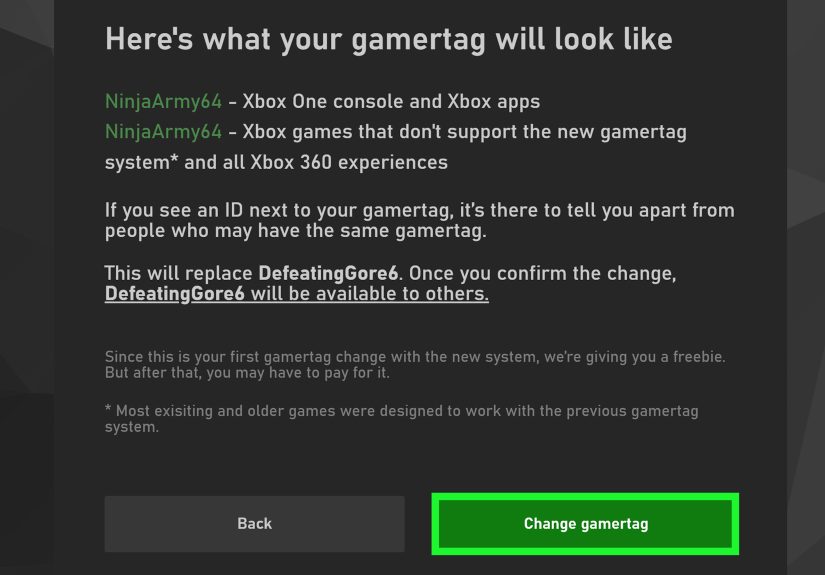
Microsoft’s current gamertag system is a little more flexible than the older “one name, one owner forever” setup. In the modern system, your chosen base gamertag can be up to 12 characters. If someone already has that exact base name, Xbox may allow it with a numeric suffix. So if the clean version of your dream tag is taken, you may still be able to claim a version of it with numbers added automatically in supported contexts.
That system is useful, but it comes with one quirky catch: some older games may display the suffix differently or flatten the formatting. So your gamertag can look slightly different depending on where it appears. Not broken, just classic platform weirdness.
Change Your Gamertag on an Xbox Console
If you have an Xbox console, you can also change your gamertag from your profile settings. Go to My Profile, choose Customize Profile, select your gamertag field, and enter a new one. The console will check whether the name is available and whether it follows policy.
This method works fine, but let’s be honest: typing names with a controller is one of gaming’s least glamorous side quests. If you have access to a browser, most people will find the online route easier.
How Much Does a Gamertag Change Cost?
For many players, the first gamertag change is free. After that, Xbox generally charges a fee for additional changes. In the United States, the common price has been $9.99, though Microsoft notes that cost can vary by region and currency. Translation: your first makeover may be complimentary, but your second identity crisis might come with a receipt.
What Changes After You Update Your Name?
Once you change your Java username or gamertag, the biggest question is usually simple: what exactly changes, and what stays the same?
In Java Edition
Your visible in-game name changes. Friends, servers, and multiplayer communities will see your new Java profile name. Your account itself still remains your account. You are not losing ownership of Minecraft just because you renamed yourself from CreeperSnack to NetherNoodle. The identity label changes, but the underlying account stays tied to your login credentials.
In Bedrock Edition
Your Xbox gamertag becomes the name most players will see across Xbox-connected experiences, including Minecraft Bedrock when you are signed into that Microsoft account. Because the gamertag is part of your broader Xbox identity, changing it affects more than just Minecraft. If you play other Xbox network games, your new name may appear there too.
What Does Not Change
Your Microsoft display name is a separate thing, and changing it does not automatically change your gamertag. Likewise, changing your Java profile name does not magically rewrite your Xbox identity. These systems are related enough to confuse people, but separate enough to create headaches. Fun!
Common Problems When Changing a Minecraft Username or Gamertag
“My New Name Didn’t Show Up Yet”
First, log out and back in. Then restart the launcher or game. Account-based changes sometimes need a moment to catch up across services. If you changed your gamertag, make sure you are signed into the correct Microsoft account inside Minecraft. This is especially important on shared PCs, family consoles, and devices that seem to collect extra logins like a sock drawer collects mystery cables.
“The Name I Want Is Taken”
Welcome to the crowded internet. Short, clean, one-word names are prized collectibles now. Instead of stapling random digits to the end like you lost a bet, try a better variation. Use alliteration, word pairing, a biome reference, a mob reference, or a style that still sounds intentional. For example, instead of Steve43219, something like SpruceSignal, CaveCompass, or GlowBerryKid feels more memorable.
“I Changed My Microsoft Name, Not My Gamertag”
This is one of the most common mistakes. Your Microsoft account display name can update across Microsoft services, but it does not replace your Xbox gamertag. If Bedrock still shows the old name, you probably edited the wrong profile field.
“I’m Using an Old Mojang Account”
If that sentence feels current to you, there is an important catch: Mojang account migration ended in 2023. Modern account management now revolves around Microsoft accounts. So if you are looking for old Mojang-specific steps from ancient forum posts, those instructions are living in the digital museum now.
Tips for Choosing a Better Minecraft Username or Gamertag
Changing your name is easy. Choosing a good one is the actual boss fight.
Make It Readable
A clever name nobody can read is like building a mansion in a cave with no torches. Technically impressive. Functionally questionable. Avoid weird punctuation overload, confusing capitalization, or letter-number swaps that make your name look like a hacked Wi-Fi password.
Think Long-Term
Try to pick something you will still like in six months. That means avoiding trend jokes that expire fast, school-grade references that age out, and names based on one random meme that will feel ancient by the time the next game update arrives.
Keep It Cross-Platform Friendly
If you play more than Minecraft, remember that a Bedrock gamertag can follow you into other Xbox-connected games. A name that sounds perfect in a block world may be less charming in a racing game, shooter, or party game. Pick something flexible.
Don’t Try to Be Too Edgy
Offensive or inappropriate names can trigger moderation issues. Also, a name designed purely to shock people usually ages about as well as warm milk in the desert. Funny is good. Smart is better. Readable and non-embarrassing is best.
Common Player Experiences After Changing a Minecraft Username or Gamertag
One of the funniest things about changing your Minecraft username or gamertag is how emotional such a tiny digital update can feel. On paper, it is just a name change. In practice, it can feel like moving into a freshly organized room, changing your haircut, and deleting old social media posts all at once. Players often say the first reaction is relief. The old name may have been childish, overly random, or packed with numbers that made it look like a calculator lost a fight. The new one feels cleaner, more intentional, and more “them.”
There is also a strange moment of suspense right after the change. You submit the new name, reopen the launcher or game, and wait to see whether it worked. When the new name appears, it feels weirdly dramatic for something that took only a few clicks. It is the gaming version of seeing a freshly painted wall dry and thinking, “Yes. This was the correct life choice.” Players who switch from a cluttered old name to something sharp and simple often say the game somehow feels newer, even though the world, inventory, and creepers are exactly the same as before.
Another common experience is instant regret over names that were not tested aloud first. A name may look cool typed on a profile page, but sound silly when a friend says it in voice chat. That is why many experienced players recommend choosing a name that works both visually and conversationally. If your friends hesitate before saying it, ask whether the name is actually sleek or just complicated. The best Minecraft usernames and gamertags are usually easy to recognize, easy to remember, and easy to type without requiring a keyboard archaeology expedition.
Players also often discover that changing a Bedrock gamertag has a bigger ripple effect than expected. Because it can affect your wider Xbox identity, the update may show up in other games too. That can be good if you want a full reset across your gaming profile, but surprising if you only meant to freshen up your Minecraft presence. A lot of people go in thinking, “I’m changing my Minecraft name,” and come out realizing they just rebranded their entire cross-platform gaming persona. That is not a bad thing, but it is worth knowing ahead of time.
Then there is the classic availability struggle. This is practically a rite of passage. You come in with one perfect idea, discover it is taken, then cycle through twelve increasingly questionable alternatives. Players often report that the name they finally choose is not the first one they wanted, but the first one that felt original and still sounded natural. Oddly enough, that usually works out better. The forced creativity pushes people toward names that are more distinctive and less generic than the obvious first pick.
There is also a small social adjustment period. Friends may ask who you are, server regulars may do a double-take, and one person will absolutely say, “Wait, weren’t you something else before?” That is normal. In most gaming groups, people adapt quickly. After a few sessions, the new name sticks and the old one starts to feel like a weird previous chapter. Some players even say the change gives them a boost in confidence online, especially if the old name felt outdated or embarrassing.
In the end, the experience is usually worth it. A better username or gamertag will not improve your parkour, make your redstone cleaner, or stop skeletons from ruining your afternoon. But it does make your identity feel more polished every time you log in. And in a game built around creating your own world, that little bit of personal control matters more than people think.
Final Thoughts
If you want to change your Minecraft username and gamertag, the most important thing is knowing which name belongs to which version of the game. Java Edition uses a Java profile name through the Minecraft website. Bedrock Edition usually uses your Xbox gamertag when you are signed in with Microsoft. Once you understand that split, the process becomes much easier and much less rage-inducing.
Take a minute to choose a name that feels good on screen, sounds natural in chat, and will not make Future You cringe like Past You apparently enjoyed doing. Because while changing your Minecraft identity is not hard, choosing one that survives your next wave of second thoughts is the real achievement.