Table of Contents >> Show >> Hide
- Quick Jump
- Why Blogger Is Still a Great Place to Start
- Prep Work Before You Click “Create”
- Step-by-Step: How to Create a Blog on Blogger
- Make It Look Like You Meant to Do That: Themes, Layout, and Pages
- Write and Publish Your First Post (Without Overthinking It)
- SEO for Blogger: Set Yourself Up for Google and Bing
- 1) Turn on search visibility
- 2) Use HTTPS (especially if you use a custom domain)
- 3) Consider a custom domain for credibility
- 4) Connect Google Search Console
- 5) Submit your sitemap (Google + Bing)
- 6) Nail the on-page SEO basics (without sounding like a toaster manual)
- 7) Add Google Analytics (so you’re not guessing)
- 8) Set expectations: SEO takes time
- Monetization Basics: Making Money with Blogger
- Common Beginner Mistakes (So You Can Skip the Pain)
- Conclusion: Your Blogger Blog Is ReadyNow Make It Useful
- Extra: Beginner Experiences You’ll Probably Have (And How to Handle Them)
- 1) “Why does my blog look different on my phone?”
- 2) “My custom domain isn’t working yet… did I break the internet?”
- 3) “I published my post, but it’s not showing up on Google.”
- 4) “I keep changing my theme because… it could be better.”
- 5) “My posts feel messy… I don’t know how to structure them.”
- 6) “I don’t want to be spammy, but I also want traffic.”
- 7) “I’m nervous to publish because it’s not perfect.”
So you want to start a blog. Welcome to the internet’s oldest tradition: sharing thoughts with strangers (politely, we hope) and occasionally Googling “why is my website doing that?” at 1:00 a.m.
The good news: Blogger is one of the easiest places to begin. It’s free, it’s hosted (no server babysitting), and it plays nicely with Google tools. The even better news: you don’t need to be “techy.” You just need to be stubborn enough to click Settings a few times.
This beginner-friendly guide walks you through creating a Blogger blog step-by-step, customizing it so it doesn’t look like it time-traveled from 2007, and setting up practical SEO for Google and Bingwithout turning your post into a keyword casserole.
Why Blogger Is Still a Great Place to Start
Blogger is a free blogging platform owned by Google. If your main goal is to get writing and publishing quickly, it’s hard to beat. You don’t need to buy hosting, install software, or worry about security patches. Blogger handles the heavy lifting, and you focus on content.
When Blogger is a perfect match
- Beginners who want a simple setup and minimal maintenance.
- Budget-conscious creators who want a legit blog without monthly hosting fees.
- Google ecosystem fans who want easy integration with Analytics, Search Console, and AdSense.
When you might outgrow it
If you want advanced plugins, complex site architecture, or total control over everything down to the atoms, you may eventually prefer a platform like self-hosted WordPress. But to learn the basics of blogging, publishing, and SEO? Blogger is a perfectly respectable launchpad.
Prep Work Before You Click “Create”
You can start a blog in minutes. You can also start a blog in minutes and regret your blog name for the rest of your natural life. Let’s avoid that.
1) Pick a clear topic (your “niche,” minus the eye-roll)
Choose something you can write about for at least 20 posts. A helpful trick: combine interest + audience + outcome. Example: “Budget meal prep for busy nurses” is sharper (and easier to Google) than “Food stuff I like.”
2) Choose a blog name that won’t age like milk
Try for something memorable, easy to spell, and not so trendy it becomes cringe in six months. If you want to build a brand, keep it flexible: “Desert Hiking Notes” is safer than “OnlyCactiVibes420”.
3) Draft 5–10 post ideas now
Blogger setup is easy. Keeping momentum is the hard part. Brainstorm a mini list:
- 3 beginner-friendly “how to” posts
- 3 list posts (tools, mistakes, checklists)
- 2 personal stories or case studies (specific and useful)
- 1 pillar guide (a longer “ultimate” post)
4) Know your basic site structure: labels and pages
In Blogger, Labels act like categories/tags for posts (example: “Beginner,” “Recipes,” “Gear Reviews”). Pages are static pages like “About,” “Contact,” or “Start Here.”
Step-by-Step: How to Create a Blog on Blogger
Step 1: Sign in to Blogger
Go to Blogger and sign in with your Google account. If you don’t have one, you’ll create it first. This Google login becomes the “key” to your blog.
Step 2: Create a new blog
In your Blogger dashboard, choose to create a new blog. You’ll be asked for:
- Title: Your blog’s name (you can change this later).
- Address: Your free Blogspot URL (example: yourname.blogspot.com).
- Theme: A starting design template (also changeable later).
Pro tip: If the URL you want is taken, don’t panic. Add a small modifier (like “hq,” “notes,” or your city). Avoid extra hyphens if possible; they look like your blog is wearing a fake mustache.
Step 3: Set your basic blog details
In Settings, you can update important basics like your blog description (a short summary of what readers get), language, and other core preferences. Think of the description as your blog’s elevator pitchshort, clear, and not weird.
Make It Look Like You Meant to Do That: Themes, Layout, and Pages
Choose a theme that’s clean and readable
Start with a simple theme that’s mobile-friendly and easy on the eyes. Fancy animations are fun until they make your blog load like it’s powered by a sleepy hamster. Focus on:
- Readable font size and contrast
- Clear navigation
- Fast loading
- Responsive design (works on phones)
Customize layout using gadgets (the good kind of gadgets)
Blogger lets you rearrange your layout with drag-and-drop sections and “gadgets” (widgets). Useful beginner gadgets include:
- Pages (for your menu)
- Search (helps readers find posts)
- Popular posts (social proof without bragging)
- Labels (topic navigation)
- Subscribe / Follow options (where available)
Resist the urge to add 17 gadgets “just in case.” A cluttered sidebar is how blogs become digital junk drawers.
Create essential pages: About + Contact + Start Here
For trust and usability, create these pages early:
- About: Who you help, what you write about, and why readers should care.
- Contact: A simple way to reach you (email or contact form instructions).
- Start Here: A curated list of your best beginner posts as you grow.
Write and Publish Your First Post (Without Overthinking It)
Use the post editor like a reader, not a robot
Click New post. Add a title that says what the post delivers. Then format the content so it’s skimmable:
- Short paragraphs (2–4 lines)
- Helpful subheadings
- Bullets for lists
- Bold for key takeaways (sparingly)
Add labels (your future self will thank you)
Add 1–3 labels that describe the post topic. Example: a post about setting up Analytics could use labels like “SEO,” “Tools,” “Beginner.” Labels help readers browse and help you stay organized as your blog grows.
Set a clean permalink (URL)
In the post settings, choose a custom permalink when it makes sense. Keep it short and descriptive. For example:
yourblog.blogspot.com/2026/02/blogger-seo-settings.html✅yourblog.blogspot.com/2026/02/omg-i-finally-did-it-and-heres-everything-i-thought-while-doing-it.html😅
Use images wisely (and add alt text)
Images make posts more engaging, but they’re also an SEO and accessibility opportunity. Use descriptive file names when possible, and add meaningful alt text that explains the image for screen readers (and helps search engines understand context).
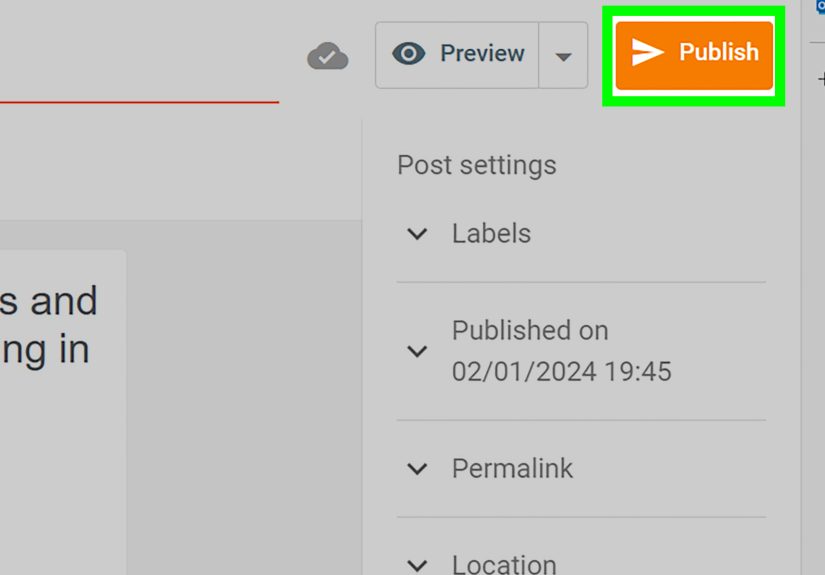
Publish (or schedule) your post
If you’re not ready to publish, schedule it. Consistency matters more than speed. Your blog doesn’t need to “launch perfectly.” It needs to launch.
SEO for Blogger: Set Yourself Up for Google and Bing
SEO isn’t magic. It’s mostly making your content easy to understandfor humans first, then search engines. The goal is to help Google and Bing crawl, interpret, and show your posts when people search for what you wrote.
1) Turn on search visibility
In Blogger settings, make sure your blog is visible to search engines. This is the “Yes, you may index me” switch that beginners sometimes miss. (It’s like opening a store and then locking the front door. Technically you’re open. Spiritually… not so much.)
2) Use HTTPS (especially if you use a custom domain)
HTTPS is the secure version of your site (the little lock icon in the browser). If you use a Blogspot address, HTTPS is typically automatic. If you use a custom domain, you may need to enable HTTPS availability and redirection in settings once DNS is set correctly.
3) Consider a custom domain for credibility
A custom domain (like yourbrand.com) looks more professional than yourbrand.blogspot.com. It can also make branding and sharing easier. Blogger supports connecting custom domains through its publishing settings.
Custom domain setup, in plain English
When you connect a domain, Blogger will provide DNS instructionstypically involving CNAME records (and sometimes A records) at your domain registrar. Two common beginner gotchas:
- DNS changes can take time to propagate. “Instant” on the internet often means “eventually.”
- If HTTPS won’t toggle on, DNS settings or verification can be the culprit. Double-check what Blogger asks for.
4) Connect Google Search Console
Google Search Console helps you monitor indexing, search queries, and technical issues. Once connected, you can submit a sitemap and catch problems early (like broken pages or indexing surprises).
5) Submit your sitemap (Google + Bing)
A sitemap is a file that lists URLs you want search engines to crawl. Blogger blogs commonly expose an RSS/Atom feed and sitemap-style endpoints, and Search Console/Bing Webmaster Tools can accept sitemap submissions.
For Google, submitting your sitemap in Search Console helps you see when Googlebot accessed it and whether there were processing errors. For Bing, you can submit sitemaps inside Bing Webmaster Tools as well.
Bonus nerd tip: many search engines can discover your sitemap via a line in robots.txt that points to the sitemap URL.
6) Nail the on-page SEO basics (without sounding like a toaster manual)
If you only do a few SEO things, do these:
- Use one clear topic per post (avoid “10 unrelated thoughts I had in the shower”).
- Write a strong title that includes your main keyword naturally.
- Use headings to structure content (H2/H3). Make it skimmable.
- Write a compelling meta description (even though it’s not a direct ranking factor, it can help clicks).
- Link internally to related posts (“If you liked this, read this next…”).
- Add alt text to images and keep pages fast.
A quick example: turning “meh” into clickable
Let’s say your post is about connecting a domain.
- Weak title: “Domain Setup”
- Better title: “How to Connect a Custom Domain to Blogger (CNAME + HTTPS Tips)”
- Weak meta description: “This post is about domains.”
- Better meta description: “Connect your custom domain to Blogger the right wayDNS records, common errors, and how to enable HTTPS so your site shows the secure lock.”
7) Add Google Analytics (so you’re not guessing)
Blogger supports adding Google Analytics measurement directly in settings using your GA4 “G-” ID. After setup, give it some time to populate data. Analytics won’t help you rank, but it helps you understand what’s workingso you can do more of it.
8) Set expectations: SEO takes time
New blogs rarely rank overnight. Focus on publishing genuinely helpful posts, building internal links, and improving clarity. SEO momentum is like a slow cooker: boring at first, but eventually delicious.
Monetization Basics: Making Money with Blogger
Blogger can be monetized in many waysaffiliate links, digital products, services, sponsorships, and ads. If you want ads, Google AdSense is the most common starting point for Blogger users.
AdSense (the simple version)
- Make sure your content follows ad policies and your site has enough quality content.
- Apply through the Blogger dashboard where monetization options are provided.
- Don’t plaster ads everywhere. A blog that reads like a billboard loses trust fast.
Common Beginner Mistakes (So You Can Skip the Pain)
Mistake 1: Choosing a blog name you can’t say out loud
If your blog name sounds like a Wi-Fi password, reconsider. Easy-to-say names are easier to share.
Mistake 2: Writing for “everyone”
Writing for everyone usually means connecting with no one. Pick a reader you want to help and aim your posts at their questions.
Mistake 3: Ignoring the basics of navigation
If people can’t find your About page or your best posts, they won’t stick around. Keep your menu simple and obvious.
Mistake 4: Keyword stuffing (aka “SEO but make it awkward”)
If your paragraph reads like: “Blogger blog Blogger tutorial create a blog on Blogger Blogger SEO Blogger beginner,” congratulationsyou’ve invented a robot’s diary. Use keywords naturally, like a human who enjoys friends.
Mistake 5: Not setting up Search Console / Bing Webmaster Tools
These tools help you get indexed and troubleshoot issues. Skipping them is like driving cross-country without a map and then blaming the car.
Conclusion: Your Blogger Blog Is ReadyNow Make It Useful
Creating a blog on Blogger is the easy part. The real magic is publishing consistently, learning what your readers need, and improving one post at a time. Start simple: clean design, clear topics, and basic SEO setup. Then write posts that actually help people.
If you do that, you’ll have something most “wannabe bloggers” never build: a blog that readers trustand search engines can understand.
Extra: Beginner Experiences You’ll Probably Have (And How to Handle Them)
You asked for experiences, so here are the most common real-world “Blogger beginner moments” people run intoplus what to do when they happen. Think of this as the emotional support section of the guide, except the support is mostly practical, and occasionally sarcastic.
1) “Why does my blog look different on my phone?”
This is almost a rite of passage. On desktop, your theme looks great. On mobile, your sidebar might vanish, fonts may resize, and suddenly your blog feels like it’s wearing someone else’s shoes. What’s happening is simple: responsive design rearranges elements to fit smaller screens.
What helps: choose a clean theme, avoid overly complex layouts, and test your homepage and a few posts on mobile before you get too attached to a design. If a theme makes your content hard to read on a phone, it’s not “quirky.” It’s a problem.
2) “My custom domain isn’t working yet… did I break the internet?”
No. You did not break the internet. The internet breaks itself plenty without help. Custom domain setup often involves DNS changes, and DNS can take time to propagate. That waiting period is normal, even though it feels like watching paint dry in a dark room.
What helps: re-check DNS records against what Blogger shows you, confirm you didn’t accidentally add spaces or wrong hostnames, and give it time. If HTTPS won’t enable on a custom domain, it can be related to DNS/verificationso troubleshooting usually starts there.
3) “I published my post, but it’s not showing up on Google.”
Also normal. Indexing is not instant, especially for new blogs. Search engines need to discover your blog, crawl it, and decide how to classify it. This is why Search Console and Bing Webmaster Tools matter: they help you verify ownership, submit sitemaps, and see whether pages are being indexed.
What helps: publish a few posts first (not just one), make sure search visibility is enabled, set up Search Console/Bing Webmaster Tools, and keep writing. You can also improve internal linking so crawlers can find more pages easily.
4) “I keep changing my theme because… it could be better.”
Theme-hopping is the blogging equivalent of rearranging your desk instead of doing your homework. It feels productive. It is not productive. A clean theme that makes content readable is enough. Readers show up for solutions, stories, and usefulnessnot because your sidebar has a tasteful gradient.
What helps: pick a theme, set a “design freeze” date (two weeks is a great start), and focus on content. You can upgrade design later once you have a handful of posts and a clearer brand voice.
5) “My posts feel messy… I don’t know how to structure them.”
This is actually a good signyou’re noticing the difference between “writing” and “publishing something people can scan.” Most strong blog posts follow a simple pattern:
- Promise a clear outcome in the intro
- Deliver in steps (with headings)
- Use examples
- Wrap with a quick summary and a next action
What helps: outline your post with 3–6 H2 sections before writing. Then fill in each section. This makes your content easier to read and easier to understand for search engines too (hello, SEO win).
6) “I don’t want to be spammy, but I also want traffic.”
Good instincts. The answer is to be specific, not spammy. Write posts around real questions your audience asks. Use your main keyword naturally in the title and a few times in the body where it makes sense. Add related phrases (LSI keywords) only when they genuinely fit the topic.
What helps: aim for clarity over cleverness. A post titled “Blogger SEO Settings: A Simple Checklist for Beginners” will often outperform “Search Engine Sorcery for the Brave,” even though the second title is objectively funnier.
7) “I’m nervous to publish because it’s not perfect.”
Perfection is an excellent way to never publish anything. Blogs grow by iteration. Your early posts are supposed to be a little roughbecause you’re learning your voice, your audience, and what topics resonate.
What helps: commit to a small goal (like one post per week for 8 weeks). Then review what gets reads, comments, and clicks. Update older posts as you learn more. “Publish, learn, improve” beats “polish forever, publish never.”