Table of Contents >> Show >> Hide
- Before You Start: Pick the Right Exit Door
- Way 1: Permanently Delete Your TextNow Account and Data
- Way 2: Deactivate TextNow Service or Cancel Paid Features
- Way 3: Release Your TextNow Number or Let the Free Number Go
- Common Mistakes to Avoid
- Which Option Should You Choose?
- Real-World Experiences: What People Usually Run Into When Leaving TextNow
- Final Thoughts
If you are trying to figure out how to delete your TextNow account, you are not alone. Plenty of people hit the same wall: they delete the app, wait dramatically, and then realize their account still exists, their subscription may still be active, and their number is still hanging around like an ex who did not get the hint.
The tricky part is that delete, deactivate, cancel, and release your number are not the same thing on TextNow. That is where people get tripped up. One option wipes your account and data for good. Another simply stops paid service. Another lets you walk away from the number without fully erasing the account. Same platform, very different exits.
This guide breaks down how to delete or deactivate your TextNow account in 3 easy ways, what each option actually does, and how to avoid the classic mistakes that leave users wondering why they are still being billed or why their number disappeared before they were ready.
Before You Start: Pick the Right Exit Door
Before you do anything, decide what you really want. This saves time and prevents regret, which is always cheaper than panic.
Delete your account
This is the permanent option. It removes your TextNow account and associated data. If this is your goal, do not assume uninstalling the app will handle it. It will not.
Deactivate service
This is the better choice if you have a TextNow SIM card, a paid plan, or a subscription you want to stop, but you may want to come back later. Think of it as ending the service without dropping a piano on the whole account.
Release the number or stop using it
This option works if you mainly want to get rid of the TextNow phone number. It is useful when the account itself is not the problem, but the number is no longer needed.
Way 1: Permanently Delete Your TextNow Account and Data
If your goal is to fully close your TextNow account, remove your personal data, and walk away for good, this is the method you want. It is the cleanest exit, but it is also the most final.
Use this option if:
- You no longer want a TextNow account at all.
- You want your account data removed, not just hidden.
- You are done with the service and do not plan to reuse the same account later.
How to permanently delete your TextNow account
- Log in to the TextNow account you want to remove.
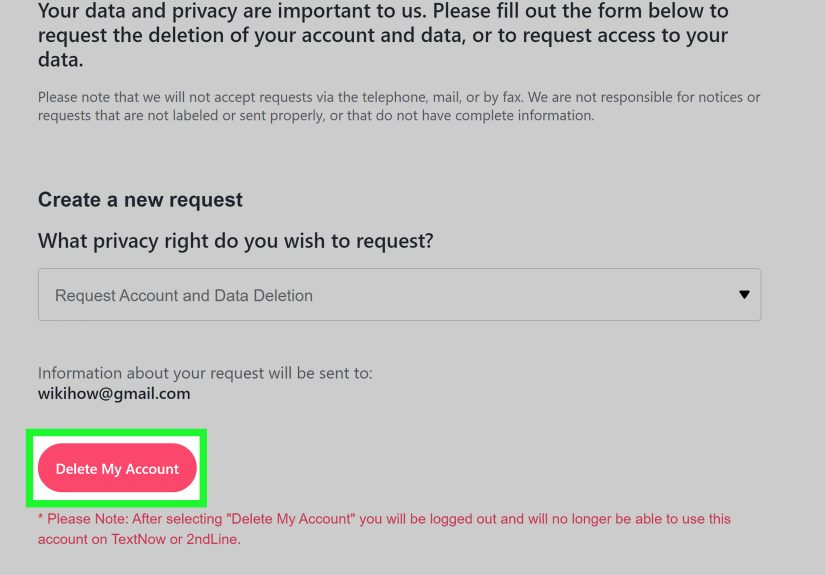
- Open TextNow’s account and data deletion request flow.
- In the request menu, choose Request Account and Data Deletion.
- Confirm that the email shown matches the account you want to delete.
- Click or tap the confirmation button to delete the account.
Once you submit the request, you are logged out and lose access to that TextNow account. This is not the sort of button you press and then casually undo five minutes later while eating chips.
What happens after deletion?
Here is the part people should read twice:
- The deletion is permanent.
- You cannot recover the account later.
- You cannot delete only the data while keeping the account active.
- You should save anything important first, such as messages, voicemails, and anything tied to that number.
There is another detail that surprises people: if you permanently delete the account, TextNow’s support guidance says you cannot create a new TextNow account with the same email address. So if you think there is even a small chance you will want that exact login again, do not sprint into deletion just because it sounds satisfying.
Important tip before deleting
If you want to keep your TextNow phone number and move it to another carrier, complete the port-out process before you submit a deletion request. Once the account is gone, your leverage is gone too.
Way 2: Deactivate TextNow Service or Cancel Paid Features
Not everyone wants the digital equivalent of burning the house down. Sometimes you just want billing to stop, service to end, and the option to come back later. That is where deactivation comes in.
Use this option if:
- You have a TextNow SIM card and want to stop service.
- You are paying for a plan, ad removal, or another upgrade.
- You want to keep the account itself but stop the paid part.
If you have a TextNow SIM card or wireless service
TextNow’s support flow says you need to cancel your plan first before you can deactivate the SIM. After that, go to your My Account area and look for the Deactivate TextNow SIM Card option under the device or number section.
This route is especially useful for users who tried TextNow wireless service, decided it was not for them, and just want out without deleting the whole account. In plain English: stop the service, keep the login.
If you have Ad-Free+ or other in-app purchases
This is where many people make the classic mistake. They remove the app from their phone and assume the billing will stop automatically. That is not how app-store subscriptions work.
If your upgrade is billed through Apple or Google, the subscription normally has to be canceled through the same billing platform. TextNow also points users to manage Ad-Free+ either inside the app or through the same Apple or Google account that was used to start the subscription.
How to cancel on iPhone or iPad
- Open Settings.
- Tap your name.
- Tap Subscriptions.
- Select the TextNow subscription.
- Tap Cancel Subscription.
How to cancel on Android
- Open the Google Play Store.
- Go to Payments & subscriptions or the subscriptions section.
- Select the TextNow subscription.
- Tap Cancel subscription.
- Follow the prompts to finish.
If you do not see the subscription, double-check that you are signed in with the same Apple ID or Google account used to buy it. Subscription mysteries are often just account mix-ups wearing sunglasses.
Best for:
Anyone who wants to deactivate TextNow service, stop charges, or cancel premium features without fully deleting their TextNow account.
Way 3: Release Your TextNow Number or Let the Free Number Go
Sometimes the account is fine. The number is the problem. Maybe you used TextNow for selling an old sofa, job applications, online dating, or a side hustle that has now retired with honor. In that case, you may not need to delete the entire account at all.
Use this option if:
- You want to get rid of the TextNow number.
- You are not focused on deleting account data.
- You want a lighter reset without full account removal.
How to release your TextNow number
- Open the TextNow app.
- Go to Menu and then Settings.
- Tap Account.
- Open TextNow Number.
- Tap the three-dot menu.
- Select Release Number.
Be careful: releasing the number is irreversible. Once you let it go, you cannot count on getting it back later.
What if you just stop using the free number?
TextNow has long treated free numbers differently from locked-in paid numbers. If you actively call or text from the free number, you can keep it active. If you want guaranteed retention, TextNow offers paid features designed to keep the number tied to your account. So if your real goal is to quietly disappear from that number, releasing it or stopping active use may be enough, depending on your setup.
This is the most overlooked option because people search for “how to delete TextNow account” when what they really mean is “how do I stop using this number before it starts attracting spam and chaos?” Fair question.
Common Mistakes to Avoid
1. Deleting the app instead of the account
Uninstalling TextNow from your phone does not automatically cancel a store-billed subscription, and it does not equal permanent account deletion. It is more like leaving the room while the lights are still on.
2. Deleting first, asking port-out questions later
If you want to keep the number, start the port-out process before deleting the account. Doing it in the opposite order is like mailing your passport into a volcano and then asking about travel plans.
3. Forgetting to cancel the paid plan before deactivating the SIM
If you have TextNow wireless service, cancel the plan first. Then deactivate the SIM through the account tools.
4. Assuming all subscriptions are managed inside TextNow
Some are tied to the Apple App Store or Google Play. That means the store where you subscribed is often the store where you must cancel.
5. Not saving what matters
If there are messages, voicemails, or account details you may need later, save them before permanent deletion. Once the account is gone, there is no magic “undo” trumpet.
Which Option Should You Choose?
Here is the easiest way to decide:
- Choose Way 1 if you want to permanently delete your TextNow account and data.
- Choose Way 2 if you want to stop service or billing but keep the account available.
- Choose Way 3 if you mainly want to get rid of the number and move on.
In other words, do not use a wrecking ball when what you really needed was a door key.
Real-World Experiences: What People Usually Run Into When Leaving TextNow
One of the most common experiences people have with TextNow is realizing that the phrase “delete my account” means different things depending on what they are actually trying to escape. A lot of users are not mad at TextNow itself. They are just done with the situation around it. Maybe the number was used for a short-term project, apartment hunting, online selling, or creating a little privacy buffer between their real number and the entire internet. When that chapter ends, they want a fast cleanup. That is usually when confusion begins.
A very typical experience goes like this: someone deletes the app from their phone, feels productive for about twelve seconds, and then notices they are still being billed through Apple or Google. That moment tends to produce the same facial expression people make when they realize they have been talking on mute during a video call. The lesson is simple but important: app removal and subscription cancellation are different actions. A lot of frustration comes from learning that difference later than expected.
Another common situation involves the number itself. Some users are not attached to the account, but they definitely care about the number. Maybe they gave it to job recruiters, customers, classmates, or delivery drivers. Suddenly, deleting the account feels riskier because the number still matters for unfinished conversations. In those cases, the smarter move is often to pause, decide whether to port the number out, or release it only after confirming there is nothing important still tied to it. The account is not always the real issue; sometimes the number is the whole story.
There is also the group of users who signed up casually and later discover that permanent deletion is more permanent than they expected. They assume they can always recreate the same account later with the same email, like reopening a favorite tab. Then they read the fine print and realize this is not that kind of goodbye. For people who are not 100 percent sure, deactivation is often emotionally and practically easier than deletion. It keeps the escape hatch available.
Some experiences are less dramatic and more practical. Users with a SIM or paid wireless service often just want to stop paying for something they no longer need. They are not trying to erase their digital identity from orbit. They simply want billing to end cleanly. For them, the best outcome is not “account deleted.” It is “charges stopped, service ended, headache avoided.” That is why the deactivate route is such a useful middle ground.
Then there are the privacy-focused users. These are the people who want the whole thing gone: account, data, history, all of it. They do not want half-measures, and honestly, that is fair. Their experience tends to be the smoothest when they plan ahead, save anything important, make sure no subscription is still hanging around, and only then submit the deletion request. The process itself is not hard. The real challenge is choosing the right path before clicking the button that turns “maybe later” into “too late now.”
Final Thoughts
Deleting or deactivating a TextNow account is easy once you know which outcome you actually want. The hard part is not the button. It is the decision. If you want a permanent goodbye, use the account and data deletion route. If you want to stop service or charges, cancel the subscription or deactivate the SIM instead. If the number is the only thing you are tired of, release it and keep moving.
The best move is the one that matches your goal. Not the one that sounds dramatic. Not the one that feels fast. And definitely not the one that starts with deleting the app and hoping the universe handles the rest.