Table of Contents >> Show >> Hide
- What a Snapchat streak actually is
- Step 1: Check whether your streak is still eligible for recovery
- Step 2: Tap the in-app Restore button first
- Step 3: Complete the restore and understand the cost
- Step 4: Use Snapchat Support if the restore does not work
- Step 5: Protect your next streak like it matters to your tiny internet soul
- Common mistakes that kill a Snapstreak
- What to expect after you request your streak back
- Real-world experiences: what losing and restoring a streak actually feels like
- Conclusion
Few digital tragedies are as oddly dramatic as losing a Snapchat streak. One minute, you and your friend are casually trading blurry ceiling photos and “gm” selfies like seasoned professionals. The next minute, the fire emoji is gone, the number disappears, and suddenly it feels like a tiny internet funeral has been held without your permission.
The good news is that getting your Snapchat streak back is often much easier than people think. The bad news is that you need to move fast, follow the right steps, and avoid the usual panic-clicking that turns a fixable problem into a full-blown “welp, guess it’s over” moment. In this guide, you’ll learn exactly how to restore a lost Snapstreak, what works, what does not, and how to keep your next streak from going up in smoke again.
What a Snapchat streak actually is
A Snapchat streak, also called a Snapstreak, starts when you and another person send each other photo or video Snaps every day. The number next to the fire emoji shows how many consecutive days the streak has been alive. In plain English, it is a tiny scoreboard for consistency, friendship, and mutual commitment to sending low-stakes chaos once every 24 hours.
Here is the part people forget: regular chat messages do not keep a streak alive. Neither does assuming your friend “probably saw that.” A streak depends on both people sending actual photo or video Snaps every day. So before you try to restore anything, make sure the streak was truly broken and not just misunderstood.
Step 1: Check whether your streak is still eligible for recovery
Before you start mashing buttons like you are defusing a bomb in an action movie, open the chat with the friend involved and look for the Restore option. Snapchat now handles many streak recoveries right inside the app, which is the fastest and easiest path back to your precious fire emoji.
If you see an hourglass emoji, that means the streak was close to expiring. If the streak is already gone but Snapchat still shows a Restore button, you are in business. If you do not see the Restore option, the streak may have ended too long ago to recover. Harsh? Yes. Honest? Also yes.
This is why speed matters. The sooner you check, the better your odds. A recently expired streak has a real chance. A streak you remember three weeks later while brushing your teeth at 11:47 p.m.? That is a tougher sell.
Step 2: Tap the in-app Restore button first
If Snapchat offers you a Restore button, take that route before doing anything else. It is the official shortcut, and it is much simpler than hunting through support pages or typing a dramatic essay about how the app betrayed you.
How to do it
Open Snapchat, go to the chat where the streak disappeared, tap Restore, and follow the prompts on screen. That is the core process. No detective work, no ritual, no candlelit apology to the algorithm.
For many users, this is all it takes. Snapchat has clearly been moving toward making streak recovery more self-service, which is helpful because nobody wants to file a support ticket over a disappearing fire emoji unless absolutely necessary.
If you recently lost multiple streaks, there may also be a Restore All option. That feature is especially handy when your app glitched, your phone died, or life briefly became more important than maintaining ten parallel streak economies. In some cases, Snapchat has made this option available for iPhone users.
Step 3: Complete the restore and understand the cost
This is the step where people get surprised. Restoring a streak is not always free forever.
Snapchat gives users one free Streak Restore, which is great news if this is your first recovery rodeo. After that, the app may charge you for additional restores, and the price can vary depending on your country. So yes, your fire emoji may now come with a small invoice. Modern friendship is beautiful.
If you subscribe to Snapchat+, there is another perk: you get one free in-app Streak Restore each month. That does not mean unlimited do-overs, but it does give chronic streak-droppers a little extra breathing room. Unused restores do not roll over, so there is no point treating them like airline miles.
What to do if the purchase fails
If the app throws a fit while you are trying to restore, do the boring but effective stuff first:
Update Snapchat. Check your Wi-Fi or mobile data. Clear your cache. Restart your phone. These steps are not glamorous, but neither is losing a 312-day streak because your app was running on chaos and vibes.
Step 4: Use Snapchat Support if the restore does not work
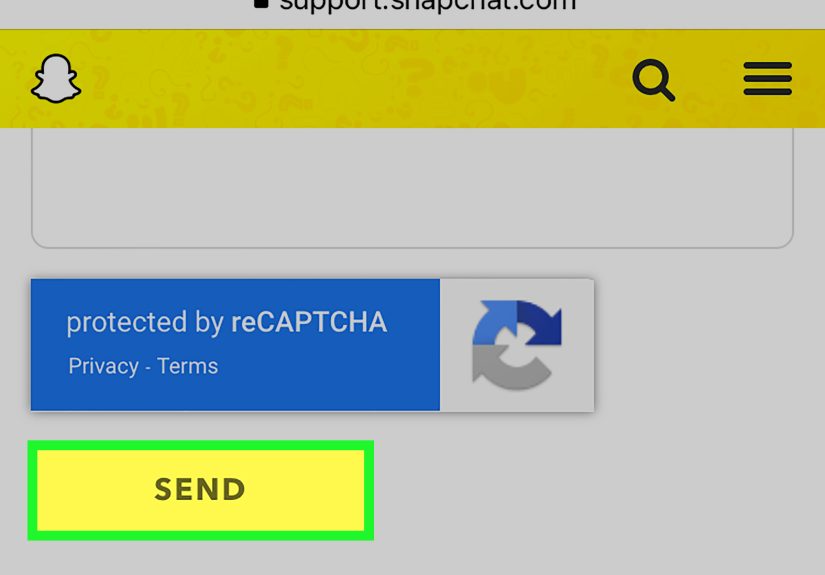
If you tapped Restore and it failed, or if Snapchat says the app cannot complete the process, your next move is to use Snapchat Support. This is the backup plan, and it is still the right one when a streak disappears because of a bug, syncing issue, failed send, or weird app behavior.
When you contact support, be clear and specific. Explain that the streak disappeared even though Snaps were sent, or that the in-app restore did not work. Include useful details such as the username involved, when the streak ended, and what happened on your end. The goal is not to write a courtroom speech. The goal is to make it easy for support to understand the issue quickly.
What support can and cannot do
Support may review your request and restore the streak if the issue qualifies. But there is no absolute guarantee. Snapchat is much more likely to help with recently expired streaks than ancient ones. So file the request as soon as you notice the problem, not after a week of bargaining with reality.
Also, be realistic. If the streak ended because nobody sent a Snap in time, support may not swoop in like a digital fairy godparent. But if you did everything right and the app still dropped the streak, there is a legitimate reason to ask for help.
Step 5: Protect your next streak like it matters to your tiny internet soul
Once your Snapchat streak is back, or once you start a new one, the smartest move is prevention. A restored streak feels great. Restoring the same streak over and over because you keep repeating the same mistakes feels like starring in your own reboot nobody asked for.
Simple habits that actually help
Send earlier in the day. Waiting until 11:58 p.m. is exciting only in the worst possible way.
Use a daily reminder. A quiet phone alarm beats a loud friendship panic.
Confirm the Snap was sent. Do not assume. Look at the status.
Keep the app updated. Old app versions and streak confidence do not mix.
Have a streak buddy agreement. It sounds ridiculous until it saves your 500-day streak.
Some people even create a routine around it. A simple morning Snap, a lunch break check-in, or an early-evening photo is enough. It does not need to be art. Snapchat streaks are built on consistency, not cinematography.
Common mistakes that kill a Snapstreak
Confusing chat messages with Snaps
This is the classic mistake. A normal typed chat does not keep the streak alive. Neither does reacting to a message, sending a sticker, or contributing a heartfelt “lol.” The streak lives on photo or video Snaps.
Assuming one side is enough
Both people have to participate. One person sending a Snap does not magically cover the other person. A streak is teamwork, not a solo speedrun.
Ignoring the hourglass emoji
The hourglass is not decorative. It is Snapchat’s way of saying, “Hello, this fire is about to become a memory.” When you see it, act fast.
Closing the app too soon
Sometimes users send a Snap, switch apps instantly, lose signal, and assume everything went through. That assumption has ended many otherwise healthy streaks. Always make sure the Snap actually sends.
Letting a buggy app run your life
If Snaps are not loading or sending properly, fix the technical issue immediately. A weak connection, outdated version, or overloaded cache can quietly sabotage a streak while you sit there wondering why the universe is rude.
What to expect after you request your streak back
If the in-app restore works, the streak usually comes back quickly. If you need support intervention, the process may take longer. During that time, do not submit the same request fifteen different ways like a person trying to summon customer service through sheer emotional force.
Be patient, but not passive. Check that your details were correct, keep using the app normally, and keep expectations grounded. Some requests are approved. Some are not. The key is giving yourself the best chance by acting fast and providing accurate information.
And if Snapchat cannot restore it? Start again. Yes, that hurts. Yes, it is annoying. But a new streak still counts, and honestly, rebuilding a streak can be weirdly satisfying. Like a friendship sequel with a stronger opening act.
Real-world experiences: what losing and restoring a streak actually feels like
Losing a Snapchat streak sounds trivial until it happens to you. Then suddenly it feels less like “just an app thing” and more like a miniature social disaster. A lot of users describe the first reaction the same way: confusion, then denial, then a very quick inspection of the chat like they are reviewing security footage. “No, no, I definitely sent something.” “Wait, did they send theirs?” “Was that a chat or a Snap?” This emotional spiral is almost a rite of passage.
One common experience is the midnight scramble. Someone notices the hourglass late, sends a blurry photo of a lamp, and prays the other person is still awake. Sometimes it works. Sometimes the other person is asleep, at work, grounded, ignoring their phone, or simply living a life that does not revolve around preserving a digital flame. That is usually when the panic turns into strategy, and people start checking for the Restore button like it is a winning lottery ticket.
Another very real experience is the “I did everything right” frustration. These are the users who insist they sent a proper Snap, saw it leave, and still woke up to a dead streak. In those cases, the in-app restore can feel weirdly comforting because it gives you a straight path forward. Instead of arguing with your friend over who dropped the ball, you can just restore it and move on with your dignity mostly intact.
Then there are the long-streak people. You know the type. Their streak is 200 days, 600 days, maybe over 1,000, and they treat it with the seriousness of a mortgage. For them, losing a streak is not just annoying; it feels like losing a tiny shared archive of daily contact. The number becomes symbolic. It is not really about the fire emoji anymore. It is about routine, continuity, and the strange comfort of knowing that no matter how chaotic the day gets, one silly photo still gets exchanged.
Some users also discover that restoring a streak changes how they use Snapchat afterward. They stop waiting until the last minute. They start sending their daily Snap earlier. They set reminders. They even create low-key agreements with friends like, “Morning Snap every day, no excuses.” It sounds hilariously formal for an app built on disappearing pictures, but it works.
And perhaps the most relatable experience of all is realizing that the streak matters and does not matter at the same time. In the big picture, losing one will not ruin your life. But in the moment, it can feel like a tiny, specific heartbreak. That is why getting it back feels satisfying. It restores not just the number, but the little ritual attached to it. So yes, it is only Snapchat. But sometimes “only Snapchat” is still enough to make people care a lot, laugh at themselves, and immediately send a ceiling photo to keep the fire alive.
Conclusion
If you are trying to get your Snapchat streak back, the smartest approach is also the fastest one: check the chat, tap Restore if it is there, complete the in-app process, and contact Snapchat Support right away if something fails. Do not overcomplicate it, do not wait too long, and do not assume a typed message counts as streak maintenance. That is how good streaks go to the great emoji graveyard.
Most importantly, remember that Snapchat has made streak recovery easier than it used to be. You are no longer stuck hoping customer support reads your cry for help like a tragic poem. In many cases, the fix is already sitting in the app. Use it quickly, back it up with smart habits, and your Snapstreak can survive another day of blurry selfies, random pets, and photos of absolutely nothing important.