Table of Contents >> Show >> Hide
If you need to crop a headshot, fix a dark vacation photo, remove a random photobombing elbow, or build a social graphic before your coffee gets cold, free online photo editors can save the day. The best part is obvious: no bulky download, no “please restart your computer,” and no need to sell a kidney for a monthly subscription.
But not all image editing sites are created equal. Some are basically digital duct tape: great for quick fixes, not great for serious editing. Others are shockingly powerful and can handle layers, masks, retouching, and design work right in your browser. A few are ideal for beginners. A few are made for marketers. And a few look like they time-traveled from 2007 but still get the job done better than tools with prettier homepages.
To help you avoid opening 19 tabs and regretting all your life choices, here are the 14 best free online photo editors worth your time right now. This list focuses on usability, genuinely useful free features, browser-based convenience, and who each tool is best for in the real world.
How We Picked the Best Free Online Photo Editors
The best online photo editing sites do more than slap a filter on your image and call it art. For this roundup, the most important factors were ease of use, strength of the free plan, browser performance, editing depth, export flexibility, and whether the tool solves a real problem for real people. In plain English: can you actually use it without getting annoyed?
Some tools below are true freebies, while others are freemium. That means the core editor is free, but certain AI tools, exports, templates, or advanced features may sit behind a paywall. That is not a dealbreaker, as long as the free version is still useful and not just a glorified teaser trailer.
The 14 Best Free Online Photo Editors (Image Editing Sites)
1. Canva
Best for: quick edits, social media graphics, blog images, and marketing visuals.
Canva is one of the easiest free online photo editors for beginners, and that is exactly why so many people keep coming back to it. You can crop, resize, adjust lighting, add text, apply effects, and turn a plain image into something web-ready in minutes. Its real superpower is speed. If your goal is to create a Pinterest pin, YouTube thumbnail, product promo, or blog hero image without wrestling with advanced tools, Canva is a strong first stop.
The free version is especially useful for content creators and small businesses because it blends photo editing with layout design. It is not the deepest editor on this list, but it is one of the most practical.
2. Adobe Express
Best for: branded content, resizing, text overlays, and polished social posts.
Adobe Express feels like the friendlier cousin of Adobe’s professional creative tools. It is designed for fast visual content, which makes it ideal for people who want clean results without learning a heavyweight editing workflow. You can enhance images, crop, remove backgrounds on supported features, add text, apply effects, and resize graphics for different platforms.
If Canva is the cheerful organizer, Adobe Express is the stylish overachiever with a good haircut. It is especially handy for people who care about consistent branding but do not need full Photoshop complexity.
3. Photopea
Best for: advanced editing, PSD files, layers, masks, and Photoshop-like workflows.
Photopea is the overqualified genius of the group. If you want a free online photo editor that feels surprisingly close to Photoshop, this is the one. It supports layered editing, masks, blending modes, smart selections, and many file types that casual editors cannot touch. It is the best choice here for designers, freelancers, students, and anyone who needs real control without installing desktop software.
The interface is not built for total beginners, but if you have ever used Photoshop, Photopea will feel wonderfully familiar. Even better, it works right in the browser, which makes it incredibly convenient when you need serious edits on the go.
4. Pixlr
Best for: users who want a balance of simplicity and deeper editing tools.
Pixlr has long been one of the most popular online image editing sites because it does a good job of serving different types of users. It offers a more modern quick-edit experience while still giving you access to stronger editing controls than many beginner-first platforms. You can work with layers, effects, cutouts, text, and handy enhancement tools without a giant learning curve.
This is a great pick when Canva feels too shallow but Photopea feels like homework. Pixlr lives nicely in that middle ground.
5. Fotor
Best for: one-click enhancements, portraits, collages, and easy design edits.
Fotor is built for people who want better-looking photos fast. It shines at automatic enhancements, basic retouching, filters, text, and quick beauty edits. If you are cleaning up selfies, making a collage, refreshing product images, or brightening a dark shot before posting it online, Fotor makes the process pleasantly painless.
Its free tier is useful, though some advanced tools lean premium. Still, for everyday editing, Fotor gives beginners enough power without making them feel like they need a design degree.
6. BeFunky
Best for: creative edits, artsy filters, collages, and beginner-friendly design.
BeFunky has always leaned into making photo editing feel fun rather than intimidating. It is a strong option for people who want to edit photos, create collages, and build graphics in one place. Its interface is clean, approachable, and easy to learn, which makes it especially good for hobbyists, bloggers, and social media users.
Where BeFunky stands out is style. If you like decorative effects, artsy finishes, and visual personality, this editor gives you more creative flavor than many purely utility-driven tools.
7. Picsart
Best for: creator-focused edits, trendy visuals, stickers, and mobile-style design in a browser.
Picsart is one of the best free online photo editors for people who want their images to look current, bold, and platform-ready. It is especially strong for social content, influencer-style visuals, stylized edits, collages, and eye-catching overlays. The platform mixes editing tools with design elements, which is useful when you want more than simple brightness-and-contrast adjustments.
If your goal is “make this look less like a raw photo and more like content,” Picsart is a very good fit.
8. LunaPic
Best for: quirky power users, fast effects, transparency work, and weirdly specific image tasks.
LunaPic is proof that a tool does not need a glossy interface to be genuinely useful. The site looks old-school, but it is packed with editing features, effects, transparency tools, drawing options, and surprisingly specific functions. It is especially helpful for quick edits, meme-style work, GIF tweaks, and internet-era image experimentation.
Would I call it glamorous? No. Would I trust it to do an oddly specific task that other editors hide behind a paywall? Absolutely. LunaPic is the digital equivalent of a messy garage with exactly the wrench you need.
9. iPiccy
Best for: simple browser editing, retouching, and beginner-friendly all-in-one use.
iPiccy is easy to overlook, but it remains one of the better free online photo editors for everyday use. It offers basic corrections, retouching, effects, text, painting, and collage features in a layout that is straightforward and unintimidating. It is a practical option for students, casual users, and small projects that need more than a crop tool but less than a professional workflow.
This is the kind of editor you open when you just want to get something done and move on with your life.
10. Polarr
Best for: filter lovers, fine-tuned color edits, and aesthetic-heavy photo work.
Polarr is a smart choice for people who care about color, mood, and visual style. It is especially appealing to users who want detailed filters, polished tonal adjustments, and a modern editing feel. The free version is good, though several advanced features are reserved for paid users.
Even so, Polarr earns its place because it gives your photos a cleaner, more intentional finish than many basic web editors. If you enjoy subtle color grading more than sticker explosions, this one deserves a look.
11. VistaCreate
Best for: design-forward photo editing, marketing assets, and template-based visuals.
VistaCreate sits closer to Canva in spirit than to Photopea. It combines photo editing with template-driven design, which makes it very useful for businesses, marketers, and creators producing graphics at scale. You can enhance photos, add effects, resize visuals, and build content for web and social channels quickly.
It is less about deep retouching and more about producing finished visual content efficiently. For people making promos, posts, flyers, and ad creatives, that is often exactly the point.
12. Sumo Paint
Best for: drawing-heavy edits, creative experimentation, and Photoshop-style tool lovers.
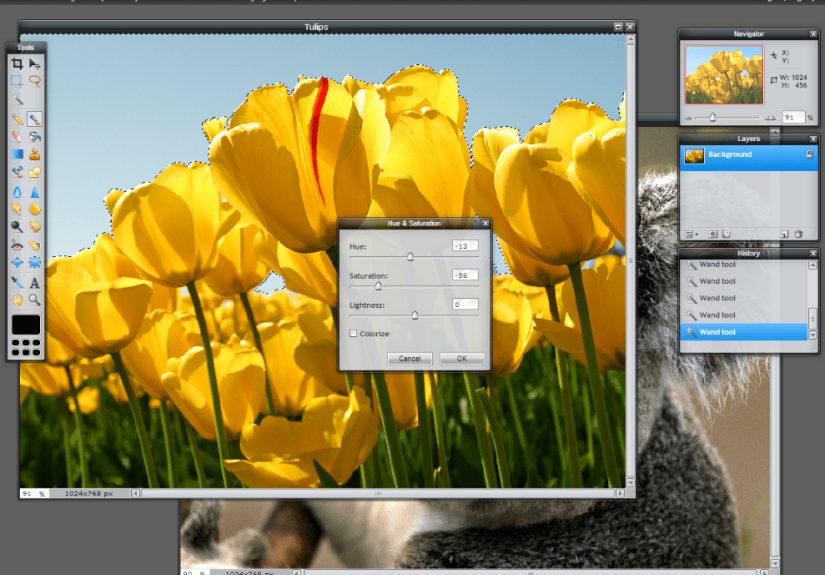
Sumo Paint is a bit different from the usual “quick online editor” crowd. It leans more toward illustration and creative image work, but it still offers editing tools, layers, adjustments, and an interface that will feel somewhat familiar to users who like traditional graphics software. It is not as mainstream as Canva or Pixlr, but it is useful for people who want more of a workshop than a one-click kiosk.
If you like to tinker, sketch, layer, and experiment, Sumo Paint is a worthy browser-based playground.
13. iLoveIMG Photo Editor
Best for: no-fuss quick fixes, text, stickers, and fast utility editing.
iLoveIMG is better known for utility tools like resizing, compressing, and converting images, but its photo editor is a nice bonus for users who want speed over complexity. It is ideal when you need to add text, apply a filter, frame a photo, or make a quick adjustment without creating an account or learning a full design platform.
This is not your choice for advanced retouching, but it is excellent for “I need this fixed in three minutes” moments.
14. Img2Go
Best for: simple editing, format changes, basic creative add-ons, and browser convenience.
Img2Go is another practical, utility-style image editing site that works well for everyday tasks. You can crop, rotate, resize, add text, use stickers, and make simple visual adjustments online without installing anything. Its strength is accessibility. It is easy, direct, and refreshingly low drama.
For users who care more about fast results than artistic perfection, Img2Go is a very solid free option.
Which Free Online Photo Editor Is Best for You?
The answer depends on what kind of editing you actually do. If you create social graphics, start with Canva or Adobe Express. If you want Photoshop-style control, Photopea is the clear winner. If you want a happy middle ground, Pixlr is hard to beat. For style-heavy creator content, Picsart and Polarr are strong picks. For quick jobs with minimal fuss, iLoveIMG, Img2Go, and iPiccy all make sense.
And if you enjoy using tools that look slightly chaotic but secretly do everything? Congratulations, LunaPic may be your soulmate.
Real-World Experience: What It’s Actually Like Using Free Online Photo Editors
Using free online photo editors in real life is usually less about making gallery masterpieces and more about solving everyday visual problems quickly. You are not always trying to create the next iconic album cover. Sometimes you just need to brighten a product photo, crop your cousin out of a family picture without starting a war, or make a blog image that does not look like it was assembled during a power outage.
That is where these tools really shine. A beginner will usually have the smoothest experience with Canva, Adobe Express, Fotor, or BeFunky because they reduce friction. You upload an image, click around a bit, adjust light, add text, save, and move on. It feels fast, forgiving, and pleasantly low-stress. For busy marketers, bloggers, teachers, Etsy sellers, and social media managers, that convenience is not a luxury. It is the whole point.
Then there is the second kind of experience: the “I need real editing tools, but I do not want to install anything” situation. That is where Photopea and Pixlr usually win people over. The first time you open a layered PSD in a browser and realize you can actually work with it, there is a brief moment of technological disbelief. It feels a little like discovering your microwave can also file taxes. These tools are not perfect substitutes for high-end desktop software, but for many users, they are more than enough.
There is also a very honest truth about free image editing sites: the experience can vary wildly depending on your goals. If you want advanced retouching, selective edits, and design precision, some free tools will feel limited fast. You may run into premium pop-ups, export restrictions, or missing features right when you are getting comfortable. That can be annoying, but it is manageable if you choose the right editor for the right job. In other words, do not open iLoveIMG expecting a full Photoshop replacement, and do not open Photopea expecting a five-second meme generator.
One of the best parts of online photo editors is flexibility. They are useful on school laptops, work computers, borrowed devices, and Chromebooks where installing software is either annoying or impossible. They are also great for collaborative or last-minute work. Need to resize a hero image before publishing a post? Easy. Need to add text to a sale graphic while half-awake on a Tuesday morning? Also easy. Need to make your dog look like a dramatic renaissance painting? Several of these tools are disturbingly ready for that task.
In the end, the real experience of using free online photo editors is simple: the best ones remove friction. They help you move from “ugh, this image needs work” to “okay, that actually looks good” without turning the process into a three-hour relationship test. And honestly, in a world full of complicated software and subscription fatigue, that feels pretty glorious.
Final Thoughts
The best free online photo editors are not all trying to do the same job, and that is a good thing. Some are built for speed. Some are built for style. Some are built for serious editing without a download. If you choose the platform that matches your workflow, you can save time, improve your visuals, and avoid paying for features you will never use.
For most people, the smartest move is to keep two tools in your back pocket: one simple editor for quick jobs and one more advanced editor for heavier work. A combination like Canva plus Photopea, or Adobe Express plus Pixlr, covers a surprising amount of ground. Your photos get fixed, your graphics look sharper, and your browser earns its keep for once.