Table of Contents >> Show >> Hide
- Why Apple Notes on Apple Watch Matters
- What You Can Do With Notes on Apple Watch
- What Notes on Apple Watch Cannot Do Yet
- How Apple Notes Fits Into watchOS 26
- Best Ways to Use Apple Notes on Apple Watch
- Is Apple Notes on Apple Watch Worth Using?
- Who Will Love This Feature Most?
- My Experience Using Notes on Apple Watch
- Final Thoughts
For years, the Apple Watch has been excellent at telling me to stand up, breathe, sleep better, close my rings, answer calls, unlock my Mac, find my iPhone, track a walk, and remind me that I am somehow both busy and behind. But one tiny, wildly obvious thing was missing: Apple Notes.
Yes, Apple finally added Notes to the Apple Watch, and it feels like one of those updates that should have existed long ago. Not because it is flashy. Not because it makes the watch look futuristic in a sci-fi movie way. But because it solves a very real problem: ideas do not politely wait until your iPhone is in your hand.
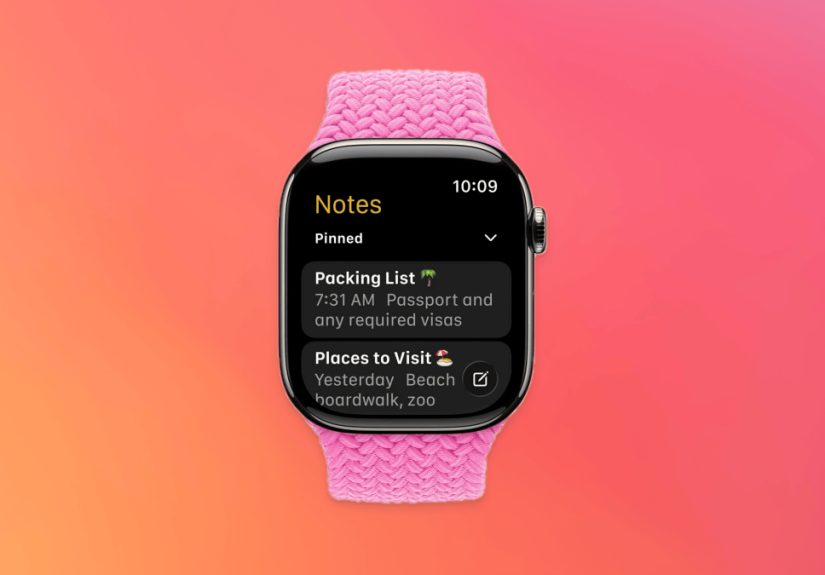
With watchOS 26, the Notes app arrives on Apple Watch as a simple, practical, wrist-friendly tool for creating new notes, viewing existing iCloud notes, checking off list items, and quickly capturing thoughts with Siri, dictation, or the small on-screen keyboard. It is not a full replacement for Notes on iPhone, iPad, or Mac. And honestly, that is a good thing. Nobody wants to write a 2,000-word grocery manifesto on a watch screen unless they have lost a bet.
Instead, Apple Notes on Apple Watch is exactly what it should be: fast, lightweight, and useful in those awkward moments when your phone is across the room, your hands are full, and your brain has just produced one of its rare premium ideas.
Why Apple Notes on Apple Watch Matters
The Apple Watch has always been strongest when it handles small moments quickly. A notification appears. You glance. A timer buzzes. You tap. A call comes in. You decide whether the universe truly needs you right now. The best Apple Watch features do not ask you to live on the tiny screen; they help you avoid pulling out your phone every seven seconds.
That is why the Apple Watch Notes app makes so much sense. Notes is one of Apple’s most useful everyday apps. People use it for grocery lists, meeting notes, packing lists, random reminders, recipe ideas, gift plans, passwords they absolutely should not store there but sometimes do anyway, and the kind of 2 a.m. thoughts that feel brilliant until morning.
Before watchOS 26, Apple Watch users had to rely on workarounds. Some used Reminders as a pretend Notes app. Some dictated messages to themselves. Some opened Voice Memos and promised to transcribe later, which is a lovely fantasy. Others used third-party note apps, Shortcuts, or the classic method known as “I’ll remember it,” which has a success rate somewhere between a paper umbrella and a screen door on a submarine.
Now, the built-in Notes app gives Apple Watch users a native way to capture and access information without switching ecosystems or building a complicated productivity shrine.
What You Can Do With Notes on Apple Watch
The new Notes app is intentionally focused. It does not try to squeeze the entire iPhone Notes experience onto your wrist. Instead, Apple gives you the features most people need when they are moving, shopping, walking, cooking, commuting, or pretending to listen in a meeting while secretly remembering they need toothpaste.
Create New Notes Quickly
You can create a new note directly from your Apple Watch. The most natural way is by voice. Ask Siri to start a note, dictate what you want to save, and let the watch handle the capture. For short thoughts, this is the best version of the feature. It feels instant, natural, and surprisingly freeing.
You can also use dictation from inside the Notes app or type with the on-screen keyboard. Typing on a watch is possible, but let us be honest: it is best reserved for short phrases, not your next novel. If you are typing “buy lemons,” wonderful. If you are typing “chapter three begins with a thunderstorm,” please blink twice and pick up your iPhone.
View Existing iCloud Notes
The Apple Watch Notes app lets you view notes synced through iCloud. This is huge for quick reference. Need your hotel confirmation note? A packing checklist? A list of measurements for that one shelf you keep meaning to buy? Your wrist can now save you from digging through your phone like a raccoon in a snack drawer.
Pinned notes appear at the top, and recent notes are easier to find because the app organizes them in a watch-friendly way. This makes the experience feel less like browsing a tiny filing cabinet and more like checking the few notes you are most likely to need.
Complete Checklist Items
This may be the most practical feature of all. If you use Apple Notes for shopping lists, travel prep, daily errands, or project checklists, you can mark items complete right from the watch.
Picture this: you are at the grocery store with one hand on a basket, one hand debating the emotional cost of premium olive oil, and your phone is buried somewhere under a reusable bag. Instead of performing a pocket excavation, you raise your wrist, open the note, and check off “eggs.” Productivity has never looked so casual.
Access Locked and Pinned Notes
The Notes app on Apple Watch can also work with pinned and locked notes. That matters because many users keep their most important notes pinned at the top on iPhone and Mac. Having those notes available on the watch makes the feature feel connected to the larger Apple ecosystem rather than like a tiny, isolated notepad.
Locked notes add another layer of usefulness, especially for information you want to reference but do not want casually visible. As always, sensitive information should be handled carefully, but having access to locked notes from your wrist is still a welcome convenience.
What Notes on Apple Watch Cannot Do Yet
The new Notes app is useful, but it has limits. The biggest one: you cannot fully edit existing notes from Apple Watch. You can create new notes and complete checklist items, but for deeper editing, formatting, moving notes between folders, or cleaning up a long document, you still need your iPhone, iPad, or Mac.
That limitation is understandable. Apple Watch is designed for quick actions, not deep document management. Editing a long note on a watch would be like trying to paint a house with a toothbrush. Technically possible? Maybe. Enjoyable? Absolutely not.
Some formatting and attachments may also be limited on the watch. Rich notes created on larger devices can be viewed in simplified form, but certain elements, such as complex tables or some attachments, are not ideal for the small display. Again, this is not a dealbreaker. It is a reminder that Apple Watch Notes is a companion, not the command center.
How Apple Notes Fits Into watchOS 26
Notes is not the only meaningful update in watchOS 26. Apple also introduced a refreshed design language, smarter Smart Stack hints, new workout features, a wrist flick gesture on supported models, and more intelligent everyday interactions. But for many users, Notes may be the quiet update that changes daily behavior the most.
Fitness features are impressive. New watch faces are fun. Design updates make everything feel fresher. But Notes is different because it touches ordinary moments. It is useful when you suddenly remember a bill, a name, an idea, a quote, a task, or the one ingredient that keeps ruining dinner because you never write it down.
The best smartwatch features are not always the loudest. Sometimes the best feature is the one that removes a tiny irritation from your day. Apple Notes on Apple Watch does exactly that.
Best Ways to Use Apple Notes on Apple Watch
1. Capture Ideas Before They Escape
Ideas are slippery. They show up during walks, showers, workouts, and the exact moment your phone is not nearby. With Notes on Apple Watch, you can dictate a thought immediately. This is perfect for writers, students, creators, business owners, and anyone whose brain enjoys throwing useful information into the void without warning.
2. Use a Pinned “Today” Note
One smart setup is to create a pinned note called “Today” or “Quick Capture.” Use it for temporary thoughts, errands, and reminders that do not deserve a full project folder. Check it later on your iPhone or Mac and organize anything worth keeping.
3. Make Grocery Lists Actually Useful
Apple Notes has long been great for shared grocery lists. With Apple Watch support, those lists become easier to use in the store. You can glance, scroll, and check off items without holding your phone the entire time. Your future self, standing in aisle seven trying to remember whether you already grabbed onions, will be grateful.
4. Keep Travel Details Handy
Travel is where wrist-based notes shine. Save hotel addresses, gate reminders, packing lists, parking details, reservation notes, or quick phrases you might need. When you are juggling luggage, coffee, and mild airport panic, a note on your wrist feels like a tiny personal assistant with better battery discipline.
5. Save Cooking Notes Without Touching Your Phone
If your hands are covered in flour, sauce, or something that was once confidently called “dinner,” touching your phone is not ideal. The Apple Watch Notes app can help you reference simple recipe notes, timing reminders, or ingredient substitutions from your wrist.
Is Apple Notes on Apple Watch Worth Using?
Yes, especially if you already use Apple Notes across your devices. The Apple Watch version is not powerful in the traditional sense, but it does not need to be. Its value comes from convenience. It closes the gap between having an idea and saving it.
The app is best for short notes, quick reminders, simple lists, and reference material. It is not best for long writing sessions, heavy formatting, folder organization, or editing complex notes. In other words, it is not trying to be your Mac. It is trying to be the sticky note you always have with you.
That is exactly why it works. Apple Watch is a glanceable device, and Notes is now a glanceable app. Together, they make a surprisingly useful pair.
Who Will Love This Feature Most?
The people who will benefit most are already living inside Apple Notes. If your iPhone Notes app is full of shopping lists, half-written plans, travel reminders, random thoughts, and “important things I will organize later,” this update is for you.
Students can use it to capture quick assignment reminders. Parents can use it for school pickup notes, shopping lists, and tiny emergencies like “buy poster board tonight or disaster.” Professionals can dictate ideas between meetings. Runners and walkers can save thoughts without stopping. Home cooks can reference recipes. Forgetful people can finally stop trusting their memory, which, respectfully, has been lying to them for years.
My Experience Using Notes on Apple Watch
After using Notes on Apple Watch, the biggest surprise is not that it feels revolutionary. It does not. The surprise is that it feels normal almost immediately. That is usually the sign of a good Apple feature. It arrives, you use it twice, and then you wonder how it was ever missing.
The first real use case happened during a walk. I remembered a small change I wanted to make to an article outline. Normally, I would either pull out my iPhone, stop walking, unlock it, open Notes, find the right place, and type; or I would say, “I’ll remember that.” One of those options interrupts the walk. The other is fiction. With Notes on Apple Watch, I dictated a quick note in seconds and kept moving.
Another surprisingly helpful moment came while shopping. I had a shared grocery list in Notes, and being able to check off items from my wrist made the whole trip smoother. It sounds minor until you are trying to hold a basket, compare two brands of pasta, and avoid blocking the aisle like a confused shopping cart statue. A wrist-based checklist is not glamorous, but neither is forgetting detergent for the third time.
The app also shines in those “phone is nearby but inconvenient” moments. Cooking is a perfect example. I do not want to unlock my phone with messy hands just to check a note that says “add lemon at the end.” On the watch, a quick glance is enough. The screen is small, of course, but for simple reference notes, it is perfectly usable.
Dictation is the feature I use most. The keyboard works for short text, but voice input feels like the natural match for a wearable. The trick is to keep notes brief. Instead of dictating a long paragraph, I use quick labels: “Article idea: compare Apple Watch Notes with Reminders,” or “Gift idea: wireless charger for Dad.” Later, when I am back on my Mac or iPhone, I clean everything up.
The biggest limitation is the lack of full editing for existing notes. I understand why Apple made that choice, but I still feel it occasionally. Sometimes I want to add one line to an existing note rather than create a new one. For now, the workaround is simple: create a fresh quick note and organize it later. It is not perfect, but it is better than losing the thought entirely.
What makes the experience work is that Notes on Apple Watch respects the device. It does not pretend your wrist is a laptop. It gives you quick capture, quick viewing, and quick checklist control. That is enough. In fact, that restraint is the reason the app feels useful instead of ridiculous.
My favorite way to use it is as a mental inbox. Any quick thought goes into Notes from the watch. Later, I sort it on a larger screen. This keeps the Apple Watch from becoming a cluttered productivity machine while still making it genuinely helpful. It catches the idea, then gets out of the way.
Is this the most dramatic Apple Watch update ever? No. Nobody is going to run through the streets yelling, “Pinned notes on my wrist!” At least, I hope not. But for everyday usefulness, Apple Notes on Apple Watch is one of those small upgrades that quietly improves the entire device. It makes the watch feel more complete, more personal, and more capable in the exact moments when a watch should help.
Final Thoughts
Apple finally adding Notes to the Apple Watch is a small feature with a big everyday impact. It will not replace your iPhone, iPad, or Mac for serious note-taking, and it is not meant to. But for quick thoughts, checklists, reminders, and glanceable information, it is one of the most useful additions in watchOS 26.
The Apple Watch has always been about reducing friction. Notes does that beautifully. It helps you capture the thing before you forget it, view the list before you miss it, and check off the task before it becomes tomorrow’s problem. Sometimes innovation looks like artificial intelligence. Sometimes it looks like a tiny yellow notepad on your wrist saying, “Relax, I wrote it down.”