Table of Contents >> Show >> Hide
- Quick Answer: How to Exit Power Armor in Fallout 4
- Step-by-Step Guide to Leaving Power Armor
- Why You Might Not Be Able to Exit Power Armor
- How to Exit Power Armor on PC
- How to Exit Power Armor on Xbox
- How to Exit Power Armor on PlayStation
- Where Should You Leave Your Power Armor?
- Use a Power Armor Station for Repairs and Upgrades
- Remove the Fusion Core Before You Walk Away
- How to Find Power Armor You Left Behind
- How to Get a Companion Out of Power Armor
- Common Power Armor Mistakes Beginners Make
- Power Armor Exit Troubleshooting Checklist
- Best Practices After Exiting Power Armor
- When Should You Use Power Armor?
- Extra Player Experience: Lessons From Getting In and Out of Power Armor
- Conclusion
Power Armor in Fallout 4 makes you feel like a walking tank with questionable parking habits. You can stomp through raiders, shrug off damage, and look dramatically overprepared for a trip to the nearest settlement. But sooner or later, every Sole Survivor faces one deeply humbling question: “How do I get out of this thing?”
The good news is that exiting Power Armor in Fallout 4 is simple once you know the correct button. The bad news is that the game does not always shout the answer at you. Many new players climb into Power Armor during the early “When Freedom Calls” quest, defeat a Deathclaw, feel extremely heroic, and then spend the next ten minutes waddling around Sanctuary like a confused refrigerator.
This easy guide explains exactly how to exit Power Armor in Fallout 4 on PC, Xbox, and PlayStation. It also covers what to do if the button does not work, how to keep your suit safe, how to get companions out of Power Armor, and why leaving a Fusion Core inside your suit is basically handing the keys to every bored settler in the Commonwealth.
Quick Answer: How to Exit Power Armor in Fallout 4
To exit Power Armor in Fallout 4, stand still and hold the same interaction button you used to enter the suit. Do not tap it. Hold it for a few seconds until the exit animation begins.
- PC: Hold E
- Xbox: Hold A
- PlayStation: Hold X
That is the whole secret. The most common mistake is pressing the button quickly instead of holding it. A quick tap interacts with objects, talks to NPCs, or opens prompts. A long press tells your character, “Okay, enough metal cosplay. Time to climb out.”
Step-by-Step Guide to Leaving Power Armor
Step 1: Stop Moving
Before exiting, make sure your character is standing still. Do not sprint, jump, attack, use a terminal, open a container, or try to leave while wedged between a car and a pile of glorious Bethesda physics. Power Armor uses an exit animation, and the game needs a little room to play it.
Step 2: Move to a Clear Area
Find a flat, open spot. You can usually exit almost anywhere, but it is easier when you are not pressed against walls, workbenches, doors, settlers, Brahmin, or that one chair that somehow blocks your entire future. If the animation refuses to start, take two steps forward and try again.
Step 3: Hold the Correct Button
Now hold the exit button for your platform. On PC, hold E. On Xbox, hold A. On PlayStation, hold X. Keep holding until the game begins the exit animation. Your character will climb out and leave the Power Armor frame standing behind you.
Step 4: Check Where You Parked It
After you exit, the suit remains in the world. It does not magically return to your inventory. Think of it like a very expensive, nuclear-powered shopping cart. Wherever you leave it, that is where it stays unless something moves it, steals it, or you enter another frame later.
Why You Might Not Be Able to Exit Power Armor
If you are holding the right button and nothing happens, do not panic. The suit is not your new permanent skeleton. Usually, the problem is one of a few simple issues.
You Are Tapping Instead of Holding
This is the classic beginner mistake. Fallout 4 uses the interaction button for many things, so a tap and a hold can do different jobs. If nothing happens, press and hold the button longer than feels necessary. Yes, it may feel slightly dramatic. Power Armor is dramatic by design.
You Are Too Close to an Object
The exit animation needs space. If your back is against a wall or the suit is jammed into a corner, the game may refuse to let you out. Move to a clear area and try again.
Your Controls Were Remapped
If you changed your control settings, the default button may not work. Check the controls menu and look for your activate or interaction button. The exit command is tied to that input, so use your custom interaction key instead of the default one.
The Game Is Bugging Out
Fallout 4 is a massive open-world RPG, which means weird things can happen. If the exit command refuses to work, save your game, reload, and try again. You can also fast travel to a safer, more open location if the game allows it. When in doubt, reload before declaring yourself legally married to the suit.
How to Exit Power Armor on PC
On PC, the default command is simple: hold E. If you use a keyboard and mouse, this is the same key commonly used to activate items, open doors, and interact with the world.
For best results, stand still, look away from containers or NPCs, and hold E until the exit animation starts. If you are using a controller on PC, use the controller button instead. For an Xbox-style controller, hold A. For a PlayStation-style controller, hold X.
How to Exit Power Armor on Xbox
On Xbox, hold the A button. Do not press it once. Hold it down until your character begins climbing out of the armor.
If it does not work, check whether you are standing too close to a wall, crafting station, settlement object, or companion. Back up, stop moving, and try again. Xbox players should also make sure the controller is not having input issues, especially if the button works for tapping but not for holding.
How to Exit Power Armor on PlayStation
On PlayStation, hold the X button. As with other platforms, the important word is “hold.” A single press will not do it.
If your character stays inside the suit, move to a flatter area and try again. PlayStation players who use custom control layouts should check the interaction command in settings. If your activate button changed, your Power Armor exit button changed with it.
Where Should You Leave Your Power Armor?
You can exit Power Armor almost anywhere, but that does not mean you should. Leaving it in the middle of a road, enemy camp, or random parking lot is a great way to lose track of it later. The Commonwealth is already chaotic enough without adding “Where did I park my nuclear exoskeleton?” to your quest log.
The best place to leave Power Armor is at a settlement, preferably near a Power Armor Station. Sanctuary, Red Rocket Truck Stop, and other settlement areas are convenient because you can return later to repair, upgrade, and organize your armor pieces.
Use a Power Armor Station for Repairs and Upgrades
Power Armor Stations are the yellow frames you find at settlements and workshops. To use one properly, walk your Power Armor close to the station, exit the suit nearby, and then activate the station. From there, you can repair damaged parts, install mods, swap pieces, and make your metal monster look slightly less like it lost an argument with a Super Mutant.
This is especially useful after big fights. Power Armor pieces can break during combat, and broken pieces may be removed from the frame. Repairing them at a station keeps your suit battle-ready and saves you from wandering into danger wearing only half a tank.
Remove the Fusion Core Before You Walk Away
Here is one of the most important Power Armor tips in Fallout 4: remove the Fusion Core when you leave your suit unattended.
The Fusion Core is the power source. If you leave it inside, NPCs may be able to enter and use the armor. That includes settlers, companions, and sometimes other characters during chaotic moments. Removing the core is like taking the keys out of a car. It does not make theft impossible in every strange situation, but it greatly reduces the chance of someone taking your prized armor for an unscheduled joyride.
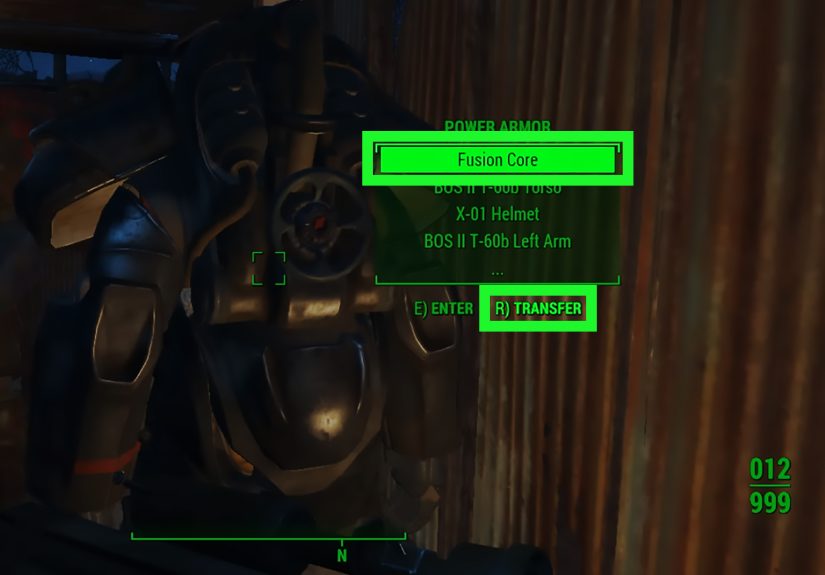
To remove the Fusion Core, interact with the Power Armor inventory after exiting. Transfer the Fusion Core from the frame into your own inventory. It is quick, easy, and much less annoying than chasing a settler who decided your T-60 suit was community property.
How to Find Power Armor You Left Behind
Fallout 4 marks your most recently used Power Armor on the Pip-Boy map with a small helmet icon. This can help you locate the last suit you entered and exited.
However, the map marker does not track every Power Armor suit you own. It usually points to the last used frame. If you collect several suits, make a habit of parking them together at one settlement. Many players use Sanctuary, Red Rocket, or the Castle as a Power Armor garage. It may not be glamorous, but neither is checking twelve settlements because you forgot where you left your favorite frame.
How to Get a Companion Out of Power Armor
Companions can enter Power Armor, and sometimes they seem a little too comfortable in it. To make most companions exit, talk to them while they are wearing the suit. In the dialogue options, you should see an option related to exiting Power Armor. Select it, and the companion should climb out.
There are exceptions. Some characters have unique behavior, and certain companions may not follow normal Power Armor rules. Paladin Danse, for example, is famously attached to his armor for story and character reasons. In general, though, the solution is simple: talk to the companion and choose the exit option.
Common Power Armor Mistakes Beginners Make
Leaving the Fusion Core Inside
This is the big one. If you leave the core inside, someone else may decide your armor looks cozy. Always remove it before walking away.
Parking in Random Locations
Power Armor is not automatically collected like normal gear. If you leave it behind, you need to remember where it is. Park it at settlements whenever possible.
Thinking the Armor Is Gone Forever
If you cannot find your suit, check the map for the Power Armor helmet icon. Also revisit places where you commonly exit armor, such as Sanctuary, Red Rocket, Diamond City outskirts, or quest locations where you remember using it.
Trying to Exit During Combat Chaos
You can exit during many situations, but it is smarter to do it somewhere safe. Climbing out while bullets, claws, or exploding cars are involved is not exactly peak Wasteland wisdom.
Power Armor Exit Troubleshooting Checklist
If you are stuck in Power Armor, run through this quick checklist:
- Stand completely still.
- Move to a clear, flat area.
- Hold the exit button instead of tapping it.
- Use the correct button: E on PC, A on Xbox, X on PlayStation.
- Check custom control settings if defaults do not work.
- Save and reload if the animation will not trigger.
- Fast travel to a settlement and try again if possible.
Most players solve the issue within the first three steps. The game is usually not broken; it is just waiting for you to hold the button long enough. Like many things in Fallout 4, the answer is simple once someone tells youand mildly ridiculous until then.
Best Practices After Exiting Power Armor
Once you exit, treat your Power Armor like valuable equipment, not disposable furniture. Park it neatly, remove the Fusion Core, repair damaged parts, and store spare armor pieces in a workshop or container you trust. If you are building a settlement, create a dedicated Power Armor area. Add lights, concrete flooring, and multiple stations if you want the full “post-apocalyptic Iron Man garage” experience.
Also consider carrying extra Fusion Cores only when you plan to use Power Armor for a while. Fusion Cores are not impossible to find, but wasting them early can make the first half of the game feel tighter. If you are just crafting, trading, or decorating a settlement with 47 wooden walls you will later regret, leave the suit parked.
When Should You Use Power Armor?
Power Armor is excellent for tough fights, dangerous exploration, high-radiation areas, and moments when you want to feel like the Commonwealth’s loudest problem. It helps with survivability and can make difficult encounters more manageable, especially for newer players.
However, you do not need to wear it all the time. Walking around in Power Armor constantly drains Fusion Core energy and can make simple exploration feel bulky. Many players save it for major missions, boss fights, Glowing Sea trips, or settlement defense emergencies. Think of it less like everyday clothing and more like a special occasion outfitexcept the occasion is usually “something enormous is trying to eat me.”
Extra Player Experience: Lessons From Getting In and Out of Power Armor
The first time many players use Power Armor in Fallout 4, it feels unforgettable. You climb onto the roof in Concord, grab the minigun, drop down in full armor, and suddenly the entire game changes. A few minutes earlier, you were a confused vault dweller with a pistol and emotional baggage. Now you are a steel-plated thunder machine fighting raiders and a Deathclaw in the street. It is one of the best early-game power trips Bethesda has ever designed.
Then the fight ends. The music calms down. The dust settles. Preston Garvey starts talking about settlements, because of course he does. And there you are, still inside the armor, wondering how to leave. That moment is funny because the game gives you this incredible machine but makes the exit command easy to miss. It is not complicated, but it is not obvious either. Holding the button instead of pressing it is a tiny detail that can make a new player feel trapped in the world’s most expensive tin can.
From experience, the best habit is to treat Power Armor like a tool, not a default outfit. Early in the game, Fusion Cores feel precious. If you stomp around everywhere in the suit, you may start worrying about battery life instead of enjoying the world. A smarter approach is to park the armor at Sanctuary or Red Rocket, remove the Fusion Core, and save the suit for major fights. That way, when you finally climb back in, it feels special again.
Another useful habit is building a personal Power Armor garage. It does not need to be fancy. A flat platform, a few Power Armor Stations, and a storage chest for spare parts can make a huge difference. Later, when you have T-45, T-51, T-60, Raider, and maybe X-01 pieces scattered around, organization becomes your best friend. Without it, your collection starts looking like a robot yard sale.
One memorable mistake is leaving a Fusion Core inside a suit at a busy settlement. Everything seems fine until combat breaks out nearby and an NPC decides to become the hero of their own action movie. Suddenly your armor is walking away without you. It is funny once. After that, removing the core becomes automatic. Exit, open inventory, take Fusion Core, walk away. That little routine prevents a lot of drama.
Companions add another layer of comedy. Giving a follower Power Armor can be useful, especially before a dangerous mission. But when they block a doorway in a giant metal frame, shuffle around during conversations, or refuse to stand where you need them, the novelty fades quickly. Thankfully, most companions can be told to exit through dialogue. Still, it is wise to quicksave before experimenting with companion armor, especially if you are using mods or unusual setups.
The most satisfying part of learning how to exit Power Armor is that it turns the suit from a confusing gimmick into a flexible part of your strategy. You can use it when it matters, park it safely, repair it properly, and avoid wasting Fusion Cores. Once you know the routine, Power Armor becomes less intimidating and more enjoyable. You are no longer trapped in the suit; you are managing it like a true Commonwealth professionalor at least like someone who finally learned where the exit button is.
Conclusion
Exiting Power Armor in Fallout 4 is easy once you know the trick: stand still and hold the interaction button. Use E on PC, A on Xbox, and X on PlayStation. If it does not work, move to a clearer spot, check your controls, and try again.
After leaving the suit, remember to remove the Fusion Core, park the armor somewhere safe, and use a Power Armor Station for repairs and upgrades. Power Armor is one of the most iconic tools in Fallout 4, but it works best when you manage it wisely. Treat it well, and it will carry you through Deathclaws, raiders, radiation, and more bad decisions than your Pip-Boy can politely count.
Note: This article is written for web publishing and synthesizes real Fallout 4 gameplay information, platform controls, Power Armor behavior, troubleshooting tips, and player-experience guidance in original wording.