Table of Contents >> Show >> Hide
- The Core Formula (Dot Product Angle Formula)
- Step-by-Step: How to Find the Angle Between Two Vectors
- Worked Examples (with Full Math, Not Vibes)
- Why the Dot Product Works (Quick Geometry, No Ted Talk)
- Alternative: Using the Cross Product (and Why It’s Handy)
- Real-World Uses (a.k.a. “Why You’re Learning This Instead of Bird Facts”)
- Common Mistakes (So You Don’t Get Betrayed by Your Own Calculator)
- FAQ: Quick Answers to Common Vector-Angle Questions
- Wrap-Up: The Angle Between Two Vectors in One Sentence
- Experiences With This Topic (What It’s Like to Learnand Actually Usethe Angle Between Vectors)
Vectors are basically math’s way of saying, “Here’s an arrow with a direction and a lengthplease don’t panic.”
And the angle between two vectors is just a fancy way of asking: How aligned are these arrows?
Are they marching together like best friends, ignoring each other like strangers in an elevator, or pointing in opposite directions like two people trying to merge into the same lane?
The good news: there’s a clean formula (dot product) and it works in 2D, 3D, and beyond. The slightly-less-good news:
your calculator will happily give you the wrong unit (radians) if you don’t tell it otherwise. But we’ll fix that.
The Core Formula (Dot Product Angle Formula)
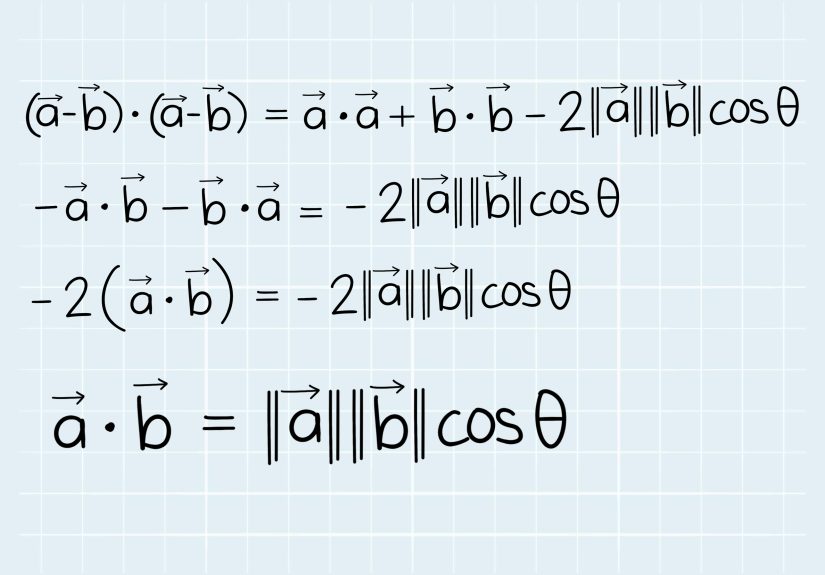
For two nonzero vectors a and b, the angle θ between them is:
cos(θ) = (a · b) / (|a| |b|)
so
θ = arccos( (a · b) / (|a| |b|) )
Translation into human: multiply matching components, add them up (that’s the dot product), divide by the product of the lengths (magnitudes),
then take arccos to “undo” cosine.
Step-by-Step: How to Find the Angle Between Two Vectors
Step 0: Make sure neither vector is the zero vector
If a = (0,0,...) or b = (0,0,...), the angle is undefined because a zero vector has no direction.
(It’s an arrow that forgot to show up.)
Step 1: Compute the dot product
If a = (a1, a2, ..., an) and b = (b1, b2, ..., bn), then:
a · b = a1b1 + a2b2 + ... + anbn
Step 2: Compute the magnitudes
Magnitude (length) is:
|a| = sqrt(a1^2 + a2^2 + ... + an^2)
|b| = sqrt(b1^2 + b2^2 + ... + bn^2)
Step 3: Compute cos(θ)
cos(θ) = (a · b) / (|a| |b|)
Reality check: cosine values must be between -1 and 1.
On computers, rounding can sometimes produce something like 1.0000000002.
That tiny extra can make arccos() throw a tantrum (or return NaN).
So programmers often “clamp” the value into [-1, 1] before taking arccos.
Step 4: Take arccos and pick your units (degrees vs radians)
θ = arccos(cos(θ))
Many calculators and programming languages return angles in radians by default.
If you want degrees, convert:
degrees = radians × (180/π)
Worked Examples (with Full Math, Not Vibes)
Example 1: A 2D example (nice and friendly)
Let a = (3, 4) and b = (4, 0).
-
Dot product:
a · b = 3·4 + 4·0 = 12 -
Magnitudes:
|a| = sqrt(3^2 + 4^2) = sqrt(9 + 16) = 5
|b| = sqrt(4^2 + 0^2) = 4 -
Cosine:
cos(θ) = 12 / (5·4) = 12/20 = 0.6 -
Angle:
θ = arccos(0.6) ≈ 53.13°
So the vectors form an angle of about 53.13 degrees. (Not too close, not too farlike polite neighbors.)
Example 2: An obtuse angle (when vectors disagree)
Let a = (2, -1, 0) and b = (-3, 4, 1).
-
Dot product:
a · b = 2(-3) + (-1)4 + 0·1 = -6 - 4 + 0 = -10 -
Magnitudes:
|a| = sqrt(2^2 + (-1)^2 + 0^2) = sqrt(5)
|b| = sqrt((-3)^2 + 4^2 + 1^2) = sqrt(26) -
Cosine:
cos(θ) = -10 / (sqrt(5)·sqrt(26)) = -10 / sqrt(130) ≈ -0.8771 -
Angle:
θ = arccos(-0.8771) ≈ 151.29°
Because the dot product is negative, the angle is obtuse (greater than 90°). These vectors are basically saying,
“We can work together, but I’m not happy about it.”
Example 3: Perpendicular vectors (the 90° classic)
Let a = (1, -2, 1) and b = (2, 1, 0).
a · b = 1·2 + (-2)·1 + 1·0 = 2 - 2 + 0 = 0
If a · b = 0 (and neither vector is zero), then cos(θ) = 0 and the angle is
90°. That’s orthogonalmath’s way of saying “perfectly perpendicular.”
Mini examples (quick intuition builders)
-
Same direction:
(1,1)and(2,2)point the same way, so the angle is0°. -
Opposite direction:
(1,0)and(-1,0)point opposite ways, so the angle is180°. - Dot product sign test: dot > 0 → acute, dot = 0 → right, dot < 0 → obtuse.
Why the Dot Product Works (Quick Geometry, No Ted Talk)
Geometrically, the dot product connects two things:
- Length (how big the vectors are)
- Direction alignment (how much one points along the other)
The relationship a · b = |a||b|cos(θ) says:
if vectors point in the same direction, cos(θ) is near 1; if they’re perpendicular, it’s 0;
if they point opposite ways, it’s near -1.
Alternative: Using the Cross Product (and Why It’s Handy)
In 3D, the magnitude of the cross product connects to sine:
|a × b| = |a||b|sin(θ)
That means you can also compute:
sin(θ) = |a × b| / (|a||b|)
One reason people like the cross-product route (especially in graphics/robotics) is that it pairs nicely with the dot product:
θ = atan2( |a × b|, a · b )
That atan2 version is often numerically stable and avoids some arccos weirdness for nearly-parallel vectors.
You still get an angle between 0 and π (0° to 180°).
Real-World Uses (a.k.a. “Why You’re Learning This Instead of Bird Facts”)
1) Physics: Work done by a force
Work is the dot product of force and displacement:
W = F · d = |F||d|cos(θ)
If the force points in the same direction as the motion, you get maximum work.
If the force is perpendicular to motion, the work is zero. So the angle between vectors isn’t just geometryit’s literally
how much “push” actually matters.
2) Data science & machine learning: Cosine similarity
When vectors represent things like documents, embeddings, or feature lists, people often measure similarity using:
cosine similarity = (a · b) / (|a||b|)
That’s basically cos(θ). Small angle → similar direction → more similar items. Big angle → less similar.
This is popular because it focuses on direction rather than magnitude (so a long document isn’t automatically “more similar” just because it’s long).
3) 3D graphics & robotics: Normals, lighting, and rotation
In computer graphics, the dot product between a surface normal vector and a light direction helps estimate brightness
(because it depends on the cosine of the angle between them). In robotics and orientation math, dot and cross products
show up constantly when you need the angle and axis of rotation between directions.
Common Mistakes (So You Don’t Get Betrayed by Your Own Calculator)
-
Forgetting the denominator: The angle formula needs
|a||b|. Using justarccos(a · b)only works if both vectors are unit vectors. - Zero vector problem: If a magnitude is 0, you’ll divide by 0 and the “angle” becomes nonsense.
-
Radians vs degrees: Programming languages typically use radians. If your answer is
1.2and you expected ~70°, that’s a unit issue, not a cosmic tragedy. -
Rounding issues: If your computed cosine is slightly outside
[-1, 1], clamp it before callingarccos. - Sign confusion: The dot product tells you acute vs obtuse. If your dot is negative and your “angle” came out acute, something went sideways.
FAQ: Quick Answers to Common Vector-Angle Questions
Is the angle between two vectors ever negative?
The standard “angle between vectors” is between 0° and 180°.
If you need a signed angle (like clockwise vs counterclockwise in 2D), you usually add orientation information
using a determinant (2D) or cross product direction (3D).
What if the vectors are already unit vectors?
Then |a| = |b| = 1, and the formula simplifies to:
θ = arccos(a · b)
That’s why normalization is common in computingfewer moving parts, fewer ways to slip on a banana peel.
Can I find the angle in higher dimensions (like 10D)?
Yes. The dot product and magnitude formula works in any dimension where the dot product is defined.
You can’t do a standard 3D cross product in 10D, but the dot-product angle formula still works perfectly.
Wrap-Up: The Angle Between Two Vectors in One Sentence
Compute the dot product, divide by the product of magnitudes to get cos(θ), then take arccos
(and don’t forget whether you want degrees or radians).
Experiences With This Topic (What It’s Like to Learnand Actually Usethe Angle Between Vectors)
People usually meet the “angle between vectors” formula in one of two moods: (1) curious, or (2) mid-homework, slightly stressed,
bargaining with the universe (“I will never complain again if this comes out to a clean number”). The first experience most learners have
is realizing the dot product is doing two jobs at once: it measures how much two vectors point in the same direction, and it also quietly
embeds the cosine of the angle. That’s a weird-but-awesome momentlike discovering your calculator can also toast bread.
In practice, the biggest “aha” tends to happen when students stop thinking of the formula as memorization and start using quick intuition:
if the dot product is positive, the vectors are generally pointing the same way (acute angle); if it’s zero, they’re perpendicular; if it’s negative,
they’re leaning opposite directions (obtuse angle). This mental shortcut turns a lot of problems from “scary trig monster” into “friendly sign check.”
It also helps you catch mistakes immediatelyif you compute a negative dot product and somehow end up with a tiny angle, you know something went off.
Another common experience: unit confusion. Many people do everything right and still get an answer that looks “wrong” because it’s in radians.
Radians aren’t evil; they’re just the default setting on many calculators and programming languages. Once you learn to convert or switch modes,
a lot of frustration disappears. In coding projects, the experience is similar but with a new twist: rounding error. When vectors are nearly parallel,
floating-point math can push your cosine slightly beyond 1 or below -1. The first time someone sees acos(1.0000000001) explode, it feels unfair
like getting penalized for being too accurate. After that, clamping becomes second nature.
The most satisfying “real-world” experience is when the formula stops living only in math class and shows up in something tangible. In physics,
the work formula clicks: a force at an angle doesn’t fully contribute to motion, and cos(θ) tells you exactly how much matters.
In machine learning or information retrieval, people recognize the same structure as cosine similaritycomparing direction rather than length.
In 3D graphics, the dot product becomes a practical tool for lighting and shading, because brightness depends on how aligned a surface normal is with a light direction.
Suddenly, “angle between vectors” isn’t just a worksheetit’s why a video game object looks correctly lit instead of like a haunted plastic mannequin.
Over time, the experience evolves from step-by-step calculation to pattern recognition. You start noticing that normalization simplifies life,
that the dot product gives quick geometry signals, and that pairing dot with cross (or an atan2 approach) can be more stable in computation.
At that point, the formula isn’t just something you can useit’s something you trust. And honestly, trusting a formula is a big deal. There are a lot of formulas out there.
Some are helpful. Some are like that one friend who says “I’ll be there in five minutes” when they’re still in the shower. The dot product angle formula?
It shows up on time.

![18 Best Types of Charts and Graphs for Data Visualization [+ How to Choose]](https://corkopencoffee.org/wp-content/uploads/2026/05/18-best-types-of-charts-and-graphs-for-data-visualization-how-to-choose-qKM1PBYG-thumb.jpg)