Table of Contents >> Show >> Hide
- Step 1: Choose the Reading Device You Already Have
- Step 2: Pick One Ebook App or Ecosystem First
- Step 3: Learn the Basic Ebook Formats Without Spiraling
- Step 4: Get Your First Book the Easy Way
- Step 5: Customize the Reading Experience Immediately
- Step 6: Use Free and Low-Cost Book Sources Smartly
- Step 7: Organize Your Digital Library Before It Becomes a Mess
- Step 8: Build a Reading Habit That Fits Real Life
- Common Beginner Problems and How to Fix Them
- What Starting eBooks Usually Feels Like in Real Life
- Final Thoughts
If you have been meaning to start reading eBooks but keep treating it like a complicated tech project, good news: it is much easier than assembling furniture, filing taxes, or figuring out why your streaming service keeps suggesting the same detective show. Reading eBooks is simply reading, with a few extra buttons and a lot more portability. Once you understand the basics, you can carry an entire library in your pocket, borrow books without leaving the couch, and make the text bigger when your eyes decide they are “not doing tiny font today.”
The trick is not to overcomplicate the beginning. You do not need to become a format expert, buy a fancy device on day one, or swear loyalty to a single ebook ecosystem like you are joining a medieval kingdom. You just need a simple setup, a book you actually want to read, and a few habits that make digital reading feel natural instead of awkward.
This guide walks you through eight practical steps to start reading eBooks with confidence. Along the way, you will learn how to choose the right device, find books without overspending, make your screen easier on the eyes, and build an ebook routine you will actually stick with. Let’s make digital reading feel less like homework and more like a superpower.
Step 1: Choose the Reading Device You Already Have
Start simple before you start shopping
The biggest beginner mistake is assuming you need a dedicated ereader before you can read your first ebook. You do not. Most people can begin on a smartphone, tablet, or laptop they already own. If you can open an app, tap a book cover, and resist checking social media every seven minutes, you are ready enough.
Phones are great for casual reading in short bursts. Tablets give you a larger screen, which many readers prefer for cookbooks, graphic novels, PDFs, and illustrated nonfiction. Laptops and desktops are convenient for reading reference material, manuals, or academic content. Dedicated ereaders, such as Kindle or NOOK devices, can be wonderful later because they are built for long-form reading and usually offer a more book-like experience. But they are an upgrade, not a requirement.
If you are just testing the waters, use what is already in your hand. That lowers the cost, reduces decision fatigue, and lets you figure out whether you actually enjoy reading digitally before you buy another gadget with a charging cable you will eventually lose.
Step 2: Pick One Ebook App or Ecosystem First
A little commitment now saves confusion later
One reason beginners get overwhelmed is that ebooks live in multiple stores and apps. Amazon Kindle, Apple Books, Google Play Books, and Barnes & Noble NOOK all make it possible to buy and read ebooks, often across phones, tablets, and computers. Library apps such as Libby add another path, and public-domain sites open the door to thousands of free classics.
That sounds like freedom, which is great. It also sounds like chaos, which is less great. So for your first week or two, pick one main reading app and stick with it. If you mostly use an iPhone or iPad, Apple Books will feel natural. If you use Android, Google Play Books may be the smoothest starting point. If you think you may eventually want a Kindle ereader, the Kindle app is a smart place to begin. If you already shop at Barnes & Noble, the NOOK app makes sense.
This does not mean you are making a lifelong vow. It just means you are giving yourself a clean starting line. The fewer apps you juggle at first, the faster you will settle into reading instead of wandering through menus like a tourist lost in a digital airport.
Step 3: Learn the Basic Ebook Formats Without Spiraling
You do not need a degree in file extensions
Here is the beginner-friendly version: most ebooks come in a few common formats, especially EPUB and PDF, while some stores use their own formats inside their apps and devices. EPUB is usually the most flexible for regular books because the text can reflow when you change font size. PDF is better when layout matters, but it can be less comfortable on small screens because it behaves more like a fixed page.
In real life, you usually do not have to manage formats much if you buy or borrow books inside a mainstream app. The app handles the file for you. The confusion tends to show up when you download books from different stores, import files manually, or try to move a title between platforms that do not play nicely together. Yes, the ebook world can sometimes feel like a group chat where everybody is technically invited but still sitting in different corners.
Your goal is not to master every format right away. Your goal is to understand one helpful principle: buy or borrow books in the ecosystem where you plan to read them. That keeps setup easy. If you later want to organize personal files, manage a large library, or read EPUB and PDF files outside retailer apps, tools such as Adobe Digital Editions and library managers can help. But in the beginning, simplicity wins.
Step 4: Get Your First Book the Easy Way
Pick a title you are excited to open tonight
The first ebook you read matters more than the “best” app or the “perfect” device. Choose a book you genuinely want to read, not the one you think you should read because the internet called it life-changing and your cousin said it “altered her molecules.” Start with momentum, not moral pressure.
There are four easy ways to get that first book:
- Buy one from your main app: Fast, simple, and ideal if you want instant gratification.
- Download a free sample: Many ebook stores offer previews, which is a great way to test both the book and the reading experience.
- Borrow from the library: Apps like Libby let many readers borrow ebooks for free with a library card.
- Grab a public-domain classic: Sites like Project Gutenberg and Internet Archive can be treasure chests for older works.
If you are brand new, a sample or a library borrow is often the best move. You remove the pressure of spending money, and you can explore what digital reading feels like without commitment. Pick something readable, interesting, and not absurdly long. A mystery, memoir, romance, business book, or short novel is usually a better first ebook than a 900-page historical epic with a family tree in the front matter.
Step 5: Customize the Reading Experience Immediately
Your eyes are not lazy; they are negotiating
One of the best things about ebooks is that they are adjustable. One of the worst things about ebooks is that many beginners never adjust anything, then conclude digital reading is uncomfortable. That would be like sitting in a car with the seat in the wrong position and declaring transportation a failed concept.
As soon as you open your first book, change the settings. Increase the font size if the text looks cramped. Try a different font if the default feels stiff. Adjust brightness. Test dark mode or a sepia background at night. Change line spacing if the page feels dense. If your app offers vertical scrolling, try it. If it offers page turns, try that too.
Many readers find their ebook experience improves dramatically after just two minutes of tinkering. People who struggle with eye strain, dyslexia, fatigue, or attention drift often benefit from larger text, softer backgrounds, and more generous spacing. Accessibility settings are not niche extras. They are part of what makes ebooks genuinely useful.
Create a setup that makes you want to keep reading. If that means giant font, warm background, and zero shame, excellent. This is your reading life, not a vision test.
Step 6: Use Free and Low-Cost Book Sources Smartly
Your wallet deserves a reading plan too
One of the most appealing things about ebooks is how many budget-friendly options exist. Public libraries are a huge one. With a library card, many readers can borrow ebooks, audiobooks, and magazines from apps like Libby without spending a dime. That alone can turn “I should read more” into “I accidentally borrowed six books at midnight.”
Public-domain libraries are also worth knowing. Project Gutenberg is famous for classics whose U.S. copyrights have expired, and Internet Archive offers a mix of freely accessible texts and borrowable books. If you love older literature, essays, philosophy, or history, these sites can keep your reading list busy for months without touching your bank account.
Deal-discovery platforms can help too. Services like BookBub are useful for finding discounted ebooks and limited-time free promotions from major retailers. That can be especially helpful once you know the genres you like and want to build a personal library without spending hardcover money on every impulse.
The key is balance. Do not download 300 free books in a burst of optimism and then read none of them. That is not a library; that is digital aspirational clutter. Start with one or two titles you are likely to open now. Build a reading habit first. Build the mountain of unread bargains later, like the rest of us.
Step 7: Organize Your Digital Library Before It Becomes a Mess
Future you would like fewer chaotic screenshots and mystery files
Because ebooks do not pile up on a bedside table, it is easy to forget they can still become messy. Libraries inside apps can fill quickly, especially if you download samples, borrow multiple books, upload PDFs, and shop deals late at night when your judgment is powered entirely by caffeine and optimism.
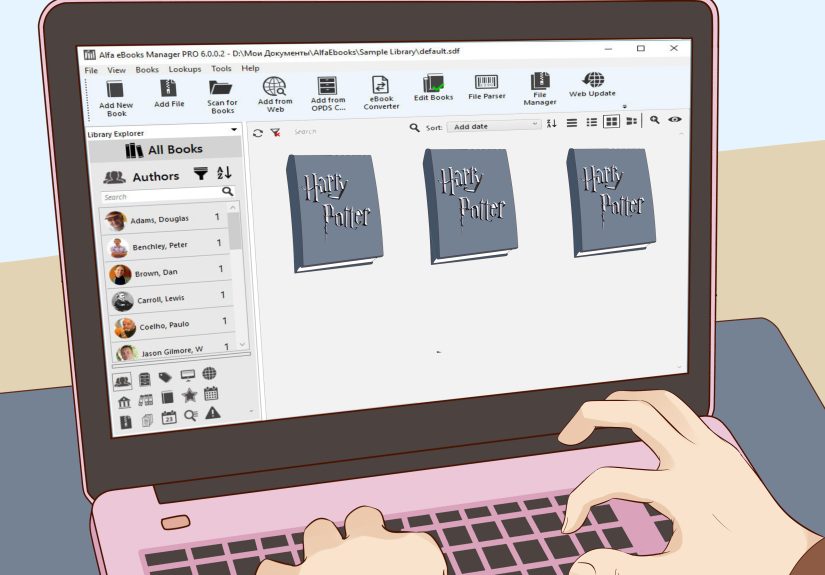
Get in the habit of organizing from the start. Use collections, shelves, or tags if your app offers them. Create simple groups like “Reading Now,” “Next Up,” “Samples,” and “Reference.” Archive books you finished. Delete samples you are clearly not going to read. Rename PDFs if the file names look like a robot sneezed on the keyboard.
Highlights and bookmarks matter too. If you read nonfiction, save key passages and revisit them. If you read fiction, bookmark family trees, maps, or especially dramatic chapters you know you will want to re-read. Digital reading becomes much more powerful when you treat your library like a working space, not just a storage locker.
If you eventually manage a larger collection of personal files, library managers and desktop tools can help catalog books and metadata. But even without advanced tools, a little organization goes a long way. Five minutes now can save you from future “Where did that book go?” rage.
Step 8: Build a Reading Habit That Fits Real Life
The best ebook habit is the one you will repeat
Once the tech is set up, the real challenge begins: actually reading. The beauty of ebooks is that they fit into small windows of time. You can read while waiting in line, riding the bus, sitting in the parking lot before an appointment, or hiding from everyone for twelve peaceful minutes in the evening.
Start with a tiny, repeatable goal. Read for ten minutes before bed. Read one chapter during lunch. Read while commuting instead of doomscrolling. Because your book can live on your phone, you no longer need to remember to pack something to read. Convenience is the secret weapon here.
It also helps to give yourself permission to abandon books that are not working. This matters even more with ebooks, where switching titles is so easy. If your first choice feels dull, try something lighter or more immediate. Momentum beats obligation. A short thriller you finish is better than a worthy classic you avoid for four months while pretending you are “still getting into it.”
You can also add gentle accountability. Track your reading streak. Join a book club. Keep a digital “want to read” list. Text a friend when a chapter wrecks your emotions. Reading does not have to be solitary and solemn. It can be social, playful, and delightfully nosy.
Common Beginner Problems and How to Fix Them
A little troubleshooting prevents unnecessary drama
“I bought a book and cannot find it.”
Usually this is a sync issue, account mix-up, or store-app mismatch. Refresh your library, confirm you are signed into the correct account, and check whether you purchased through a web browser instead of inside the app.
“Reading on my phone feels distracting.”
Turn on Do Not Disturb, hide notifications, or use reading during times when you are less likely to get interrupted. Some readers love dedicated ereaders for this exact reason.
“The text looks weird.”
Change the font, font size, margins, line spacing, or theme. PDF files are often less flexible than EPUB-style books, so the file type may also be the issue.
“I do not know what to read next.”
Download a few samples, browse library recommendations, or use book deal newsletters to test new genres with low commitment.
“I miss paper books.”
That is normal. You do not have to choose one format forever. Many readers switch between print, ebook, and audiobook depending on mood, budget, lighting, travel, and whether they want to read in bed without dropping a hardcover on their face.
What Starting eBooks Usually Feels Like in Real Life
The part nobody tells you: your first week is a tiny adventure
Starting to read ebooks is rarely a dramatic, cinematic transformation where you suddenly become the kind of person who reads 80 books a year and uses phrases like “narrative architecture” at brunch. Usually, it begins in a much more ordinary way. You download an app, poke around a little, choose a book almost at random, and then spend ten minutes adjusting the font like you are decorating a studio apartment for your eyeballs.
At first, the experience can feel slightly strange. You may miss the physical cues of a paper book: the weight in your hands, the thickness of pages already read, the smug little satisfaction of a bookmark. Digital reading replaces those sensations with different comforts. Your book is always with you. Your place is saved automatically. You can search for a quote instead of flipping around like a detective in a wind tunnel. Once that convenience clicks, it clicks hard.
Many new ebook readers have a moment of surprise when they realize how often they can read in tiny pockets of time. Five minutes while waiting for coffee. Eight minutes before class. Fifteen minutes in the passenger seat. These moments used to disappear into scrolling. With an ebook, they add up. A chapter here, a chapter there, and suddenly you are halfway through a novel because your phone became a book instead of a distraction machine for once in its life.
There is also a confidence-building phase. The first time you borrow a library ebook from your couch, it feels a little magical. The first time you sample three books before buying one, it feels smart. The first time you increase the font size and think, “Wait, I can just make reading easier?” it feels borderline revolutionary. Ebooks often win people over not because they are flashy, but because they quietly remove friction.
Of course, there can be mild chaos too. You may accidentally download too many samples. You may forget which app holds which book. You may buy one title in a browser, then stare at your app like it personally betrayed you. This is all normal beginner stuff. Think of it as digital shelf-building. After a week or two, the process becomes much more intuitive.
Emotionally, one of the best parts of starting ebooks is that they make reading feel more flexible and forgiving. If a book is not working, switch instantly. If your eyes are tired, increase the size. If you are traveling light, your entire library comes with you. If you are in a reading slump, a fun sample or a free library borrow can pull you back in with almost no effort. There is less ceremony, which means there are fewer excuses.
And maybe that is the most useful experience of all: ebooks make reading easier to start. Not easier in an “all books become effortless” way. Easier in the practical, human way. Fewer barriers. Fewer delays. More opportunities to pick up a story when you actually have the time, energy, and interest. For busy people, tired people, budget-conscious people, and curious people who simply want a book now, that convenience can be the difference between reading more and always meaning to.
So if your first ebook experience is a little clunky, do not interpret that as failure. It is just the learning curve of a new format. Give yourself a few reading sessions, test a few settings, and try a book you are genuinely excited about. Soon the weirdness fades, the habit settles in, and the whole thing starts to feel wonderfully normal. Then one day you will look at your phone, tablet, or ereader and realize it is no longer just a device. It is your library, your reading nook, and occasionally your escape hatch from the world.
Final Thoughts
Learning how to start reading eBooks is not really about technology. It is about reducing friction between you and the books you want to read. Choose a device you already own, start with one app, get one book you are excited about, tweak the settings until reading feels comfortable, and use budget-friendly sources like libraries and public-domain collections to keep the habit going.
If you follow these eight steps, you do not just learn how to read ebooks. You build a reading system that fits modern life. And that is the real win. Your next great read can be with you on the couch, on the train, in a waiting room, or under the blankets at 11:48 p.m. when you told yourself you were definitely going to sleep early tonight.