Table of Contents >> Show >> Hide
- Why Rapid Prototyping Matters in Assistive Technology
- Prosthetics: From Plaster to Pixels
- Braille: Fast Prototyping Is Helping, But Not Always the Way People Expect
- Wheelchairs: Customization Beyond the Frame
- What Prosthetics, Braille, and Wheelchairs Have in Common
- Experiences From the Prototyping Front Lines
- Conclusion
Assistive technology used to have a frustrating habit of moving at the speed of paperwork, foam dust, and “we’ll call you in six weeks.” Rapid prototyping is changing that. Across prosthetics, Braille tools, and wheelchair customization, digital scanning, computer-aided design, 3D printing, and fast iteration are helping makers and clinicians move from idea to test version with much less drama. Not no drama, mind you. This is still healthcare, engineering, and human bodies all trying to cooperate in the same room. But the timeline is shrinking, and that matters.
What makes this shift exciting is not just the shiny hardware. It is the fact that people can test a design sooner, reject a bad idea faster, and improve a good one before the user gives up, outgrows it, or decides the whole thing belongs in a museum next to dial-up internet. In practical terms, rapid prototyping can mean a prosthetic hand that is easier to resize for a child, a tactile map that helps a Braille reader navigate a building, or a wheelchair cushion shaped more precisely to reduce discomfort and pressure risk.
The big story is simple: assistive devices work better when they are shaped around real bodies, real tasks, and real daily frustrations. Rapid prototyping gives that personalization a faster engine. It does not replace clinical judgment, disability expertise, or user feedback. It just gets all three into the room sooner.
Why Rapid Prototyping Matters in Assistive Technology
In the assistive tech world, speed is not about showing off. It is about access. If a design process takes too long, the user may change, the need may change, or the opportunity may disappear. A child may grow. A patient may heal or lose strength. A student may miss a semester of accessible materials. A wheelchair user may spend months sitting on a cushion that is “almost right,” which is engineer-speak for “still wrong.”
Rapid prototyping solves a very old problem: traditional fabrication often requires expensive, labor-heavy, one-shot production. You measure, build, wait, test, and hope the result behaves like a dream instead of a medieval torture device. Digital workflows flip that model. Scan first. Model in software. Print or mill a test version. Adjust quickly. Repeat. That cycle makes room for experimentation, and experimentation is gold when every user’s anatomy, strength, goals, and environment are different.
Still, this is where the hype needs a seatbelt. A 3D printer is not a magical empathy toaster. It does not understand gait, hand function, tactile literacy, posture, skin integrity, or user preference. It just follows instructions. The real innovation happens when clinicians, engineers, educators, and disabled users work together, use the tool wisely, and know when a clever prototype should become a real device and when it should remain a “nice try” on a lab bench.
Prosthetics: From Plaster to Pixels
Prosthetics may be the most visible example of rapid prototyping in action, partly because they are visually dramatic and partly because the internet loves a heroic-looking 3D-printed hand. Fair enough. But beneath the headline-friendly images is a more important shift: digitization is making prosthetic development more adaptable.
How the New Workflow Works
Modern prosthetic prototyping often starts with a digital scan or precise measurements of the limb. Designers can then create or modify a model in CAD software, print components, test fit, and revise without starting from absolute zero each time. Clinics and university programs have shown how this workflow can streamline socket development and upper-limb device customization, especially when the goal is to test shape, alignment, comfort, or function early in the process.
That speed matters because prosthetic fit is not optional decoration. It is the whole game. If a socket is uncomfortable, unstable, or poorly aligned, no amount of futuristic marketing can save it. Rapid prototyping helps teams compare versions, tweak contours, and preserve digital files so changes are easier later. In other words, the second attempt does not have to pretend the first attempt never happened.
Where Prosthetic Prototyping Shines
One major strength is affordability for selected use cases, especially in upper-limb devices. Open-source communities and university chapters have used 3D printing to create low-cost, customizable hands and finger devices for children and adults. These designs can be resized more easily than traditional systems, which is especially useful for growing kids who have the audacity to keep growing after the device is delivered.
Another strength is local fabrication. When a program can design, print, test, and revise on-site, the feedback loop gets dramatically shorter. That is one reason hospital labs, rehabilitation centers, and student maker groups are investing in digital production workflows. Rapid iteration also helps with accessories, training aids, and prototype components that support the clinical process even when the final device is not fully 3D printed.
The Limits Nobody Should Ignore
Prosthetics are also where the “just print it” fantasy runs into reality. Durability, load-bearing performance, long-term skin contact, and safety all matter. Regulators and researchers have repeatedly emphasized that 3D-printed medical devices are not free from the usual questions about materials, manufacturing consistency, intended use, and clinical oversight. Translation: a device worn on a human body is not the same as a dragon figurine from your friend’s garage printer.
That is why the most responsible view of rapid prototyping in prosthetics is this: it is a powerful tool for customization, testing, and selected low-cost solutions, but it works best when paired with trained professionals and user-centered evaluation. The printer adds capacity. It does not replace expertise.
Braille: Fast Prototyping Is Helping, But Not Always the Way People Expect
Braille innovation is a little trickier than prosthetics because the challenge is not just making something quickly. It is making something tactilely readable, durable, understandable, and truly useful. A bump is not automatically Braille, just like a guitar is not automatically music.
Tactile Graphics, Maps, and Learning Tools
This is where rapid prototyping has made some of its smartest contributions. Universities, nonprofits, and educators have used 3D printing to create tactile maps, diagrams, STEM teaching aids, and object-based learning tools for people who are blind or have low vision. These are especially valuable because visual information often needs spatial translation, not just text conversion.
A rapidly produced tactile campus map or building map can do something wonderfully practical: reduce uncertainty. Instead of receiving a vague spoken explanation of a hallway maze that sounds like a hostage negotiation, the user can physically explore layout, landmarks, and routes. Tactile models can also make graphs, geometric forms, anatomy, and scientific concepts more immediate.
But tactile design has rules. Texture matters. Scale matters. Label placement matters. And one important lesson from educators is that 3D-printed Braille itself can feel sharp or awkward if not designed carefully. That means rapid prototyping is great for experimentation, but not every printed dot is ready for prime time.
Refreshable Braille and Hybrid Systems
Another important trend is that Braille access is becoming more digital. Refreshable Braille displays and multiline tactile devices are moving the field beyond static embossed pages. Instead of waiting for a specialized hardcopy version of everything, users can increasingly read digital files, access libraries, connect to phones or computers, and interact with tactile graphics in more dynamic ways.
That does not mean hardcopy Braille is going away. Not even close. Embossed Braille still matters, and for many readers it remains the most practical or comfortable format in specific contexts. What is changing is the range of options. Rapid prototyping now intersects with Braille in two ways: first, by helping produce tactile teaching tools and custom accessibility aids; second, by accelerating the design and refinement of devices that combine Braille with digital interaction.
A good example of the direction of travel is the emergence of multiline tactile displays that bring Braille and tactile graphics onto the same device surface. That is a big deal for education, especially in math, diagrams, and spatial learning. Meanwhile, government-supported access programs have lowered barriers by expanding availability of refreshable Braille eReaders for eligible users. In plain English: Braille tech is slowly becoming less of a luxury item and more of a usable daily tool.
Wheelchairs: Customization Beyond the Frame
When people hear “wheelchair innovation,” they often picture a whole new chair. In reality, some of the most meaningful progress happens in the less glamorous parts: cushions, back supports, mounting points, control adaptations, and seating geometry. Not flashy, perhaps, but ask any wheelchair user whether pressure management and comfort are exciting after six hours in the wrong seat. Suddenly, everyone becomes a poet about cushions.
Why Seating Is a Big Deal
Custom wheelchair seating exists because sitting is not a passive activity when your chair is also your mobility system, posture support, and daily workstation. Poor seating can contribute to discomfort, instability, skin damage, and functional limitations. Historically, custom-contoured seating has often been labor-intensive, relying on molding, carving, and a good deal of technician artistry.
Digital workflows are changing that. Scanning, parametric modeling, CNC milling, and additive manufacturing are making it easier to translate body shape into a more precise seating solution. Research in wheelchair customization has shown a broader move away from purely manual techniques toward software-supported design and faster manufacturing methods. That does not mean every clinic now resembles a sci-fi design studio, but the direction is clear.
Where Rapid Prototyping Helps Most
Rapid prototyping is especially useful when the goal is to refine shape, stiffness, support zones, or accessory placement. A cushion prototype can be adjusted digitally. A joystick mount can be redesigned for better reach. A grip aid or tray attachment can be printed and revised after real-world testing. These changes may sound small, but small changes often decide whether a device is empowering or infuriating.
There is also growing interest in digitally customized cushions designed to improve pressure distribution and reduce material waste. That matters because wheelchair users do not need innovation that is merely clever. They need innovation that survives daily use, manages heat and pressure, and can be produced without turning every revision into a time-consuming artisanal ritual.
Even here, the caveat remains: a prototype is not a prescription. Clinical evaluation, pressure mapping, user feedback, and long-term testing still matter. But rapid prototyping makes those conversations more productive because the team can react to real objects instead of abstract sketches.
What Prosthetics, Braille, and Wheelchairs Have in Common
These three areas may seem different, but they share the same engineering truth: personalization is not a bonus feature. It is central to usability. The best assistive devices are not merely manufactured. They are negotiated between function, comfort, context, and identity.
They also share the same design lesson: involving users early beats fixing mistakes late. A prosthetic hand that looks cool but is hard to grasp with, a Braille tool that feels awkward under the fingers, or a wheelchair cushion that photographs beautifully but traps heat are all examples of design that admired itself in the mirror a little too long.
Rapid prototyping improves this because it invites co-design. Users can test sooner. Clinicians can see problems sooner. Engineers can fail sooner. And failing sooner, in this case, is excellent news. It is cheaper, safer, and much less emotionally exhausting than discovering a major flaw after a final build.
Speed Needs Standards
There is one more shared lesson: faster development should not mean lower standards. Assistive technology sits at the intersection of dignity and risk. A rushed classroom model is one thing. A body-worn or medically consequential device is another. That is why regulation, documentation, and professional oversight still matter, especially for devices intended for prolonged use or clinical care.
The smartest future is not “move fast and print things.” It is “move thoughtfully, test quickly, and keep the human being at the center.” Much less catchy on a T-shirt, admittedly, but vastly better policy.
Experiences From the Prototyping Front Lines
One of the most revealing things about rapid prototyping in assistive technology is that the experience is rarely about the machine. It is about the moment when a person says, “This is closer.” In prosthetics, that may happen when a child tries a lightweight printed hand and, for the first time, can grasp a toy, hold a bottle, or simply wear something that feels less intimidating than a heavily medicalized device. The first prototype is usually not perfect. The wrist angle may be off. The tension may feel strange. The straps may need to move. But the emotional shift is immediate: there is now something concrete to react to, not just a promise.
For clinicians and student teams, that experience can be equally powerful. Instead of spending weeks preparing a single version, they can produce a test piece, bring in the user, watch what works, and revise. A digital file becomes a living conversation. If a child grows, the design can be scaled. If a grip is weak, leverage points can be adjusted. If the user hates the look, color and styling can change too, which is not trivial. A device someone is proud to use often has a better shot at being used consistently.
In Braille and tactile learning, the experience often revolves around access becoming immediate. Educators working with tactile graphics have described how much changes when a student can explore a map, diagram, or model without waiting for a long production queue. A prototype might begin as a rough tactile version of a science concept, a campus layout, or a classroom graphic. Then the student interacts with it and instantly reveals what the designer missed: lines too crowded, textures too similar, labels too far away, or shapes that make perfect visual sense and terrible tactile sense. That feedback is gold. It turns accessibility from a compliance exercise into a design practice.
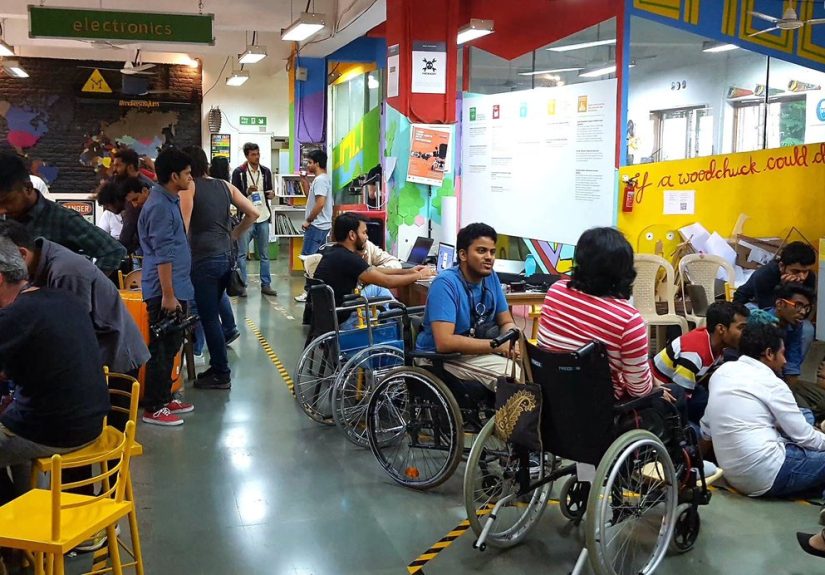
Wheelchair-related prototyping has its own pattern. The breakthroughs are often quiet. A user shifts less in the seat. A support contour finally matches the body. A control mount lands at the right distance. Pressure feels more evenly distributed. The chair becomes less tiring to occupy. These are not cinematic moments, but they are the kind that improve daily life hour after hour. For therapists, rehab engineers, and seating specialists, rapid prototyping means they can test a contour, bracket, or adaptation before committing to a more expensive final version. That can reduce guesswork and improve communication with the user, because everyone is responding to a real object rather than describing sensations in theoretical language.
Across all three fields, one experience keeps repeating: the best results come when disabled users are treated as design partners, not passive recipients. They notice details others miss. They know when a solution is elegant in software but annoying in life. They know whether a surface feels readable, whether a grasp feels natural, whether a support angle helps or hurts. Rapid prototyping works best when it respects that expertise. The machine makes iteration faster, but the user makes it meaningful. That is the real story. Not that we can print faster, scan faster, or model faster, but that we can learn faster from the people who actually have to live with the result.
Conclusion
Rapid prototyping is not a miracle cure for every accessibility challenge, but it is one of the most practical revolutions happening in assistive technology right now. In prosthetics, it helps teams customize, test, and refine faster. In Braille, it expands the possibilities for tactile graphics, hybrid learning tools, and digital reading access. In wheelchairs, it improves the path toward better seating, better support, and better everyday comfort.
The common thread is not the printer, the scanner, or the software. It is responsiveness. Assistive technology becomes better when it can respond quickly to the body, the task, the user’s feedback, and the real messiness of life. Rapid prototyping makes that responsiveness possible at a scale and speed that older methods often could not.
And that may be the best reason to care. Because when assistive technology improves, people do not just get cooler devices. They get more independence, more participation, more comfort, and more room to move through the world on their own terms. That is the kind of progress worth making quickly.