Table of Contents >> Show >> Hide
- What “VST” Stands For (and Why It Exists)
- What a VST Plugin Actually Is (Plain-English Version)
- The Main Types of VST Plugins
- What VST Plugins Do in Real Sessions
- How VST Plugins Work Inside a DAW (The Useful Nerd Stuff)
- VST2 vs VST3: What Changed and Why You Care
- VST vs AU vs AAX: Which Plugin Format Do You Need?
- How to Install and Use VST Plugins Without Losing Your Weekend
- How to Choose Great VST Plugins (Without Buying 47 “Must-Haves”)
- Common Beginner Mistakes (and How to Avoid Them)
- Real-World Experiences: What Using VST Plugins Feels Like (About )
- Conclusion
If you’ve ever opened a digital audio workstation (DAW) and thought, “Wow, my laptop has more knobs than a spaceship,” you’ve already met the world
of plugins. And if you’ve heard producers casually say things like “Throw a VST on it,” they’re usually talking about the most common way we add
instruments and studio-style effects inside music software.
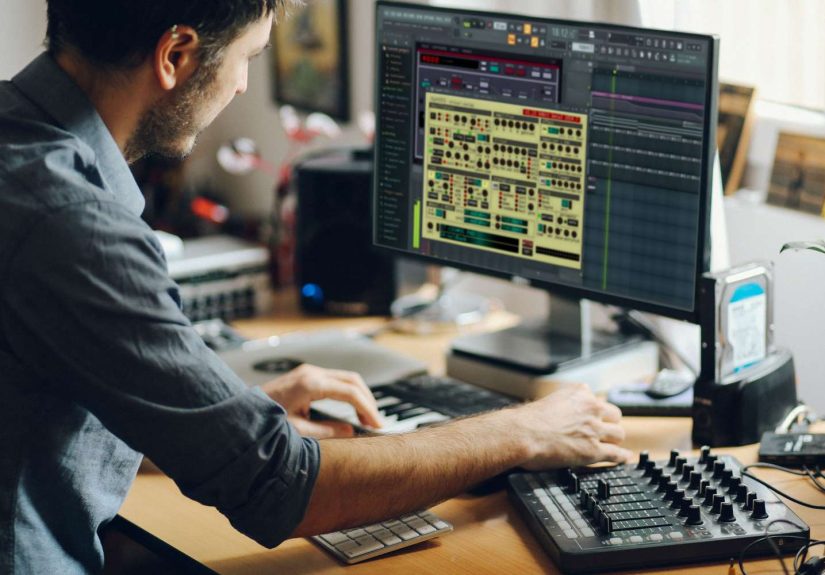
VST plugins are the reason a bedroom setup can sound like a million-dollar studio. They can turn a silent MIDI track into a grand piano, make a vocal
sound polished and radio-ready, or help a podcast voice feel warm and clearwithout buying an EQ the size of a microwave.
What “VST” Stands For (and Why It Exists)
VST stands for Virtual Studio Technology. In simple terms, it’s a widely supported plugin standard that lets
third-party software instruments and effects run inside a host applicationusually your DAW.
Think of it like this: your DAW is the kitchen, and VST plugins are the appliances you plug into the outlets. Some are blenders (effects that process
sound). Some are espresso machines (instruments that create sound). Either way, the kitchen becomes a lot more powerful once you can swap tools in and out.
What a VST Plugin Actually Is (Plain-English Version)
A VST plugin is a small software “module” that your DAW loads to do a specific job. When you insert it on a track, the DAW feeds it audio and/or musical
events (like MIDI notes), and the plugin returns the processed result back to the DAW.
- The DAW (host) handles playback, recording, routing, timing, and the overall session.
- The VST plugin handles the specialized sound task: generating audio, shaping tone, analyzing loudness, etc.
The best part: you can stack plugins. A guitar track might pass through an amp sim, then an EQ, then a compressor, then a reverbeach plugin doing one
focused job, like a relay team passing the baton (except the baton is your tone, and it refuses to behave).
The Main Types of VST Plugins
1) VST Instruments (VSTi): “Make Sound from Notes”
A VST instrument generates audio. You usually control it with MIDI: a keyboard controller, piano-roll notes, or programmed patterns.
Examples include software synths, drum machines, orchestral libraries, bass instruments, and sampled pianos.
Example: You write a four-chord progression in MIDI. A VST piano turns those notes into realistic piano audio. Swap the plugin, and now the
same MIDI becomes a vintage electric piano, a string ensemble, or a growling analog synthsame notes, completely different vibe.
2) VST Effects (VSTfx): “Change the Sound You Already Have”
A VST effect processes incoming audio. This is where mixing and sound design come alive: EQ, compression, reverb, delay, saturation,
distortion, chorus, flanging, pitch correction, noise reduction, and more.
Example: Your vocal sounds thin. Add an EQ plugin to reduce muddiness, a compressor to even out volume, and a reverb to create space. Suddenly
it sits in the mix instead of floating awkwardly like it missed the group chat.
3) Utility and Analysis Plugins: “Help You See (and Fix) What You Hear”
Not every plugin is a dramatic sound transformer. Some are the responsible adults of the plugin universe: tuners, spectrum analyzers, loudness meters,
stereo imagers, gain tools, and phase/correlation meters. They don’t always sound excitingbut they prevent the kind of “Why does this mix fall apart on my car speakers?”
mysteries that keep producers up at night.
What VST Plugins Do in Real Sessions
They create instruments you can play and program
VST instruments can emulate classic hardware (analog synths, electric pianos) or do things hardware never could (giant evolving pads, granular soundscapes,
cinematic percussion with hundreds of mic positions). For composers, they’re the entire orchestrawithout needing to feed 80 musicians.
They shape and “mix” audio like studio hardware
Many plugins are modeled after real studio gear: compressors, EQs, tape machines, and console channels. Even when they aren’t modeled, the goal is the same:
control tone, dynamics, and space so everything works together.
They add space, motion, and character
Reverb can place a vocal in a small room, a cathedral, or a dreamy cloud that definitely violates physics. Delay can create rhythmic echoes that lock to tempo.
Modulation effects can add movement. Saturation can add warmth and perceived loudness. These tools are basically “sound styling.”
They solve problems (sometimes the problems we created)
Noise reduction can tame hiss. De-essers reduce harsh “S” sounds. Pitch correction can tighten vocals. Transient shapers can punch up drums. And yes, there
are plugins designed to fix clippingthough the best fix is still “don’t clip,” which is advice everyone hears and nobody follows consistently.
How VST Plugins Work Inside a DAW (The Useful Nerd Stuff)
Under the hood, your DAW processes audio in tiny chunks called buffers (or blocks). The DAW passes a buffer to the plugin, the plugin
runs math on it (digital signal processing, or DSP), and hands the result back. This repeats thousands of times per minute.
Buffer size, CPU, and latency
The buffer size affects responsiveness. Smaller buffers feel snappier for playing instruments live, but they demand more CPU. Larger buffers are easier on
your computer but can add noticeable delay while recording.
Automation: making plugins move with your song
Automation lets you change plugin settings over timelike turning up reverb in the chorus or sweeping a filter during a build. Modern plugin workflows make
automation central: it’s how a mix becomes dynamic instead of static.
Plugin Delay Compensation (PDC)
Some plugins (like linear-phase EQs or look-ahead limiters) introduce latency because they need to “peek” at audio. Many DAWs compensate automatically by
delaying other tracks so everything stays aligned. If you’ve ever heard a track suddenly feel late after adding a plugin, PDC is the concept you’re looking for.
VST2 vs VST3: What Changed and Why You Care
You’ll often see both VST2 and VST3 versions of a plugin. From a user perspective, they can look similar. But there are
practical differences that can matter for performance, routing, and long-term compatibility.
Why VST3 is the modern default
-
Better CPU efficiency in many cases: VST3 supports a “silence” behavior so plugins can avoid processing when no audio is presenthelpful in
large sessions. - More flexible routing: VST3 supports dynamic input/output configurations, which can make setups like sidechains cleaner in compatible hosts.
- More precise automation: VST3 supports sample-accurate automation, which matters for fast, detailed parameter moves.
- Creative performance features: VST3 includes capabilities like note expression that can add per-note nuance in supported instruments and hosts.
What about VST2?
Many producers still have older VST2 plugins that work fine in their current DAW. But the industry has largely transitioned toward VST3 for new releases and
ongoing updates. In other words: VST2 isn’t “bad,” it’s just increasingly “legacy.”
VST vs AU vs AAX: Which Plugin Format Do You Need?
VST is popular, but it’s not the only plugin format. Two other big ones show up constantly:
- AU (Audio Units): A macOS-focused plugin format commonly used in Apple’s ecosystem (especially in Logic Pro).
- AAX: A plugin format designed for Avid Pro Tools users.
If you use a DAW that supports multiple formats, you might see the same plugin offered as VST3, AU, and AAX. You usually don’t need to install everything.
Install the format your DAW actually uses. Your future self will thank you when it’s time to troubleshoot.
How to Install and Use VST Plugins Without Losing Your Weekend
Step 1: Pick the right format during installation
Most plugin installers let you choose formats (VST3, VST2, AU, AAX) and sometimes standalone versions. Choose what matches your DAW. If you’re on Windows
and your DAW supports VST3, that’s typically the simplest path.
Step 2: Let the DAW scan (or re-scan) your plugins
DAWs usually scan standard plugin folders automatically. If something doesn’t show up, the fix is often: confirm the plugin was installed in the correct
location, then trigger a rescan in the DAW’s plugin manager/settings.
Step 3: Load plugins where they make sense
- Insert effects: EQ, compression, pitch correction, saturationthings that directly affect a track.
- Send effects: Reverb and delay are often used on sends so multiple tracks share the same space.
- Instrument slots: Put VST instruments on instrument/MIDI tracks and feed them MIDI notes.
How to Choose Great VST Plugins (Without Buying 47 “Must-Haves”)
The internet will happily convince you that you need a separate plugin for every emotion. You don’t. A smarter approach is to build a small, reliable toolkit:
Start with the essentials
- EQ: for tone shaping and problem solving
- Compressor: for dynamic control and punch
- Reverb + Delay: for space and depth
- Saturation/Distortion: for character and energy
- Limiter: for controlling peaks and mastering loudness
- A go-to instrument: piano or synth, depending on your style
Pick plugins that match your workflow
Some plugins are “clean” and surgical. Others add flavor. Some are minimal and fast. Others have deep features that reward learning. The best plugin is the one
you can use quickly and confidentlyespecially at 2 a.m. when your ears are tired and your decision-making is basically held together by caffeine.
Common Beginner Mistakes (and How to Avoid Them)
1) Stacking plugins without a goal
More plugins doesn’t automatically mean better sound. If you can’t explain what a plugin is doing, bypass it and listen. If nothing changes, congratulations:
you just improved your mix by deleting something.
2) Mixing with your eyes
Cool-looking meters are fun. But your ears are the boss. Use analyzers to confirm what you hearnot to overrule it.
3) Ignoring gain staging
Many plugins behave best when levels are reasonable. If everything is slammed into the red, you’ll get harshness, distortion, and a mix that feels like it’s
arguing with itself. Keep levels under control and use output trims when needed.
4) Forgetting that “latency” is a real thing
If you’re recording live and everything feels delayed, check buffer size and look for heavy plugins on the monitoring chain. Save the CPU-hungry stuff for mixing.
Real-World Experiences: What Using VST Plugins Feels Like (About )
The first time most people “get” VST plugins is the moment a blank MIDI clip becomes music. You drop a VST instrument onto a track, play a chord, and your
computer suddenly behaves like it’s been hiding a full keyboard rig under the desk. That early experience is usually equal parts excitement and confusion:
excitement because it sounds great, confusion because the plugin has 120 presets named things like “Neon Twilight Panda Bass” and you don’t know if that’s
supposed to go on a verse or summon a weather event.
After the honeymoon phase, the practical experiences start. If you’re producing songs, you’ll notice VST instruments are incredible for sketching quickly.
You can write the melody with a simple piano, then swap to a synth lead later without rewriting anything. It feels like rearranging furniture instead of
rebuilding the house. And once you discover that many synth plugins respond to automationfilter cutoff, resonance, envelope amountsyour tracks start moving.
That’s when a loop becomes a “section.”
Mixing with VST effects is its own rite of passage. Early on, it’s easy to overdo it: too much reverb, too much compression, too much “I saw a tutorial once.”
The turning point often comes when you learn to bypass plugins and compare. You realize a compressor isn’t magic; it’s control. Reverb isn’t “pro”; it’s space.
EQ isn’t “fixing”; it’s choices. Suddenly you’re not collecting plugins like trading cardsyou’re using them like tools.
If you record vocals or podcasts, VST plugins can feel like a cleanup crew and a stylist at the same time. A gentle EQ can reduce boominess. A compressor can
keep speech consistent so listeners don’t ride the volume knob. A de-esser can tame sharp consonants. And when you add a tiny amount of room reverb (or sometimes
none at all), the voice can sound natural instead of “recorded in a closet,” even if it was recorded in a closetbecause closets are surprisingly popular studios.
Guitarists often have the most dramatic “VST moment.” You plug in an interface, load an amp sim, and suddenly you’re auditioning amps and cabinets that would
cost more than your car in real life. The experience is empowering, but also a little dangerous: you can spend an hour moving a virtual microphone one inch and
forget you were supposed to write a chorus. (This is normal. The chorus will forgive you. Probably.)
Over time, most people settle into a “go-to” setup: a few trusted plugins they know deeply. That’s the real win. VST plugins aren’t about endless options.
They’re about being able to create, shape, and finish sound with the tools that fit your workflowwhether that’s music, film, streaming, or just having
fun making your computer sing.
Conclusion
VST plugins are software tools that run inside a DAW to either generate sound (VST instruments) or process sound (VST effects).
They’re a core part of modern music production, mixing, and audio creation because they expand what your DAW can dooften dramatically.
The smartest way to approach VST plugins is simple: start with a small set, learn what each one does, and use them with intention. You’ll get better results
fasterand you’ll spend less time scrolling through presets named after imaginary galaxies.